It’s been over a year since I’ve tested out a Melgeek keyboard – the Cyber01. It’s not because they haven’t been releasing keyboards, not at all. It’s because they’ve been slowly but steadily releasing keyboards, taking meaningful steps in iterations and ensuring that they don’t miss when producing a keyboard that players will love. It’s a bold approach to keyboard design that signifies that new members of the Melgeek keyboard family are boldly designed, going in new aesthetic directions.
Melgeek’s REAL67 is their newest keyboard that looks highly unlike anything they have currently available, let alone like a standard Hall Effect (magnetic) keyboard available from any of Melgeek’s competitors. From its customizable side panels (sold separately), translucent keycaps, to its compact form factor, I am impressed by how well Melgeek has designed this Hall Effect keyboard. For $119, it’s an excellent 65% keyboard to add to your collection.
Check out the Melgeek REAL67 Magnetic Keyboard on Melgeek’s website and/or on Amazon! (non-affiliated URLs)
Yes, the REAL67 is a 65% keyboard, meaning that it lacks the function row (F1-F12), numpad, and extra input keys of a full-sized keyboard. Instead, the layout is relatively compact that features just the essentials that folks might need. The number keys are situated right next to the enter and function keys with very little wiggle room. Melgeek has added a small little light bar in between the function and arrow keys, giving the keyboard a slight splash of color to liven things up a little.
 I’ve tested the REAL67 for the fast few weeks, and it’s blown me away with how well it functioned in its 65% form factor. I typically prefer keyboards on the larger side, but every so often a 65% keyboard comes along and is pleasing on multiple fronts. Here, the REAL67 felt stable to use, was pleasant on the ears, and had quite the easy web driver (HIVE UI) to use to configure the device to my liking.
There are several variants of the REAL67, varying by color and which Hall Effect switch comes pre-installed. The Calcium Grey and Potassium Purple variants feature transparent PC Cherry Profile keycaps, while the Sodium White and Silicon Grey are solid colors and feature Cherry Profile PBT double-shot keycaps. To make things slightly more complicated, the Silicon Grey and Sodium White comes with the TTC Tai E switches pre-installed, while the Calcium Grey and Potassium Purple come with the TTC Sacred Heart KOM switch.
I was sent the Calcium Grey model to review, and it looks so pretty when the LEDs glow and shine through the transparent keycaps. When the lights are off, it is reminiscent of the transparent Game Boys I had when growing up. When the lights are too bright, though, the legends on the keycaps can be tough to read. This is something I’ve encountered in reviewing transparent keycaps (such as those on the KiiBOOM Phantom and lelelab Y2K76 keyboards), but it’s not an issue if you’ve memorized your keyboard’s layout.
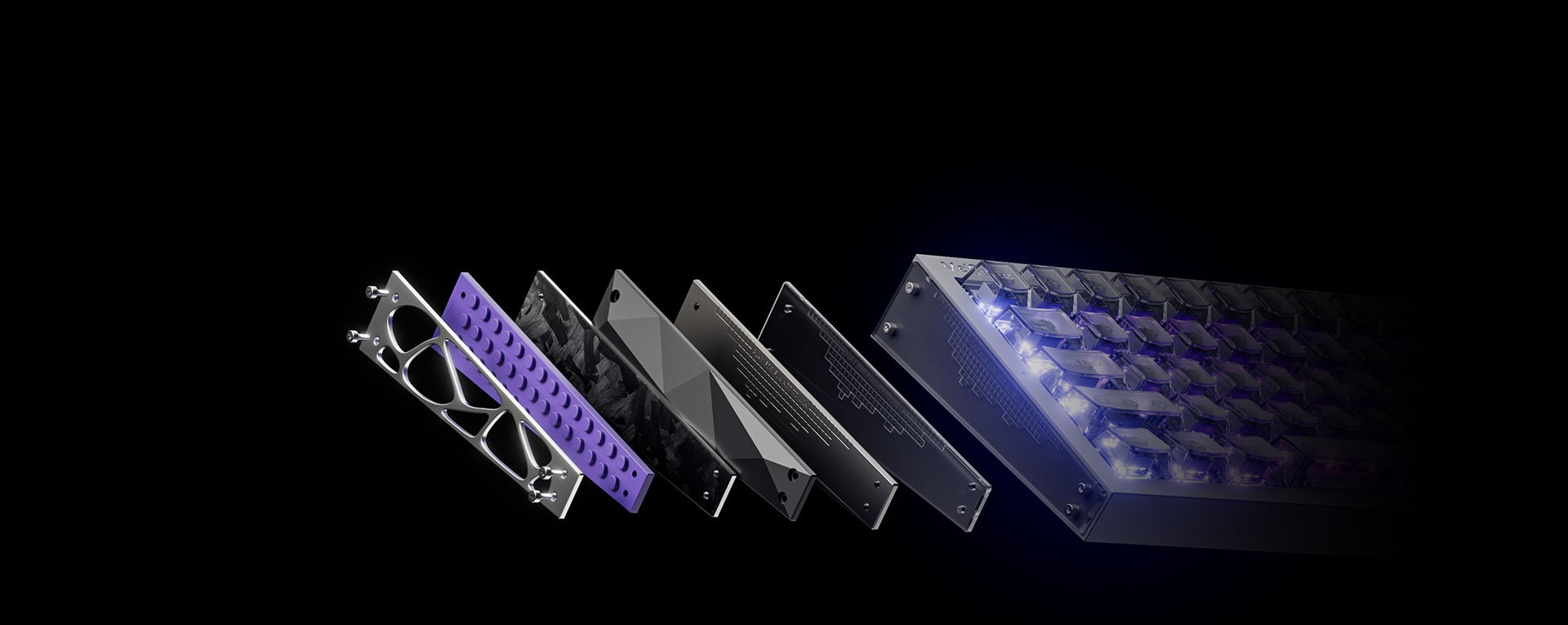
 The REAL67 is a compact and lightweight keyboard thanks to its plastic construction. It doesn’t feel cheap, however, and that’s in part because of the sound absorption materials that Melgeek has packed into the keyboard. From the PORON sandwich foam, sandwich silicon, composite acoustic switch pad, latex bottom foam, to the bottom silicon pad, there’s quite a bit of cushion that absorbs the harsher sounds of pressing down on the keys. These sound absorption materials add a nice degree of stability to the keyboard, too.
As I mentioned earlier, the REAL67 comes with one of two types of switches – I was only able to review the TTC Sacred Heart KOM switches with my unit. I wasn’t able to find much information on these switches’ construction, but I was able to identify their actuation force of 35gf. Having a relatively light actuation force of 35 or under means that not much pressure is needed to push down. Interestingly, these switches feel bouncy when in use and have a slightly loud and clacky acoustic profile. I’ve yet to find a thocky/deep/creamy Hall Effect switch that is appealing to the ears, but I can appreciate how the Sacred Heart KOMs sound when paired with the sound absorption of the REAL67.
If you’re torn on which switch to consider for your potential REAL67, I’m going to be honest: I don’t think it matters too much. From all of the research I’ve done on these elusive switches that are supposedly exclusive to the REAL67, the differences are minimal. Melgeek claims that the main differences lie in spring length and bottom-out magnetic flux, but that doesn’t tell us much. Upon further research, the TTC Sacred Heart switches have a 1mm larger spring and 200more magnetic flux, but those numbers don’t push the needle in the grand scheme of things.
To customize the keyboard, change its LEDs, and/or take advantage of the Hall Effect features, I was to use the Hive web launcher. Since I’ve originally used the CYBER01 last year, Melgeek has taken several steps to refine the HIVE launcher’s UI and make it easier to use than ever before. It’s not as feature filled as Wooting’s or Keychron’s launcher, but it’s still leaps and bounds easier to use and functional than other HE keyboard web drivers I’ve used as of recently.
 There’s always a question about how well Hall Effect keyboards work for gaming, as well as how important Hall Effect is for gamers. I’ll go ahead and reiterate what I’ve said about Hall Effect in the past: Yes, 0.01mm accuracy, 8K polling rates, 16K scan rates, and 0.125ms latency are fantastically precise and great in theory, but you won’t suddenly become a god(dess) gamer should you choose to use a Hall Effect/Magnetic keyboard. Instead, the biggest value drivers of a Hall Effect/Magnetic keyboard lie in its customizable actuation and durability. A customizable actuation lets the user decide how far they need to press in order for the keyboard to register an input. Hall effect switches tend to have a far higher durability than your average magnetic switch, lasting upwards of 100m presses per switch!
Like other Hall Effect keyboards, the REAL67 allows the user to access Rapid Trigger and Multiple Actions in a Single Keystroke (also known as Mod Tap). Rapid Trigger is a function that can activate multiple presses if you’re pressing the same key down – it tracks the travel distance of your pressing down to execute a chain of actions rather than a single action. In gaming contexts, rapid trigger is great for players like me who will rapidly tap and release a button without fully letting the key return to its original state. Rhythm and FPS players can benefit the most from the accurate and fast response from Rapid Trigger, especially when it minimizes the fatigue from having to press all the way down and letting the switch return to its original state. Multiple Actions in a Single Keystroke can make it so a single keypress can be different from long-pressing a key.
With the instant key response of the REAL67, you can rest assured knowing that your inputs will not only be recognized by the keyboard, but will keep up with the pace of your rapid gameplay. With zero dead zone, an 8k polling rate, 16k scan rate, and a 0.125 theoretical latency, this keyboard is designed to hold up under immense pressure and function as an excellent gaming keyboard for games that require precision, accuracy, and split-second inputs.
In short, you can customize your switches to any degree you want, and they’ll last you quite a while. It’s quite a great combination of features for any gamer who plays high intensity games like Counter-Strike 2 or VALORANT!
Do I wish that Melgeek made a larger REAL67? Absolutely, even though I know larger keyboards tend to have smaller ROIs and tend to be more costly. The fact that Melgeek has improved their web driver’s UI on the accessibility front while advancing Hall Effect technology tells me that they’re committed to providing best-in-class Hall Effect keyboards. It just shouldn’t be confined to smaller form factor, though. I envision a world where Melgeek is competing with the likes of Meletrix’s ZOOM lineup of keyboards, allowing Melgeek fans to acquire accessories like the REAL67’s sideplates to be used on any of their favorite Melgeek keyboards.
I digress, the REAL67 is a great keyboard. It might be slightly more expensive than other Hall Effect keyboards on the market, but it’s still a competitive option for those who prefer function, switch compatibility, and stability over a keyboard that is made of more premium materials.
Let’s wrap this up!
The Melgeek REAL67 is the real deal. What it lacks in premium external materials it makes up for in a unique design, customizability, and an excellent typing experience!