
As smaller keyboards go, this is impressive.
Epomaker’s TH65 65% keyboard is a little marvel. Built for non-competitive gamers looking for comfortable keystrokes, creamy sounds, and a bevy of smaller features, this is a good keyboard solution.
Let’s get right into it.
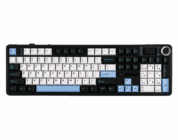
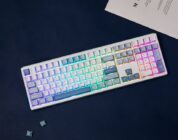
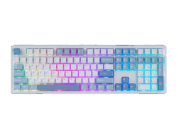
Starting with design, the TH65 brings artsy, crystal-like keys, backed by a warm, colorful glow underneath. The design of the keyboard is awkward, almost camouflaged in style right out of the box, but once hooked up, the colors underneath bring out a more visually appealing design that works well through the keys.
When I first unleashed this thing onto the desk, I was incredibly uncertain about its design. It truly looked like something a hunter would type on, as the keycaps blended in with the crystal covers that almost drowned out the letters/functions each key represented. Once I got over my preconceived notions about the visuals, and I actually hooked the keyboard up to my machine, the colors danced hand-in-hand with the keycap designs. The glowing colors underneath the keys helped balance out the crystal-like designs around and on top of them. The camouflaged blend quickly turned into a work of art. Again, I was certainly suspicious of the design out of the box, but it worked when turned on.
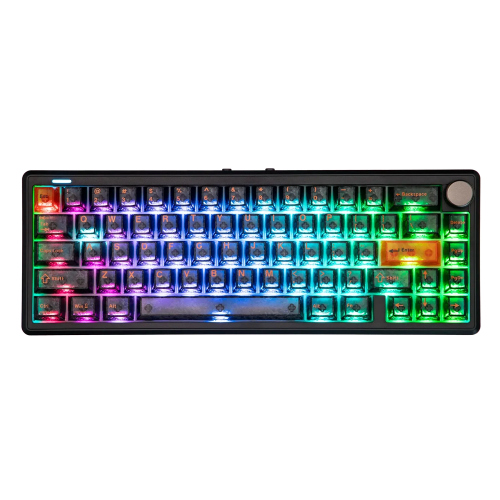
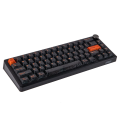
Beyond those keycaps, the TH65 props up comfortably on the desk without taking up too much space. While I am not a huge fan of keyboards this size, it was still comfortable to type on with minimal typing errors. The creaminess of the keys did help tame any frustration about the lack of a number pad, as the keys hit well, sounded great, and were reassuring when it came to correct keypunch. It does what it is advertised to do on the design side of the tracks. It’s a perfectly sized keyboard for the casual gamer, and maybe something inexpensively tempting for a competitive type on a budget.
On the functionality side of the TH65, it brings with it a 1000hz polling rate, which is typical for casual gaming experiences. It’s not quite as impressive as an 8000hz polling rate, but it will certainly do the trick either wired or via the 2.4GHz connection, which is a nice compromise. I can live with that.
Staying with connections, the keyboard also brings tri-mode connectivity to the table, which will allow people who love wired, dongle, or Bluetooth some good options. Pinpointing that middle option, the dongle, Epomaker has moved from hiding the dongle in a tiny compartment, which is featured in its more sophisticated keyboard releases, to tucking the dongle underneath one of the feet on the bottom of the keyboard. That small movement adds more security to the dongle, which probably sounds silly, but it’s a better place to put it than on the edge of the keyboard. The last Epomaker keyboard I reviewed put the dongle insecurely on the outside, and now I have a bi-mode connected keyboard because of it. It works so much better underneath the left foot.
As for the keys on the TH65, it features hotswappable keycaps and switches, the former of which are currently wearing additional Epomaker/Human Fall Flat keycaps sold separately because that’s just so ridiculous and cool. The keys and switches are super simple to pop off and replace. Be warned, though: you might become a bona fide keycap collector in the process. I think I might be heading that direction.
Below the keycaps and switches lies a five-layer optimization. The multiple layers help not only emphasize that creamy sound every keyboard enthusiast should want, but also deliver accurate keystrokes, which is vital for people who love typing or gaming. For my money, accuracy might be more important than sound, but having the best of both worlds in a small, inexpensive keyboard is a huge bonus. The TH65 delivers with its optimized five layers and fun, hotswappable keycaps. It’s everything you would expect from a larger, more expensive keyboard experience.
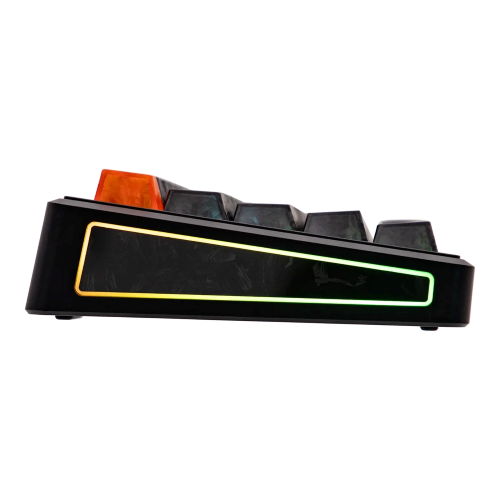
Outside of the keys and everything underneath, the TH65 brings with it a nice 8000mAh battery that provides a sizable amount of life to the wireless keyboard experience. Quite honestly, unless I am using the keyboard on the go, and there are times when I had to do that in the past, the battery life, while nice, is a non-factor. I generally like plugging my keyboard up via wire, which means I don’t have to worry about battery life. BUT! For those who like dongles and Bluetooth, at least you’ll know you’ll get 2-3 days of heavy use from it before it needs to be charged again. It’s a good-sized battery that doesn’t take long to charge when you need to.
So, with all the above glowing positivity about the keyboard, what’s the downer? It’s the software.
The software for the TH65 is browser-based. While there aren’t too many adjustments on the software side beyond macros, key-binding, and color changing, it’s still a horse to get to when you need to do those things. Here is the process I took to get to the software for the TH65:
- I went to the website and chose downloads.
- From there, I went to software.
- After reaching software, I was met with the Epomaker Hub option.
- I clicked on the Hub option, and it opened in a new tab that said to bind the device.
- I chose to bind the device, but the keyboard didn’t show up.
- I assumed a driver was needed, so I went to Downloads again.
- I went to software again.
- I searched for the TH65 software.
- It came up with a message that I had to go to the TH65 device page, so I did.
- I scrolled down the long list of keyboard features until I ran into an option to download the driver.
- Once I installed the driver, it launched a browser-based option…which was the Hub.
- Once inside the Hub, I found all the features (listed above) and began to easily toy with the keyboard.
- When I closed that browser-based window, I remembered I needed to open the Hub again to check another feature out.
- When I launched the Hub, it asked me to bind the device, which couldn’t be found.
As I have stated in the past, it’s much easier to have software installed directly on the computer than to go through a browser. The above steps would have been cut by 75% had that option been available. As much as I enjoy not installing software, it’s better to have software to adjust a single device. I would love for Epomaker to have one software to rule all their devices. It would make life easier for the end-user. Until then, I can only hope and wish for such things.
At the end of the day, if the software launch is the worst part of the experience, I would take it. Good devices don’t need great software to drive them. That should only complement the device. And when the Hub works, it works well.
On that sweet note, let’s wrap up this review.
Conclusion
Epomaker’s TH65 keyboard is a small wonder of sorts. It feels good to type on, has some big-boy keyboard functionality, and it’s creamy as hell. The added bonus of hotswappable keycaps and switches makes it even better. For those interested in an inexpensive keyboard solution, this is a good keyboard to consider.
To find out more about the TH65, click here.