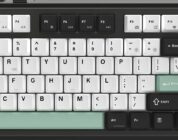
The Epomaker QK108 is an amazingly affordable, sturdy, and comfortable keyboard that should make gamers and office workers happy. Its large layout contains enough space for folks with larger hands. Its cute little screen gives you a taste of customizability beyond the traditional customizable RBGs that come on every other keyboard. Its switches are good for just about anything, be it late night gaming sessions or everyday work. For under $100, this is definitely a mechanical keyboard that’s worth your consideration if you want a keyboard that sounds great and feels even better.
Back when I reviewed Epomaker’s QK81 mechanical keyboard, I praised Epomaker for how it avoided cutting corners in the spirit of cost-cutting a keyboard into the “budget” category. It contained the essentials, ranging from hot-swappable switches/keycaps, a volume knob, a large battery for wireless use, and materials feel anything but cheap. I’m happy with how the QK81 has lasted all this time since I reviewed it, but I’m even happier with how Epomaker has opted into maintaining that consistency in how they expanded the QK line of keyboards into the 98%-and-larger keyboard space.
Epomaker’s prebuilt mechanical and hall-effect keyboards have continuously impressed me over the past few years. They’ve taken big swings in changing up traditional keyboard designs by incorporating screens, a wide range of switches, and materials all within an affordable package. I generally recommend Epomaker to consumers who are wanting to get their first mechanical keyboard that doesn’t break the bank nor require too much upkeep. For new potential owners, an affordable keeb that works right out of the box is very important. Epomaker fits that description exceptionally well.
Check out the QK108 on Epomaker’s store by clicking here! (non-affiliated URL)
The QK108 is part of Epomaker’s QK lineup of mechanical keyboards. This specific lineup of theirs skews more affordable than some of their other lines (like the RT, TH, and Galaxy) along with utilizing materials that make the keyboard sound ultra creamy (or thocky, as the mechanical keeb fans say these days). While the QK108 doesn’t feature Epomaker’s Creamy Jade switches (which are admittedly one of my favorite switches based on acoustics alone), it comes pre-installed with one of two Epomaker switches that have held up quite well over time. More on that in a sec.
The QK108 is a legitimate full-sized keyboard, including every key that some consumers feel necessary, like a numberpad, function keys in the middle, and some breathing room around the arrow keys on the right-hand side. It comes in a single colorway (grey white green), making the decision-making process easier for those attempting to figure out what they need. It also features a small silver volume knob along with a screen on the upper right-hand side.
I’m not the biggest fan of plastic keyboards, but I felt that the plastic used on the QK108 was relatively sturdy yet lightweight. When picking up the unit, I could feel it slightly bend when twisting the corners, but the internals had no such give when pressing firmly during my typing tests. It holds up quite well thanks to the internal materials that support the keyboard’s PCB. Since this is a full-sized keyboard (with all 108 keys!), there’s quite a bit of space on the keyboard that feels very natural for someone who prefers to use desktop-sized keyboards on a daily basis.
 Let’s talk about the screen for a moment. I was surprised to see the QK108 come with a screen for two reasons. First, the QK81 (which is arguably a budget-keyboard in all but name) lacks such a feature, so I didn’t expect its sibling-with-a-larger-layout to have it. Secondly, I’ve come to associate Epomaker’s RT-line of keyboards with having customizable screens. Regardless of surprise, the inclusion of a screen on the QK108 should be treated as a “nice-to-have” rather than a “standout must-have” feature.
I’ve seen consumers treat screens on keyboards as hardware elements that take up real estate with little functional value. Volume knobs are discussed with similar degrees of contentiousness. This isn’t an issue with the QK108, as the screen is small enough in the top-right corner that it doesn’t compromise on keys being oddly positioned or outright missing. Remember, this is a 100% full-sized keyboard featuring 104 keys. There’s nothing “missing” from this keyboard at all.
The QK108’s screen is quite similar to the screen on the Epomaker RT82, albeit embedded within the unit instead of being able to be removed at will. The default display contains the date, time, and small indicators that correspond to settings being enabled (like Caps Lock, Num Lock, and so forth). While I couldn’t find a way to change the time from 24-hour to 12-hour (nor a way to change the date format), I was able to customize the screen with an image/gif just like I could with the RT82. Epomaker’s online tool makes it easy to upload my favorite image/gif without needing to download another driver.
 Should you need a driver, though, the QK108 is VIA compatible using the same .json workaround that their previous keyboards utilize. It’s not a “natural” compatibility, by any means, but it’s functional enough to give users the ability to customize their keyboard with VIA without issue.
The QK108 has tri-mode connectivity, too. This means that you can use it in wired mode (which is my personal preference), Bluetooth, and 2.4GHz with the included dongle. In wireless mode, the 87000mAh battery lasts a few work days before needing to be charged again. If the screen and RGBs are off, it can last a few hundred hours before needing to be charged again.
In terms of switches, the keyboard comes pre-installed with the Wisteria Linears or the Sea Salt Silents. These two switches are Epomaker staples – I’ve used them on several keyboards over the years I’ve covered Epomaker products. The Wisterias are linear (part of their name, heh) and feel very smooth to use. The Sea Salt Silents are legitimately silent switches; they produce very little sound when pressed. They’re a smidge too mushy for my liking, but they’re excellent switches to use in a shared office.
The Wisteria Linears are excellent all-around switches for gaming and office work. I’ve tested the Wisteria Linears in multiple types of games of varying intensity, from the uber intensive shooters (like CS2 and VALORANT) to more easygoing games (like Absolum, Stardew Valley, and Possessor(s)). These switches hold up generally well across all games, but you shouldn’t expect them to be as sensitive nor precise as a Hall Effect switch. They work, though, and that’s what matters.
 If you need to swap out the switches for another set of mechanical switches, you can do so with ease. You can also pop off the PBT keycaps, should the green and white tones not meet your expectations. Frankly, I don’t expect the average consumer who’s considering the QK108 to want to do so, but I’m glad that the option is available.
Now that the holidays are over, you’re probably looking for some additional peripherals to complete the setup that Santa Claus, Hanukkah Harry, and Festivus Francine have bequeathed you with this holiday season. You’re probably reeling from how much money the holidays cost, too. Here’s where the QK108 succeeds and why you should consider it if you’re shopping for a new keyboard right now.
The Epomaker QK108 is an amazingly affordable, sturdy, and comfortable keyboard that should make gamers and office workers happy. Its large layout contains enough space for folks with larger hands. Its cute little screen gives you a taste of customizability beyond the traditional customizable RBGs that come on every other keyboard. Its switches are good for just about anything, be it late night gaming sessions or everyday work. For under $100, this is definitely a mechanical keyboard that’s worth your consideration if you want a keyboard that sounds great and feels even better.