The Wooting 60HE v2 is a notable improvement from its older sibling. It perfects the split keyboard layout through the use of Mod Tap, its new acoustic options are a delight for the ears, and it features the excellent Wooting software support that I adore. If this is the blueprint for Wooting’s v2 keyboards, I cannot wait for what’s next.
I was too critical when initially reviewing Wooting’s 80HE keyboard back in late 2024. I was. I was reviewing the unit from the perspective of an average mech keeb enjoyer. There are two issues with that: First, I (as in, the reviewer writing this review) am not an average keyboard enjoyer. Second, Wooting’s keyboards are not for the average keyboard customer. They’re enthusiast-grade keyboards for consumers who already understand what they want out of a keyboard and are willing to pay a premium to get that keyboard of their dreams.
Starting this review out with my admission of guilt, if you will, is my way of demonstrating that I now fully understand Wooting’s position within the mechanical keyboard space. It is also a way of me sharing that the Wooting keyboards I have reviewed thus far are leaps and bounds above being considered an “average mechanical keyboard.” They excel in mostly every way and are an utter joy to use and configure. Their 60HE v2, the newest addition to Wooting’s library, is no different from its predecessors in terms of being a high quality, enthusiast grade, and well-designed keyboard. With some additional tweaks and improvements, it’s perhaps one of Wooting’s best keyboards to date.
That’s a major compliment, folks.
The 60HE is the keyboard that introduced me to the Wooting brand. Its small form factor and left-hand hook with cloth loop has become a commonly emulated form factor amongst competitors in the 60% keyboard space. Now, Wooting has elevated the 60HE with some new features and much needed innovation. At the top of that innovation list? A split spacebar.
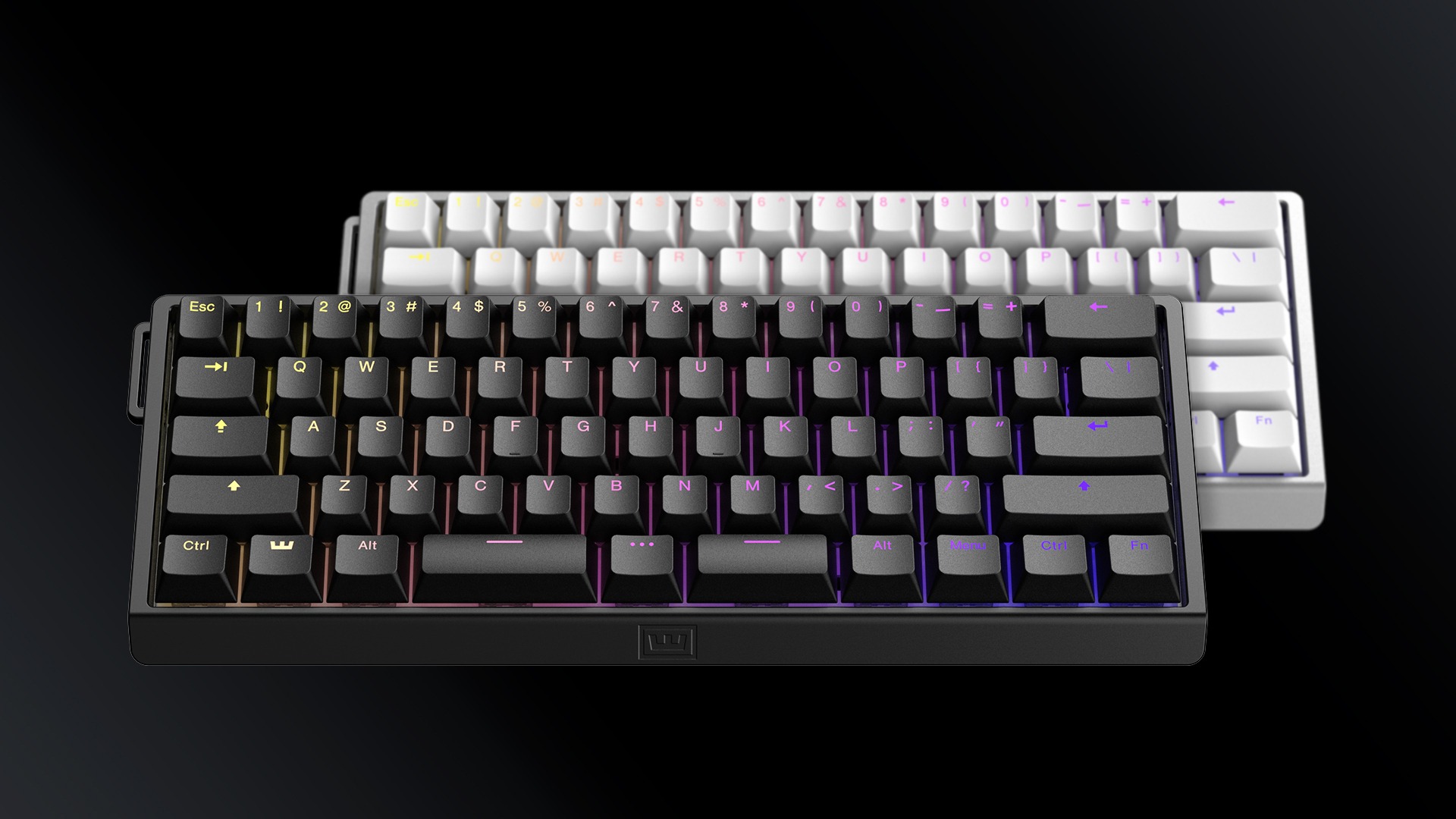 The 60HE v2’s split spacebar is not mandatory – one can purchase a 60HE v2 without a split spacebar. The issue is that the split spacebar is a unique version of the keyboard that replaces the single spacebar switch with three switches: a larger spacebar, a smaller spacebar, and a “…” button in between those two spacebars that acts as a remappable FN key.
Split spacebar layouts take some getting used to, especially on an already small 60% layout keyboard like the 60HE v2. Wooting eases this learning curve by a generous onboarding process: When plugging in the keyboard and opening the Wootility for the first time, I had a brief explanation of what the “…” button could be used for along with input presets.
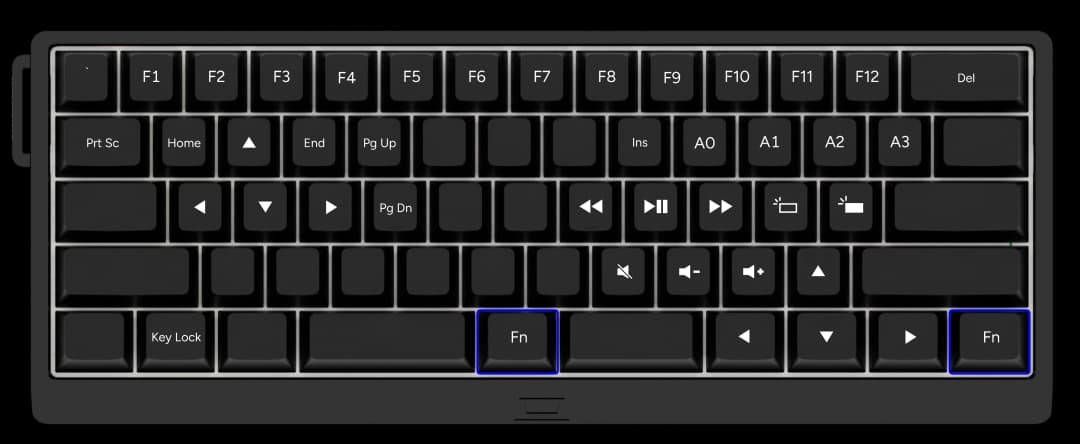
I chose the input preset that turned the bottom right-hand keys into arrow keys via Mod Tap. If I tapped the right shift, menu, right FN, and right Ctrl keys, they would work like regularly positioned arrow keys; if I held down on those aforementioned keys, they would function as normal input keys. This is quite smart for those coming from larger keyboards, as those right-hand keys are often ignored during regular use. Wooting’s implementation trained me to use every single one of the keys on that small space and avoiding the notion of wasting valuable keyboard real estate.
Smaller keyboards aren’t my typical cup of tea, but Wooting has done something nearly impossible by training my hands into using foreign keys in natural fashions. After several days of using the keyboard, things felt (relatively) natural barring the exceptions of needing additional function keys for my day-to-day work. Using the “…” key felt natural, too, giving me an idea of how input layers functioned.
A split spacebar is not for everyone, I’ll be the first to admit that. Those who missed out on Mavis Beacon and were left to their own self-taught devices will have to reteach themselves how to use a keyboard effectively. During my own review period, I started using my thumbs to press the spacebar, improving my WPM. This might not be unique to a split spacebar keyboard, but Wooting’s marrying of its software features (ala Mod Tap) and compressed form factor is indeed unique and better than similar competitors (e.g., an Alice-layout keyboard).
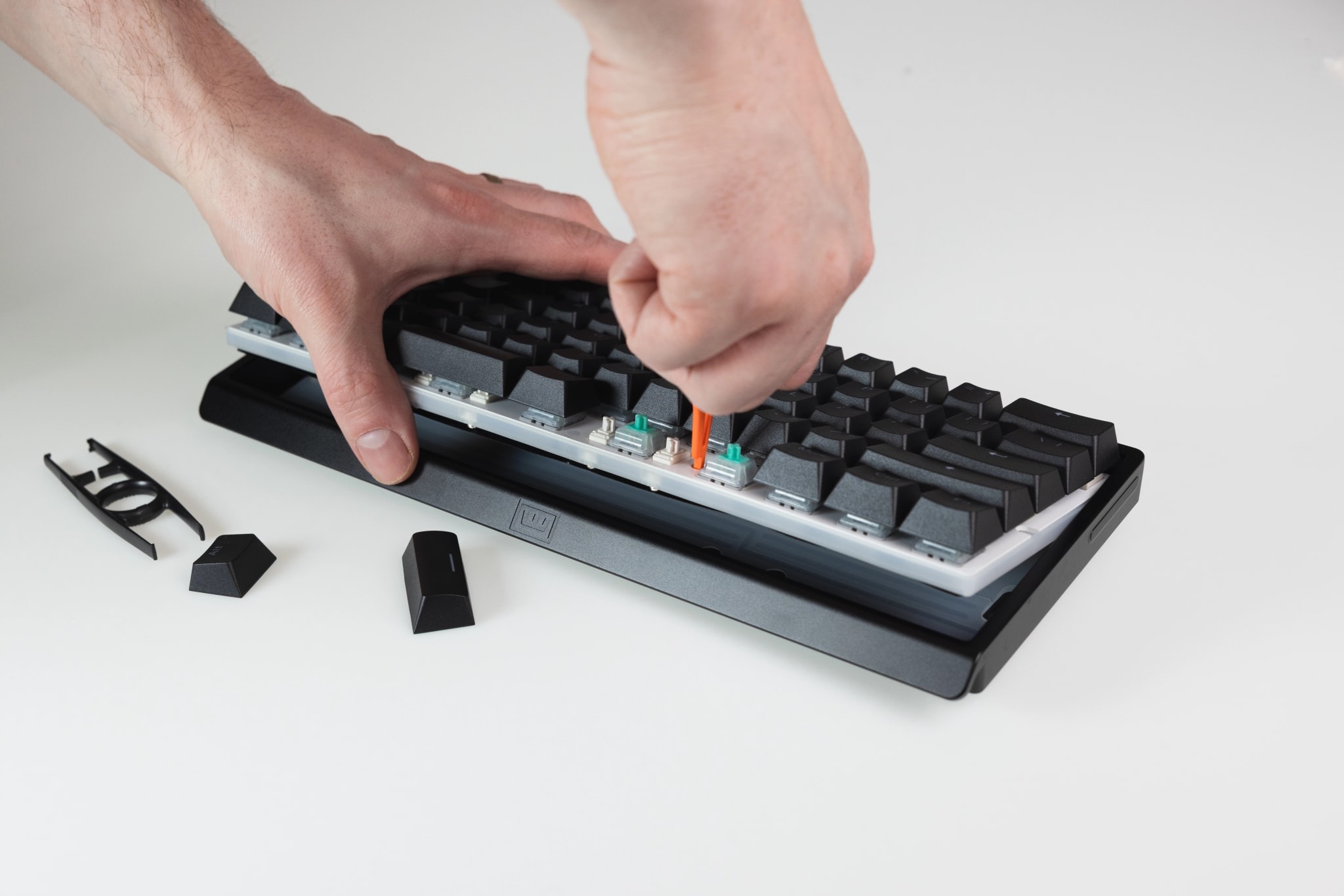 The second major addition to the v2 is the inclusion of the swappable bottom-case dampening inserts. On other keyboards, these dampeners make up the acoustic foams and pads that emphasize or modify the sounds produced when you tip-tap away. As of writing, there are three acoustic options to select from: EPDM foam (included within the box), a silicone “block” (pre-installed on the keyboard, no adjustments needed), or…nothing at all (just an empty space in the keyboard’s casing). The dampening insert you choose impacts the sound your keyboard eventually makes, as demonstrated on Wooting’s sound test video.
Customizing a keyboard’s innards is important for those who care about their keyboard’s acoustics, especially in the enthusiast-grade keyboard space. Meletrix’s Zoom75 comes to mind as a keyboard with similar customizability, albeit utilizing cork padding and plates of differing materials. The main difference (and massive benefit) of the 60HE v2 is its immense ease of installation: All I had to do was give the keyboard module a light pull upward and slot the material of my choosing into the space. That’s it. No additional screws. No needing to pull off the switches and keycaps. Nothing. The process took no more than 3 seconds.
Do I wish that there were more materials (like films or other padding) to choose from? Sure. The biggest miss in the internal department at this time is the fact that there’s only one plate available: an FR4 plate. Unlike the 60HE+ which now boasts several alternative plates, the 60HE v2 has no other options than the stock plate and is incompatible with the 60HE+ plates. I’ll give Wooting a pass for this, though, as the 60HE+ has a PC Switch Plate (sold separately) that utilizes a softer polycarbonate for the true thocks. Let’s hope that there are some additional accessories on the way for those who want to modify the externals and internals of their 60HE v2.
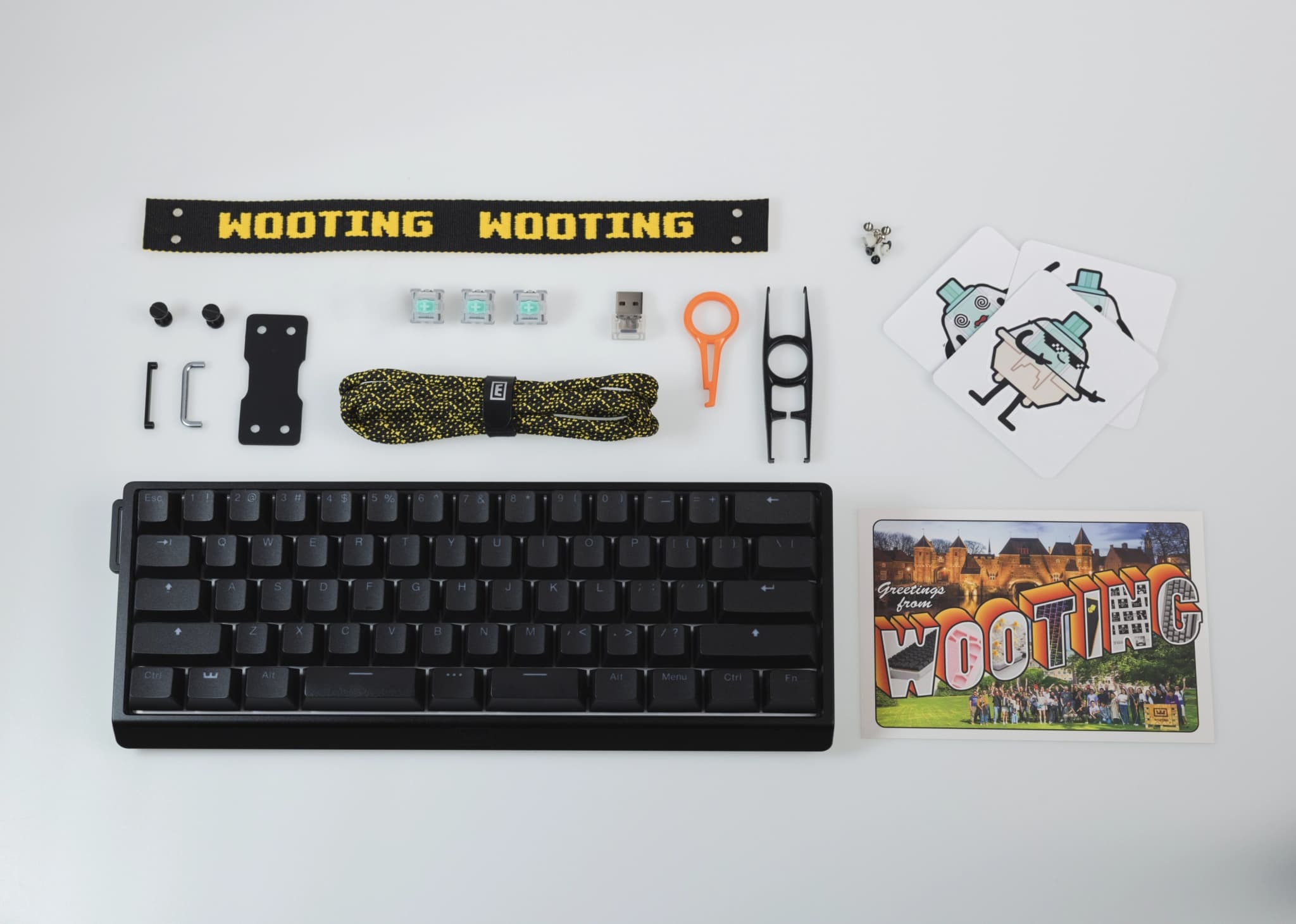 In terms of aesthetics and construction, the 60HE v2’s aluminum case is surprisingly light without erring on flimsy. It feels sturdy like my aluminum daily driver keyboard without the usual heft associated with metal. The PBT shine through keycaps are the same keycaps on Wooting’s other keyboards, so no complaints there. I’ve recommended these keycaps for non-Wooting keyboards because of their durability and shinethrough potential.
Let’s pivot to the switches. This keyboard release comes with Wooting’s newest in-house Hall Effect switches, the “Lekker Tikken Medium” switches. Wooting claims that these switches have a cleaner yet deeper acoustic profile, longer springs for a full 4mm of travel, along with less wobble. On the acoustic side, these switches’ nylon, PC, and POM material combination results in a deeper yet satisfying clack. When paired with the aluminum case, this clack resonates well and is a noticeable improvement from the previous Lekker switches. That said, there’s still a degree of stem wobble, but it’s lesser than its predecessors.
Luckily the switches are hot-swappable with most other Hall Effect switches. I remain convinced that the Gateron Magnetic Blues are the thockiest and most stable HE switches alongside the GEON Raws (which are sold on Wooting’s web store), but these Lekker Tikken Mediums are a close third in their sensitivity and stability. Their 42gf actuation force makes them smooth to use and require a small amount of pressure for comfortable typing over long periods. As someone who prefers stronger switches with deeper profiles, I often seek out switches with 45gf or more of force to minimize mistypes, but this can very easily be solved via adjusting the actuation points.
Finally, let’s discuss Wootility, Wooting’s online keyboard driver. To date, Wootility remains the best (not one of – the best) keyboard configuration drivers I have tested. Some of the online drivers from competitors come close (like Keychron’s newer online driver) on the utility side, but all pale in comparison to Wootility’s customization and explanations. Every single one of the Wooting features (like Mod Tap, Rappy Snappy, Snappy Tappy, you name it) are clearly described and easily enabled/disabled. Updating the keyboard is a breeze. There are endless LED customizations that can be done to make the keyboard shine bright and unlike any other keyboard you’ve seen.
It bears repeating that a good chunk of a Wooting keyboard’s value lies in its software support. Some of these features are overhyped amongst gamers, sure, but Wooting is reigning supreme in getting these features in players’ hands for use in ways that matter. The use of Mod Tap for simulating arrow keys on the lower right-hand side of the keyboard is proof in the pudding: These features showcase the benefits of Wooting’s marrying powerful software with well built hardware. The features work as described and make the smaller keyboard easier to use. I won’t go so far as to claiming that SOCD and Snappy Tappy make me a better gamer, but the keyboard feels responsive as all get out. That’s what’s important, folks.
 Seeing that Wooting has made meaningful improvements with the 60HE v2, I am curious and somewhat excited about what else they have in store for their 80HE and otherwise. They’ve successfully improved the 60HE’s internals while innovating on the Split Spacebar side. At the bare minimum, I’d love to see some of these features come to the 80HE. The 80HE feels a bit better to use because of my larger hands and in terms of ergonomics, so it deserves some new love. I wouldn’t mind a larger keyboard, though…
If you’re an existing 60HE (or other Wooting keyboard) owner, I’d be hard-pressed to recommend the 60HE v2 unless you require a split spacebar. You’ll still get the classic Wooting special of high-performance Hall Effect switches, fine-tuned software configuration, and premium materials. Coming from another keyboard, though, is a night and day experience and worthy of your consideration. If you’re in the market for a 60% Hall Effect keyboard, the 60HE v2 is a definite must have for its internal improvements along with its new Lekker Tikken Medium switches.
Let’s wrap this up.
The Wooting 60HE v2 is a notable improvement from its older sibling. It perfects the split keyboard layout through the use of Mod Tap, its new acoustic options are a delight for the ears, and it features the excellent Wooting software support that I adore. If this is the blueprint for Wooting’s v2 keyboards, I cannot wait for what’s next.