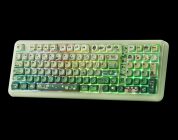
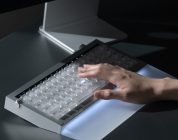
The Luma100 is a great new direction for a low-profile keyboard from Epomaker. Its switches are strong enough for multiple use cases without compromising on accuracy while the keyboard’s build quality and aesthetic make it perfect for someone wanting some refinement for their desk space. It’s beating out the competition at its price point, as well.
Of the Epomaker keyboards I have reviewed over the past few years, there has been one key similarity bringing them all together: Their height. The Epomaker keyboards I’ve reviewed, as wild and varied as they have been in the aesthetic department, have had a consistent (and sometimes adjustable) height. Epomaker’s low profile keyboards have been out of reach from my hands until now.
Epomaker’s Luma100 mechanical keyboard is part of their Luma lineup. Well, it’s more like a larger version of the Luma84 than the Luma40 (which seems to be a cross between a Wooting and a mini keyboard). The Luma lineup emphasizes slimness, ergonomics, and sleekness – three values that are important for low-profile keyboards. It also has a few novelties that give it a unique touch to set it apart from other low-profile keyboards.
Check out the Luma100 on Epomaker’s website by clicking here! (non-affiliated URL)
 I usually avoid recommending low profile keyboards for other gamers, especially those who do more gaming than work. There’s something about low-profile keyboards that makes typing feel equivalent to being on a laptop. Not that there’s a problem with typing on a laptop, but many folks (myself included) associate desktop typing with elevation. But what if you like minimalism, though? What if you liked a keyboard that is near-flush with your desk? What if you are transitioning from using a laptop to a desktop? A low-profile keyboard is perfect for you.
The Luma100 is a full-sized low-profile keyboard, and it’s an absolute treat. It’s encroaching into a keyboard territory that Lofree and Nuphy have dominated for a hot second, as well.
The Luma100 is all about minimalist portability. It’s made of a lightweight aluminum that ensures the unit remains lightweight while still looking and feeling moderately premium. It’s not as heavy as other aluminum keyboards, but it’s smooth to the touch and feels better than plastic. It also has a small lightbar on the upper right hand side, adding a nice touch of color. In terms of color, there’s only one colorway available in the form of a lavender purple and white. It’s a pleasant color scheme that complements the aluminum well.
Unfortunately, the Luma100’s height cannot be adjusted. The default and sole height setting of this keyboard is near flush with your desk surface. This makes is so that if you want a more comfortable typing angle, you’ll need to add something underneath the top edge of the keyboard to improve the ergonomics. For what it’s worth, I had the same criticism for the original Lofree Flow low-profile keyboard back when I reviewed it. Hopefully, a future iteration of this keyboard will add in support for some adjustment just so folks like me can reach their preferred low-profile typing angle.
Moving onto the keycaps. When I think of minimalism and a refined aesthetic, I think of keycaps featuring as little additional designs as possible outside of the legends. Epomaker made a strange decision here: They made keycaps with shinethrough legends and added secondary icons that convolute the aesthetic and make the keyboard visually busy. Shinethrough legends are great – I wish more keyboards had them to begin with so they can take advantage of the keyboards’ bright LEDs. The issue is that when the keyboard is positioned as designed with minimalism in mind, secondary legends (like icons on Q, W, E with BT1, BT2, etc.) decrease the minimalism. I’d rather they did away with the secondary legends altogether. If someone needs to find the FN commands, they can check the manual booklet (included in the box) or create custom keybinds using VIA.
 The keyboard has VIA support, yes. It’s the same VIA-support as Epomaker’s other keyboards that involve downloading a .json file and importing it into the web configurator. It’s great to see Epomaker sticking with VIA support (even if it’s a wonky workaround rather than native and full open-sourced VIA support). The Luma100’s other features that are standard on other keyboards include tri-connectivity (wired, wireless, and so forth) along with a myriad of LED configurations. The 3000mAh battery can last for a bit, but don’t expect it to last too long with all the LEDs activated.
When I opened the Luma100 for the first time, I was pleasantly surprised to find a cute pleather folio carrying case for the keyboard. The bottom of the store page mentions a “storage bag” included with the keyboard, but nowhere else does it mention that little bag. Frankly, I love the bag – it perfectly encapsulates the lightweight form factor and portability of the Luma100. I wish Epomaker included other goodies like this on some of their other keyboards.
Let’s talk switches. The Luma100 comes with one set of low-profile switches: The Epomaker Low-Profile Mint Switch. To my knowledge, they’re Epomaker’s first (and currently only) set of low profile switches. They’re supposedly of Gateron origin, as well. My prior low-profile switch experience has primarily been testing Lofree’s keyboards along with the Keychron K5. Epomaker’s Mint switches are a step above the competition in their strength – they have a 50gf actuation force which is far stronger than other low-profile switches I have tested. They’re great to type on as someone who prefers stronger switches. During my testing, the 50gf prevented the accidental keypresses I often make when typing on low-profile keyboards with lower-than-average actuation points. Here, the actuation point is 1.2mm (which is far under my typical comfortable typing point of ~1.75mm-2.0mm). The stronger spring offset what I interpret as sensitivity well.
 For the purposes of gaming, I wholeheartedly recommend the Luma100 for most games. The switches’ durability is lower than normal (they only last around 20M keypresses), making them a short-term consideration if you’re into playing high intensity games like VALORANT or other FPS titles. When playing League of Legends and some other games of medium intensity, though, the keyboard felt great to use and reacted to my keypresses just enough.
If the switches prove too strong, you’re gonna have to look elsewhere for a set of low-profile switches. At time of publication, Epomaker does not sell another set of low-profile switches. I’d recommend you consider the Kailh Chocs or another low profile switch from Gateron.
I am unsure if Epomaker intends on making more low-profile keyboards, but if they do, they should absolutely continue with the design and quality of what they’ve successfully done with the Luma100. In terms of price point, it’s giving the Lofree Flow a run for its money by being more affordable and style. Yes, it weighs slightly less than the Flow and feels less “premium,” but it has more features in the color/LED department. Switch-wise, the Mint switches are great because of their high actuation force, but there needs to be more options. I often recommend tactile switches in low-profile keyboards to offset the decreased travel; trust me, tactile switches feel great on low-profile keyboards and scratch the mental itch of lightweight tactility.
The Luma100 is a great new direction for a low-profile keyboard from Epomaker. Its switches are strong enough for multiple use cases without compromising on accuracy while the keyboard’s build quality and aesthetic make it perfect for someone wanting some refinement for their desk space. It’s beating out the competition at its price point, as well.