Wooting’s 80HE Module is an excellent way to build a keyboard yourself. It’s straightforward, comes with a wide variety of switch/keycap options, and looks fantastic once it’s settled onto your desk. I enjoyed reviewing the Zinc Alloy model, as it’s worthy of its premium moniker and emphasizes the acoustics of the Hall Effect switches! Other keyboard manufacturers should take note: Wooting’s DIY Hall Effect Keyboard Kit is well-designed and results in a stellar keyboard.
Perhaps I was too critical of Wooting last year when I reviewed their 80HE+ Hall Effect Keyboard. Perhaps I had unknowingly given in to the hype during the waiting period and was disappointed with the keyboard’s price point. Perhaps I was grumpy about the use of plastic.
When reviewing products, be it games or peripherals, I am often evaluating and reevaluating my initial thoughts. The more I play a game post-publishing my thoughts, the more I question how I approached the first review. Was I too harsh? Was I too lenient? Could I have given the developer/manufacturer some grace?
Several months since reviewing the Wooting 80HE, I sit here before you with a unique review. Today, I’m covering the Wooting 80HE Module – a DIY kit that allows you to build your own Wooting 80HE from the ground up. If you are familiar with putting keyboards together and want to have a dream Wooting keyboard, this review is for you. Our colleagues at Wooting sent us a massive package of goodies that are available for those who want to put their 80HE from scratch.
Wooting has earned itself the name of a disruptor in the mechanical keyboard industry, challenging assumptions of the Hall Effect keyboard manufacturing process while creating keyboards that players, myself included, want and need. Their software support is unmatched, too, allowing for endless RBG customization and a litany of Hall Effect infused features that level up your gaming experience (e.g., Rappy Snappy and Snappy Tappy). While I can admit that these Hall Effect features are no Game Shark for mechanical keyboards, I can and will admit that Wooting makes a very smooth keyboard.
The 80HE Module is Wooting’s DIY offering for those who want the 80HE (their newest available Hall Effect keyboard) but want to customize and assemble their keyboard as they see fit. Folks can choose from several switches, one of two case types, and an optional set of keycaps to build the 80HE of their dreams. I received this DIY kit just under two months ago, putting additional time into testing the capabilities of the 80HE while also gauging the differences between what originally came with my 80HE along with some of the options available for DIY consumers. If you already own an 80HE, you can purchase a new case, new set of keycaps, and/or new set of switches from Wooting without needing to purchase the entire module all over again.
Wooting’s YouTube account has tutorial videos that teach consumers how to assemble and disassemble the 80HE Module (in case you’re upgrading from the plastic case to the metal case). These videos are short, leading me to believe that steps were skipped or things were sped up. As it turned out – assembling the 80HE was quite easy. In fact, it was easier than any other DIY Kit I’ve reviewed or used so far.
Check out the 80HE Module on Wooting’s storefront! (Non-affiliated URL)
Compared to my experiences assembling other keyboards, disassembling and reassembling the 80HE was an absolute breeze, far easier than the “30-minutes-or-less” claim attached with Meletrix’s ZOOM75 assembly process. The fact that the module is pre-assembled (meaning that the stabs are already lubed and snapped in) makes for an efficient build process – all I really needed to do was open the metal case, plug in the JST cable, attach the silicon blocker into the LED bar, and then put the top case back on with some screws. It’s not screwless, sure, but it’s straightforward to be done in around 15 minutes.
For reference, it took me far more time to remove and reinsert switches throughout the duration of my testing period. I guess I need a fancy switch remover tool instead of the typical keycap/switch remover that comes with most keyboards, but that’s on me to acquire. The only hiccup I encountered during this process was attempting to slot the JST cable into the module and getting things perfectly aligned, but even then, it took some mild adjusting before I finally got it right.
In case you didn’t know – the 80HE module has some awesome little designs in the switch slots. I love the little touches of uniqueness that Wooting has included in the board’s design!
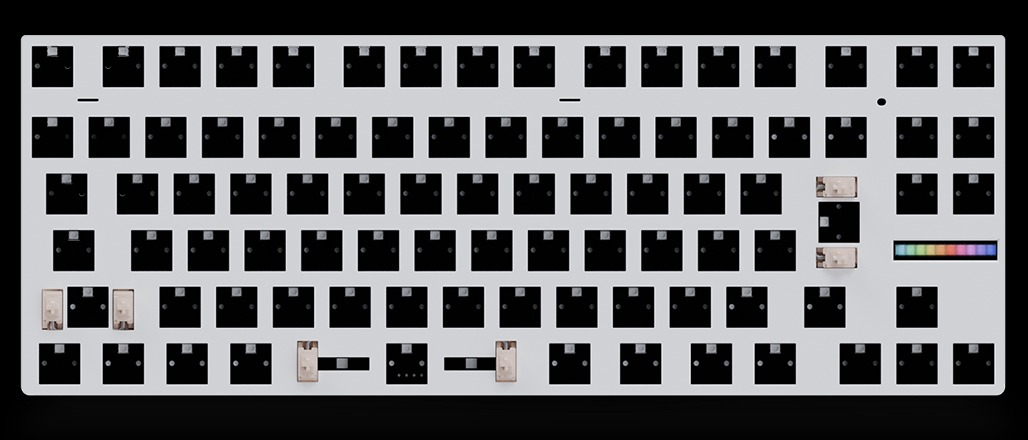 I was sent the Zinc Alloy Case (Raw) as part of this review – a sizeable upgrade from the standard PCR plastic case I had with my 80HE I reviewed all those months ago. This metal case comes in three colors: black, white, and “raw” (similar to brushed aluminum). The Raw color looks just like stainless steel, featuring just enough shimmer to shine on my desk. With the LEDs active, the keyboard glows almost as bright as a transparent acrylic. Like other metal cases, this keyboard is heavy once it’s assembled, but it’s a premium heft that doesn’t budge when pressing firmly down or attempting to slide it across my desk.
The Wooting 80HE with the Raw Zinc Alloy Case is the dream case I’ve envisioned for my original 80HE. For the cost, it elevates the keyboard from a typical plastic case into a shiny, premium, and solid hunk of metal that glows. When typing on it, the metal amplifies the noises that emit from individual keypresses, so it’s bringing out the best acoustics from my switches.
Get the Zinc case – it’s worth the additional upgrade cost and feels great to use. Looks aside, metal keyboards feel better to use given their sturdiness. If you plan on using your keyboard on a daily basis and putting it through its paces playing multiple video games, the durability of the metal case will give you some great peace of mind. The Zinc Alloy case comes with a canvas travel case, too!
I was also sent an alternative set of keycaps to review. The typical keycaps that come with the Wooting 80HE are the Wooting Etched Backlit ABS Keycap set. I generally liked these keycaps, as the etched emblems shone bright with the LEDs of my keyboard and matched my LED aesthetic well. However, some folks prefer legends imbued into the plastic. If you’re one of those folks, consider the Dye-Sub PBT Cherry Profile Keycap set!
The keycaps that I received were the Dye-Sub PBT Cherry Profile Keycap set with Kana. While they lack the shinethrough of the etched keycaps, the Dye-Sub PBT Keycaps felt sturdy, ergonomic, and featured easily readable legends. When testing other keycaps with Kana, I’ve often found that adding Kana made the keycaps visually busy. Not here – Wooting’s keycaps are visually appealing and have some breathing room. I’m still learning Japanese, but I’m sure that these keycaps will come in clutch when I’m attempting to type in Japanese.
 The 80HE Module comes with a variety of switch options, ranging from the default Lekker switches (that come with the prebuilt 80HE) to the Gateron Jades to some other switches that are exclusive to the Wooting 80HE! We were sent not one but two sets of switches to test! Let’s get to it!
First, we have the Wooting x TTC KOM RBG switch. Wooting describes these switches as having unmatched stability and top-tier RGB visibility thanks to its transparent housing. On the technical side, the switch has PC housing and a POM stem – both of which are on the harder material side of the switch material spectrum. From my testing, the harder materials used in the housing and switches, the clackier and louder the switch. This remains true for the KOM RBG – this switch has a decently loud clack that sounds like a modernized typewriter, but a helluva lot smoother.
For a Hall Effect switch, I enjoyed using these additional switches…perhaps a little bit more than the Lekker V2s that originally came with my 80HE. They were far more stable than any of the other Hall Effect switches I have tested so far – virtually no wobble whatsoever. Their 55gf actuation force was far stronger than the typical Hall Effect switch strength of ~30gf while still feeling smooth to press. In fact, this was one of the strongest HE switch I have tested thus far (save for the Lekker L60 V2 which have a strength of 60gf). In my testing, the KOM RGBs felt great and more stable/smooth than the Lekker V2s. Thanks to their strength, I would imagine that these switches would pair relatively well with ceramic keycaps.
Second, we have the GEON RAW HE switches. These switches are available via Wooting’s storefront as well as directly from GEONWORKS, assuming you want a different variant of these switches. The variant available for the Wooting 80HE is the 50gf version – slightly less strong than the KOM RBG, but still stronger than most HE switches I’ve used. Wooting claims that these switches have a distinct sound – this is absolutely true. It’s a blend between a thock and a clack, almost as satisfying as the Gateron Magnetic Jades (one of the HE switches I’ve grown to love over the past year) but slightly more muted. It’s a pleasant acoustic profile.
Compared to the Wooting x TTC KOM RGB, the GEON RAW switches felt just as great to use. I couldn’t tell that much of a difference in the RGB shinethrough in my testing, but I could notice the difference in strength and sound profile. While I would prefer the GEON RAW switches available in this model to be the 60gf model (as I tend to prefer stronger switches), the TTC KOM RBGs sound and feel just as great. It comes down to preference here: If you prefer a louder switch, consider the TTC KOM RBG. If you prefer a deeper switch, consider the GEON RAW switches. I had trouble choosing, so I ended switching back and forth during my review period.
 This now begs the question: Should you stick with the Lekker V2 switches that come with the Wooting 80HE, or should you select one of the other switches available from Wooting’s storefront? I’m a fan of the classic Gateron Magnetic Jades, but the TTC KOM switches are a delight to use and pair well with the premium metal case, producing a nice, loud, yet satisfying clack.
While I loved putting this keyboard together and customizing it with the new goodies from Wooting, there’s a part of me that wishes that there was more customizability for the 80HE. Similar DIY kits from the likes of Meletrix, Chosfox, MM Studio, and QwertyKeys feature things like alternative plates, sound dampening foams, modules, and mounting styles; Wooting’s 80HE, not so much. I know that the 60HE has some additional accessories for purchase while the upcoming 60HE V2 is reportedly coming with some customizable features, but the 80HE should have some of those customizable features, too.
I wouldn’t lie, though – the day Wooting releases a full-sized keyboard will be an amazing day. I sincerely hope that they experiment with larger keyboards for those of us who use the numberpad for our day-to-day work.
And now it comes to the part of the review where I discuss the price/value of the DIY kit. In my previous review, I expressed some concerns with Wooting’s steep prices, especially the prebuilt plastic model. It bears repeating that Wooting’s prices are steep, but there’s something to be said about them being one of the only manufacturers in the market that allows you to easily put together a (partially) customized Hall Effect keyboard.
Breaking down the prices, the 80HE+ DIY Kit is one of the most expensive keyboards I have put together. The module alone is $155, while the metal case is another $100. When you factor in a single set of switches and keycaps, that’s another $100 (or so). Taking this all together, Wooting’s offering can exceed the $300 range despite not being an “artisan” brand.
 The Zinc Alloy case makes this DIY kit worth it alone – everything else is the icing on the proverbial cake. I especially love the variety of Hall Effect switches to choose from; consider the GEON Raw HE Switch if you’re on a budget but you want a strong switch with deep-sounding clack. The Wooting x TTC KOM RGB has a delightful clack and is one of the more stable HE switches I’ve used, but I am not the biggest fan of a clacky profile. The Dye-Sub PBT keycaps (with Kana) are well designed and feel premium, but I don’t think you need a set of keycaps if you have your favorite set already. That said, all of the keycaps Wooting sells in the DIY kit are more affordable than some other PBT keycaps I’ve seen, so it may be worth it to pick them up just so you can have them.
Wooting’s 80HE Module is an excellent way to build a keyboard yourself. It’s straightforward, comes with a wide variety of switch/keycap options, and looks fantastic once it’s settled onto your desk. I enjoyed reviewing the Zinc Alloy model, as it’s worthy of its premium moniker and emphasizes the acoustics of the Hall Effect switches! Other keyboard manufacturers should take note: Wooting’s DIY Hall Effect Keyboard Kit is well-designed and results in a stellar keyboard.