Do you ever look at something and think to yourself, “Wow, you’re really too fancy for me”? I do that with my 2022 Toyota Corolla every day. That is the truth. I love the tiny screen on the car, where I can avoid hitting pedestrians when backing up, while at the same time changing my tunes and finding my Moulin Rouge soundtrack quickly so that I can sing loudly to work. It can do everything. Plus, it has unbelievable gas mileage. I can go on a full tank of gas for a week (my work is an hour away), and a full tank costs around $27 to fill up. Again, it’s fancier than I deserve.
Well, related to another piece of hardware I have been using lately, the Victrix PRO KO from gaming hardware designer Turtle Beach crossed my desk about a week or so ago, and it is fancier than I deserve as a gamer. Built for pro gamers who are competing in Esports tournaments, the hardware is comfortable, complicated, and configurable. Honestly, it’s tough to find a single flaw in its design, even the $279.99 price tag.
So, put down your janky, old controller, and let’s talk about this new hotness.
Design for old and new
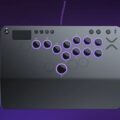
Victrix PRO KO has a solid design featuring well-placed buttons that will remind you (if you’re old enough) of arcade games back in the 90s (looking at you, SNK and your fighting games), while also featuring style and comfort that only fighting tournament players and arcade enthusiasts could appreciate.
The buttons are a solid, hard/slick plastic that emulates what you would get from a gaming experience, if you were lucky enough to be alive the first time Street Fighter II was around. The 16 buttons have a pleasant and accurate click to them and are driven by a hot-swappable Cherry MX Speed Silver RGB Switch underneath. If you’re old like me, the click of those buttons and their quick response time will bring back so many memories and provide an accurate replication of an arcade gaming experience that you didn’t know you needed or wanted. For old people like me, it’s memory and muscle triggering in the most pleasant ways.

For new gamers out there who enjoy the arcade controller experience and who are true titans of the Esports fighting scene, the hardware was built for you. The controller does not feature a joystick, unlike its cousin, the Victrix Pro Fight Stick Arcade (featuring a joystick), which means that those who are true competitors should dig its stickless design. So, what are the advantages of having no stick to twang? It’s quite simple.
The lack of a joystick means that you can provide a more accurate input command to whatever fighting game you’re playing. Jumping forward, backward, or launching into quick and accessible commands to pull off a combo is almost always guaranteed. The lack of human reaction to mess things up, as I’m sure we have all panicked, pushed a stick or two in our lifetime, is out of the equation. For example, when I first played Marvel vs. Street Fighter with this controller, I was expecting to be horrified by my lack of muscle memory reaction and lack of stick to grasp. Shortly into the experience, I found myself pulling off Akuma’s spinning kick easily and repeatedly by pressing all three buttons together. And it worked every single time I executed it.
In my 30+ years of fighting game experience with this series, I have never done that with accuracy before. It was always a struggle with the stick/button combination. Getting the stick in the right location and pressing the button at the right time was a challenge, which was part of the weird charm back in the day. The Victrix PRO KO button assurance and comfort made me instantly connect with this controller and understand why this might be the choice of EVO-type tournament goers. Did it take some getting used to? Once everything clicked (pun intended), it took an hour (at max) to retrain my brain to use this design.
At the end of my initial experience with the Victrix PRO KO, I found I didn’t want to live without it when it came to playing fighting games. It’s smooth, easy, and thoughtless during a fight, and it opened an entirely new fighting game experience for me. I can see why professional gamers would want to go in this direction.
Customization
While the Victrix PRO KO took some getting used to with its current configuration, two buttons specifically threw me off, the up and down keys, which were placed opposite of where my brain wanted them to be (down is on the top of the button scheme, and up is on the bottom). While I did my best to deal with them, I did wish they were in opposite positions, as it made more sense to me. A good chunk of that retraining my brain session was getting used to their placement. But then something amazing happened… I read the controller’s guide.
With its sleek simplicity, perfect ergonomic design at 6.28 degrees for your wrist (and that’s just a blessing for us old folks), the controller featured a lot of unused real estate, as well as some mysterious circles on the face that looked like button placement spots. Curious as I am, I started reading the manual. Then I went to the website. Then I discovered that there were additional switches, buttons, and a tool hiding underneath the controller’s hood that would allow me to add, subtract, and customize the button scheme, thus customizing the controller experience.
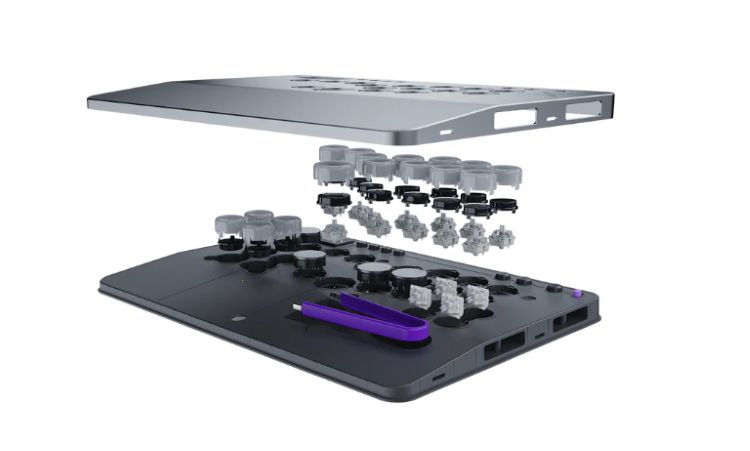
Will Silberman and I review keyboards regularly, so seeing the switches, buttons, and tools wasn’t foreign. It just made me giddy that there was a console controller that allowed a gamer to do this. I mean, this controller is pure heaven for these features.
By flipping the controller on its head, you will find four clickable switches, which unlock the underbelly of the Victrix PRO KO. Within that underbelly, you’ll find four new switches, more buttons, and the ability to remove and move everything. That is insanely customizable.
Now, while the physical part is cool, and the hidden compartment that contains all the above helps to maintain that smooth style the Victrix PRO KO is trying to maintain, the other component to this customization is the software called the Victrix Hub.
Software goes hard
The Victrix PRO KO software is super intuitive and contains features like remapping current buttons, such as the Up/Down buttons, and even changing the color scheme to the way you want it. Gotta keep up your brand, right? In addition, the software also features lighting controls, SOCD (Simultaneous Opposing Cardinal Directions) options, audio settings, and even a tournament lock tab. Those are some professional-grade options.
The only thing the software was missing was the ability to change the sensitivity of the button pushing. Although it may not be suitable for the Esports scene, I found this option to be great for PC keyboards and was hoping it would be available for this controller. Pro gamers would probably find a way to abuse this during competition. No offense meant to all pro gamers. When money is on the line, sometimes trying to cheat bubbles up into thoughts. But having that option to change button sensitivity would be so much fun for us normies.
Now, my only other suggestion for the next iteration of this controller is to somehow install small LED screens above each button. I know that button distance is vital for the success of this controller in the Esports scene, as well as comfort for us old folks, but having the ability to put a new symbol in a reconfigured button scheme would be visibly nice. While I did swap the Up/Down buttons on the controller, if I looked down to see my hand placement, my brain saw that down symbol and immediately thought of ‘down’, when it was up. Having a small LED screen to adjust to button changes would help this controller immensely. It may not be possible, but that is my suggestion. I’m not an engineer, but I like acting like one.
Overall, the amount of customization that comes with this controller, both physically and software-wise, is truly spectacular. I didn’t expect much from this controller beyond just a gaming experience, yet it brought so much more to the table. I understand why the word ‘PRO’ is in the name. The Victrix PRO KO is top-tier.

Unintended consequences
While I enjoy this controller for fighting games, I found another great use for it that was unexpected and unintended – ARCADE GAMES FROM THE ‘80s!!!!
My arcade resume starts back in 1980, when my parents would irresponsibly drop my brothers and me off at an arcade while they went shopping in an entirely different location (seriously, a different building far away). While there, I played the hell out of games like Galaga, Track & Field, and Moon Patrol. Those were my three go-to games that I could always play.
Fast-forward 45 years, and I brought those three out on the PlayStation 5 to play with this controller. All of them were immensely improved, as I could use the Victrix PRO KO’s big fat buttons to recreate some of the finer arcade and child abandonment experiences that happened to me back in 1980. Having crisp and clickity buttons to fire relentlessly on vertically falling bugs made Galaga so much more enjoyable. Having the ability to tap the hell out of a running button, while leaping over hurdles with another button, put me back on a loud and often button-violent experience with Track & Field. It was simplicity and accuracy that made these new memories and moments so beautiful, thanks to this controller.
I know that not everyone will use the controller for these purposes, but if you’re an arcade fan, like me, then you’ll be in absolute retro-heaven. It was so delightful. *small tear*
Anyway, we’ve reached the end of this review, so let’s wrap things up.
Conclusion
The Victrix PRO KO from Turtle Beach is an amazing controller that will tickle the fancy of pro gamers, while overwhelmingly impressing normies, like myself. Its sleek and comfortable design, mixed with amazing customization via hardware and software, makes the $279.99 price tag understandable. It’s one of the best controllers I’ve reviewed in a long time.