
Finally! A fresh new way to use a mouse. Not that there was anything wrong with a gaming mouse in general, but this one certainly takes the cake and throws on some yummy icing on top.
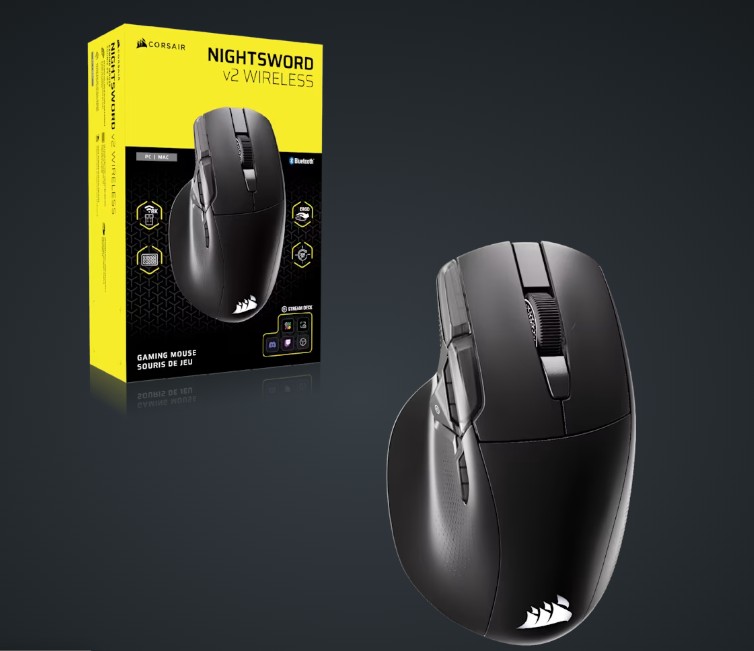
So, I have been trying out the Nightsword v2 Wireless SD Gaming Mouse from Corsair for the last month or so to see how useful it is, and I found some impressive details in the process. Firstly, this is a gaming mouse at its very core. It’s programmable, comfortable, and built to withstand temper tantrums, long usage, and any other sort of abuse that could come up during a gaming session. Being that I am not a competitive gamer by nature, the tantrums were kept to a minimum during this review period.
And, honestly, that isn’t why this mouse interested me.
At my core, I am a video creator and amateur streamer. One is a career, and the other is my retirement plan. I’ll probably be like those old guys who were ex-military, playing Battlefield and just kicking the sh*t out of the younger generation while the world is watching. Of course, I am no ex-military, but I am a great typer, so streaming typing games non-stop might be the niche I carve in that retirement plan.
I digress.
Those jobs relate to this mouse because the Nightsword v2 Wireless SD Gaming Mouse is advertised as not only programmable, but also as using Elgato Stream Deck (that’s what the SD stands for) commands to make life easier and faster for content creators. I am here to tell you that they have made this super easy. Of course, it really helps when you are the company that owns Elgato. I guess that makes the software integration far easier than with most mice of this type.
On that note, let’s get this review going.
Design
Obviously, the Nightsword v2 Wireless SD Gaming Mouse cosplays as a gaming mouse, which means it was designed for comfort. Much like Ryan Reynolds cosplaying as denim Deadpool at this year’s Comic-Con, this cosplaying gaming mouse does a great job of bringing the comfort, style, and complication that any good gaming mouse would bring.
For comfort, the mouse feels good for long periods. A smooth groove design on the left side welcomes the thumb while placing the other digits where they need to be, with the button, mouse, and other buttons on the left side. The mouse feels good for gaming and stays comfortable during long sessions. For example, I played the hell out of Hellslave II this weekend. For an old guy like me, the 5.3 hours of nonstop gameplay generally end with me shaking my mouse hand and cursing the Gods for the arthritis I had been blessed with. In other words, it’s generally not comfortable. With the Nightsword v2 Wireless SD Gaming Mouse, because of its curves and comfortable design, my arthritis didn’t bother me at all. My fingers and thumb stayed happy, while my gaming went slowly downhill (can’t have a good mouse and great gaming skills at the same time). Eventually, I will find a game I am good at, maybe returning to League of Legends (kidding) or Balatro (not kidding). Regardless of the game, the mouse felt like a true gaming mouse, with built-in comfort.
Beyond that comfort, the Nightsword v2 Wireless SD Gaming Mouse brought a cool style. It has a distinct design with LED lighting and easy lighting customization, and it all looked cool. It is stylish, yet not too loud and proud of its coolness. It’s enough to get you going without being visually overstimulating. It’s like being at a party and playing it cool, but not being the guy in the corner who’s too cool to talk to people. Like a mid-grade Fonz from the classic show, Happy Days.
Now, as for the complication part of the design, well, that bleeds right into functionality. Let’s go there now.
Functionality
The Nightsword v2 Wireless SD Gaming Mouse‘s complication starts with its optical switches, rated for 100 million clicks. This means that unless you’re competing in Esports tournaments every day for the next ten years, you probably won’t outlive the functionality of this mouse. I’m not sure whether that is entertaining or depressing, but either way, it’s impressive.
To make this an even better experience as you spiral toward your finite days, imagining a lonely mouse with no captain, it comes packed with a wireless 8000Hz polling rate, which is beyond impressive. If you’re not familiar with polling rate, that means how quickly your mouse functions talk to your computer when you press a button. It’s akin to a child hopped up on so much sugar that they know the response of their parent when asked a question before a parent can even get a word out. Trust me, that’s fast. Most high-end keyboards are rated at 8000, and those are typically favorites of Esports competitors. Having a mouse like the Nightsword v2 Wireless SD Gaming Mouse bring that same response quickness to a competitive game is just gorgeous. And, again, in case you missed it at the front end, I said ‘wireless’ with that polling rate. WIRELESS. Yes. Now, you see. And believe me, it’s as advertised.
Now, let’s shift gears here and discuss what I was most excited about with this mouse, and that is the Elgato integration.
I have thoroughly enjoyed the streaming world since it was born from the fires of Justin.tv years ago. Hell, even when it was oddly used in movies, like Contact, I thought to myself, I want to be a part of that streaming video world one day. Probably not talk to Jodie Foster about janksy from Australia, but definitely video chat with an audience.
Anyway, over the last decade, I have found myself knee-deep in streaming, occasionally making it to the front page of Twitch, and working the hell out of Streamlabs and OBS, trying to find new, efficient ways to present content to the masses. While creating graphics, ridiculous animations, and presenting music that always hits the nail on the head, and mashing it all together in one of the streaming software programs is a kick; getting a smooth workflow out of the streaming software has always been an uphill battle.
Granted, Elgato made a wonderful set of devices in the Stream Deck family that helped alleviate some of these issues. Using a Stream Deck meant not having to use a mouse, scroll a screen, or do other magical movements during a live stream to avoid indicating that you don’t have a producer or technical director at your disposal was only possible through the Stream Deck family of devices. It was like having a mini-switcher at your disposal, which is useful, especially when you are juggling lots of inputs and outputs. Simplifying it all into one device is a wonderful blessing. Now, as much as that is nice and it skips quite a few steps, it was still obvious button-pushing when streaming solo. Don’t get me wrong, it’s much cooler with one of these, but it still involved movement, which kind of took away from the streamed content.
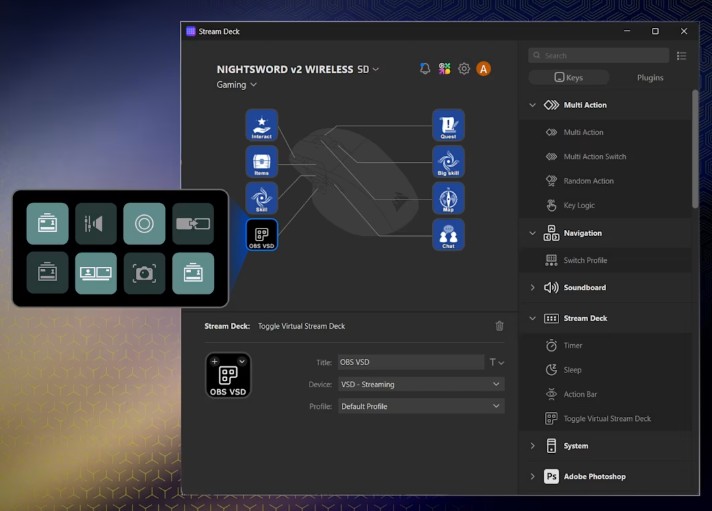
To obliterate most of this issue, Corsair took the concept of the Stream Deck, specifically the software, and integrated it within the mouse’s programmable functions. The profundity of that move, even if it’s truly just software working with pre-existing buttons that every gamer would assume would be there, was genius. When you load the software for the first time, hook up the mouse, and see a sliver of familiar Stream Deck software pop up on the left side of the screen, you can instantly see the seamlessness that is awaiting your OBS fandom.
Integrating the software with the Nightsword v2 Wireless SD Gaming Mouse is simple, yet it adds some complications to mouse use. The simplicity lies in dragging a command into a pre-defined mouse button map and dropping it to assign the code. It works exactly like the Stream Deck hardware and software do: it’s a drag-and-drop, rename process, and that’s it.
The complication is the device’s finite number of buttons and deciding what you should and shouldn’t include to make your OBS life easier. Going into this mouse and forcing yourself to decide some weird video strategy through it makes the whole process complicated. Complicated in a good way, but complicated nonetheless. The actual usage isn’t complicated, just the planned usage. Any good technical director will tell you that pressing assigned command buttons is easy, but developing a show around those buttons and trying to decide which ones are important is the hard part. That hard part is also the fun part, because it forces the user to be creative in a live environment.
All of this train of thought through a mouse. A. MOUSE. That’s ridiculous and cool at the same time. Like a mid-grade Fonz (Hey).
Anyway, overall, the Nightsword v2 Wireless SD Gaming Mouse is a dream come true and a marvel of a mouse. It simplifies streaming, streamlines gaming, and brings good design, style, and comfort with it all. It’s one of the best experiences I have had with a gaming mouse, probably ever.