
This is our first KEMOVE review, and it’s certainly a good start for the company.
Over the last two years, Will Silberman and I have been reviewing keyboards like they were a brand-new technology. We have dipped into Epomakers and others, discovering an entirely new world of keyboard craziness. If you had told me that keyboard reviewing would be this interesting and this much fun, I would have called bullsh*t. It has been a blast. And that blast continues to reverberate.
Anyway! The latest keyboard that we have had the pleasure of putting through the ropes is the K94 keyboard from KEMOVE. It’s a creamy keyboard with a wonderful feel, precise accuracy, and easy-to-use web-browser software. And that last part is tough for me to say because I haven’t been a fan of web-based software before.
Let’s get this review moving and grooving, starting with the keyboard’s design.
The KEMOVE K94’s design starts with comfort. The comfort comes from its easy, sturdy support, which doesn’t put unnecessary pressure on the wrists. It makes long-term typing comfortable, with no downside, as the keys are contoured to help the typing process instead of working against it. Sometimes companies want more ‘pretty’ than ‘practical’ with their key flow, but K94 gives a bit of both. As an older man, I need to protect my wrists as much as possible during long review sessions. After using this keyboard for the last two weeks, I have felt absolutely no stress in my wrists, which lets me type long sessions of terrible reviews. That’s gold for me, and because of that, this might be my go-to keyboard from now on. It might even replace my ROCCAT Vulcan, which I have been living the dream with for years. It’s tough to top the champ, but the K94 might do it.
The next aspect of the K94 design that impresses me is where the tri-connectivity dongle sits. I have seen these dongles from other companies hidden under a poppable plastic casing, shoved under a foot, put on a USB wire, and haphazardly connected right into the keyboard’s mold. The latter is the worst because that thing drops harder than a Justice concert. KEMOVE adds its own design flair to a dongle solution, as the K94’s dongle sits in a compartment with a magnetic door between it and the open world. That magnetic door is easy to push open, but it is also sturdy when you keep that dongle at home. It’s a brilliant way to hide a dongle while also balancing dongle security. It’s a brilliant new design that raises the bar for securing and hiding a dongle. I am sure Epomaker and others will take note of this design and try to replicate it, and I wouldn’t blame them. Again, it’s a brilliant design that is a definitive solution to dangling and lost dongles.
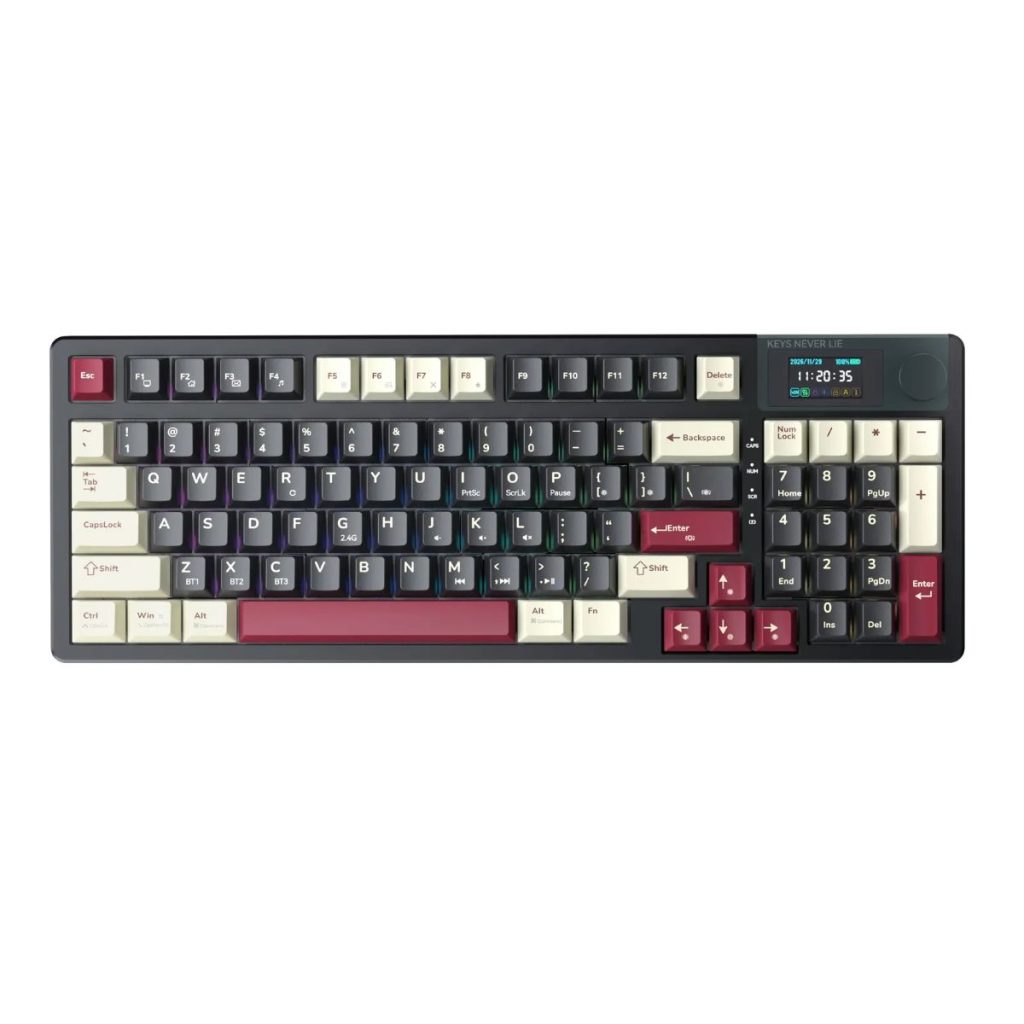
To round out the design, the K94 comes with a multi-color set of keycaps that work visually. This K94 comes with a black casing, white keycaps for important keys for easy identification, and a bevy of maroon keycaps for often-used keys. At a glance, it’s a gorgeous color combination that gives it more style and panache than a keyboard should. It’s a work of art. It’s one of the nicest-looking keyboards I have come across in a while, and the color scheme is beautifully woven together to make it feel fancy. For gamers out there trying to impress folks with their computer setups, it checks the box as a high-end visual masterpiece. Throw in the under-cabinet LED lights, and it just adds to the art.
Continuing with the art, the K94 also comes with a gorgeous LCD screen in the upper right that’s easy to program, plus one of the sturdiest metal knobs with perfect clicking rotation. That last part matters because most keyboards with this design have a loosey-goosey knob that turns easily without much adjustment. This is a solid knob with definitive clicks as the user goes through options. I know, it sounds silly to point this out in a review, but it was noticeable and effective. This is a high-quality knob that fits a high-end design.
To round out the design, the keys come equipped with creamy clickity-clack sounds. Not only is that sound pleasant to the ear- not too loud and not too soft- but it’s a reassurance that key punches have been made. Honestly, people just love creamy keyboards, and this checks that box.
As far as functionality and options, the KEMOVE K94 comes with hot-swappable switches, which can be easily pried up using their P10 tool (such a nice tool to have around – much better than the flimsy shit that comes with keyboards). Pulling up a keycap for replacement or pulling a switch out to update is super simple, which makes for a good time for any keyboard enthusiast. While I would have loved to use my Human Fall Flat keycaps as a replacement for the K94 keys, and to use the P10 again, I didn’t want to ruin the aesthetics. Anyway, for those folks who love swapping switches and keycaps, it will be easy-peasy.

On the battery side, it comes packed with an impressive 8000mAh battery that lasts a while. As I said earlier, I have reviewed this for the past two weeks and enjoyed not having to charge it for a week or so. Battery time varies depending on use and whether LED lighting matters to the user. Ultimately, I am a huge fan of keeping this sucker wired because I am old school, but the option to go wireless for an extended period is a good option for those who want it.
As for the polling rate, it sits at 1000Hz with both wired and wireless options. While that might not impress hardcore, competitive gamers in the Esports world, it’s enough to enjoy a good gaming session with friends. An 8000Hz polling rate would have added to the mythos of the K94, but 1000Hz does the trick.
To round out this keyboard, I have to give major kudos to KEMOVE, and it’s a well-designed/executed browser-based software solution. I am not a fan of web-based software, as it can feel clunky and imprecise. It’s a tough sell that one piece of software not being installed would be the end-all, be-all for a company’s line of keyboards. It’s a tough sell. Anyway, KEMOVE made it simple, easy to use, and incredibly responsive. It’s like installing individual software or using a VIA solution, yet it doesn’t add delay or clunkiness. I easily got into the software through the keyboard’s web portal, changed things like the LCD images and keyboard layout, and created macros. It even supported multiple profiles efficiently. There was no delay, no glitchy clunkiness, just smooth sailing from the start of the software until the end. Again, I am not a fan of web-based software solutions, but KEMOVE impressed me with what they brought to the table.
Overall, the K94 from KEMOVE is an impressive keyboard that feels good, types well, and offers enough customization to make any keyboard enthusiast happy as hell. It’s certainly one of the more visually pleasing and comfortable keyboards I have had the pleasure of reviewing.
For more information on the KEMOVE K94, click here.