

The HyperX Clutch Tachi is an arcade controller with a clean design that treasures form just as much as function. Though exclusive to PC and Xbox platforms, the responsive inputs and customization options make it a viable accessory for those in the fighting scene.
The fighting pad and arcade controller market has always been a fascination to me. As a player who is extremely mediocre at fighting games but still enjoys their penchant for speed, skill, and flair, there’s never been much of a reason to use a genre-specific device.
Let’s be honest, these accessories are meant for fighting games and fighting games alone, much like a wheel set-up is only used for driving games. You buy an arcade controller because you are a fighting game pro, participate in tournaments, or aspire to enter the scene in one way or another.
Over the years I’ve seen reviews and deals and articles about this controller or that–blocky pads with a joystick, bright plastic constructions, crazy button layouts. They allows players to unleash insane combos. They replicate the feel of an arcade cabinet. Their response times are lightning fast. Through all manner of forums, video advice, and research, players will eventually figure out a solution that meets their requirements for a price and what they are hoping to execute in their fighting game career.
The HyperX Clutch Tachi finds itself in a wide enough sea of options, across a range of price points and brand names. So what makes it a highlight in the space for potential budding pros or those wanting to break away from an old favorite?
HyperX has made an impressive dent in the gaming scene over the last decade. One of the first headsets I ever reviewed was the original HyperX Cloud back in the early 2010s. Since then the brand has spread its efforts across controllers, keyboards, mice, microphones, gaming laptops, and other tech. The Tachi is the company’s flagship shot aimed directly at the fighting community, crafting an arcade controller incorporated into its HyperX Clutch branding of controllers.
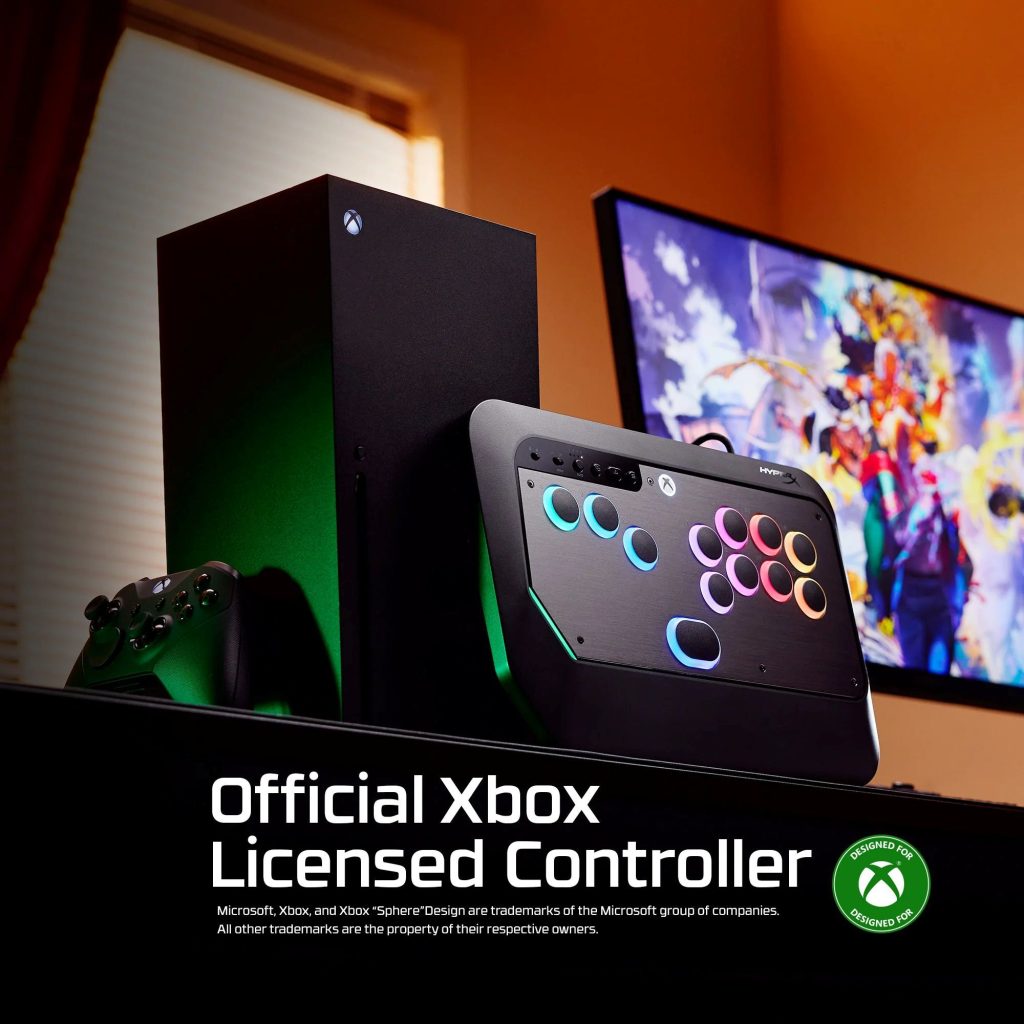
I think one of the biggest determining factors on whether or not the HyperX Clutch Tachi holds value is its designation as an official Xbox licensed controller. The Tachi is compatible with the Xbox Series X|S and Windows PC. This means PlayStation-exclusive users with no PC won’t get any functionality out of the controller.
For PlayStation 5 owners who call that console their primary home (such as myself), the Tachi is going to have a difficult time justifying itself. Do you own a capable PC? Have an Xbox Series with a generous smattering of fighting games? Sure, you might be tempted. But this is an important barrier for entry that should go into your calculation on whether or not the Tachi has viability.
I recognize that one of the purposes of owning any kind of controller or pad dedicated towards fighting games is to amplify one’s skill, perhaps elevating it to the point of being tournament ready. And because I’m not well-versed in the tournament scene, it’s hard for me to make a judgement on platform usage and exclusivity whether it be tournaments at local shops or those watched by global audiences. I’ve always been under the impression that the tournament scene leans towards PlayStation, partially due to Sony’s involvement in EVO and the importance of having players on an even field.
Does a tournament implement strict console rules? Can players bring their own consoles and devices? These are important considerations. On PC, small deviations in graphics and connectivity could disrupt even and fair play. That would be less of an issue on Xbox but again, players would need to gauge which scenes they could actually bring the HyperX Clutch Tachi to and use it in a competition.
As another esoteric issue, owning a fight pad is an admission that the user wants to enhance and excel their gameplay. I adore video game controllers and have for decades. Nintendo’s insanity present in the design of the Nintendo 64 and GameCube controllers. The familiarity of the DualShock and its descendants. The strange brilliance of Microsoft’s placement of the left and right sticks. These are tools we’ve been using for decades that have gone through numerous generational changes. But some games and genres simply play better on devices made with them in mind. A thumb can only travel so far, so fast, and so accurately over directional and face buttons. Fighting games and competitive players forged skills on decades of arcade cabinets where two palms rested on a solid surface and let fingertips do the work.
Breaking into the world of arcade controllers isn’t going to be easy for everyone and will likely take varying acclimation times. And I think about the numerous times I’ve sat down at a desktop or a laptop whether at work or at home or somewhere else and it takes me a moment before my fingers are at ease typing. There are subtle differences in devices that you won’t notice until you start using them. Now imagine honing and improving your skills on a device like the HyperX Clutch Tachi: it is THE controller you use to win matches online and potentially humiliate some of your friends in couch co-op. But what if you can’t use it in a different setting? It’s probably going to take a bit of practice to take your Tachi skills and transition them to whatever controller is required for that setting. But again, this is an esoteric problem. Your individual ability to acclimate between fighting pads is leaps and bounds ahead of a person using one for the first time.
If the HyperX Clutch Tachi’s Xbox and PC compatibility is not a concern–or is, actually, a benefit–then players will be treated to an exceptionally sleek and comfortable arcade controller.
The preamble regarding console functionality is important because I think it is the singular barrier for entry on what is otherwise a wonderful device that seemingly caters to almost anything players would be looking for in a leverless arcade controller.
Yes, there’s no arcade stick here to jiggle around. Directional inputs are performed by four buttons on the controller, three on the left side for left, right, and down, with a larger button at the bottom center for up. Eight buttons on the right side represent the four face buttons and four triggers found on a controller.
By stripping the controller of a lever, these fighting pads clearly define what will control the flow of the game. The finger taps a button to move in a direction or to perform a move, not having to rest the palm on the rounded top of a lever or manipulating it between fingers. Personally, I’ve never been a fan of levers on a home device. At an arcade cabinet in a theater or restaurant I was happy to be a little rough or careless with how aggressive I would move a lever. They existed for fighting games, platformers, and everything else. But at home on an expensive device, I would be hesitant, worried I would break something that isn’t designed with enough sturdy parts.
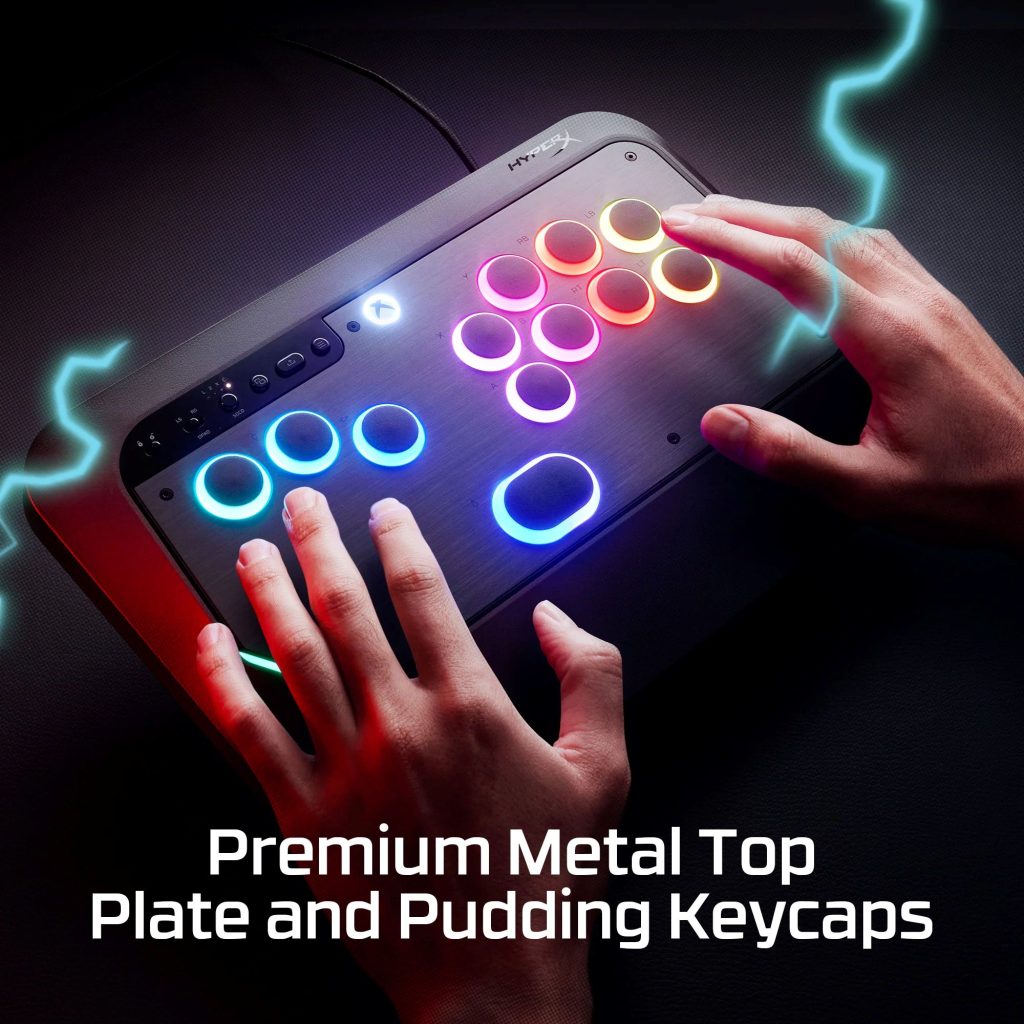
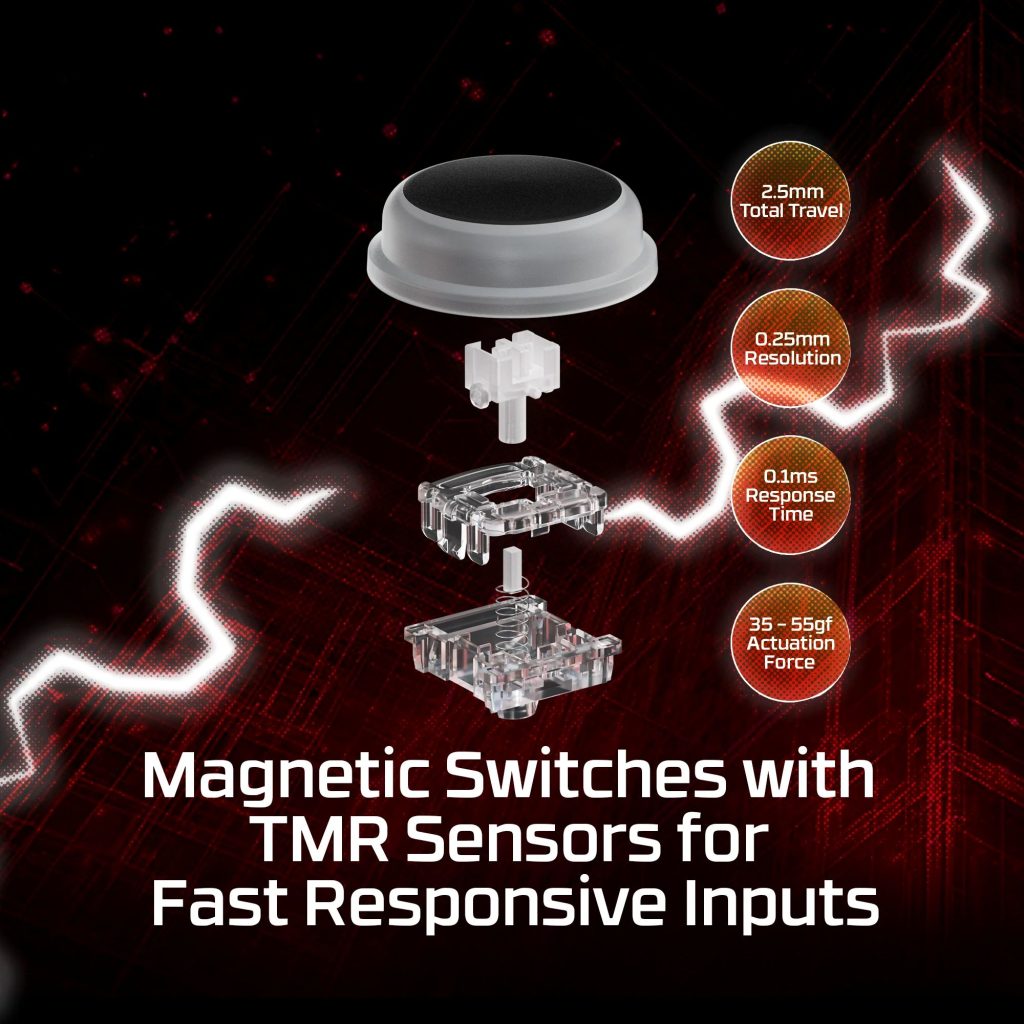
Rather than using Hall Effect switches, the HyperX Clutch Tachi implements TMR sensors, which are becoming increasingly popular due their fast responsiveness coming in at a time of 0.1ms. The included pudding keycaps are about the size of a penny, perfect for the fingers to gently rest on or hover over. The membrane on the switch is soft but the tops of the buttons are solid and textured enough to to be too smooth and have the finger slip.
When pressing on the Tachi’s buttons, there is a satisfying give where the user needs just enough gentle force to trigger an input. A satisfying “pat” sound accompanies presses, akin to the quieter mechanical keyboards that aren’t about a louder clacking sound. Merely tapping around on the pad has a rewarding feeling to it from the sound and also the tactile feedback of a full press giving away to making contact with the bottom of the button.
The placement of the up/jump button (by default) at bottom center allows the thumb enough freedom of movement for that crucial input. More so, HyperX opted for an oblong shape rather than a larger circle. By doing this, players can actually rest the side of their thumb along the button, providing a bigger surface area press. Because the thumb isn’t aligned similarly as the rest of the fingers on a hand, it’s more natural for a player’s index, middle, and ring fingers to touch the right, down, and left buttons with their fingertips while the side of the thumb is angled. Instead of having to lift the thumb, players can merely press it into the larger button.
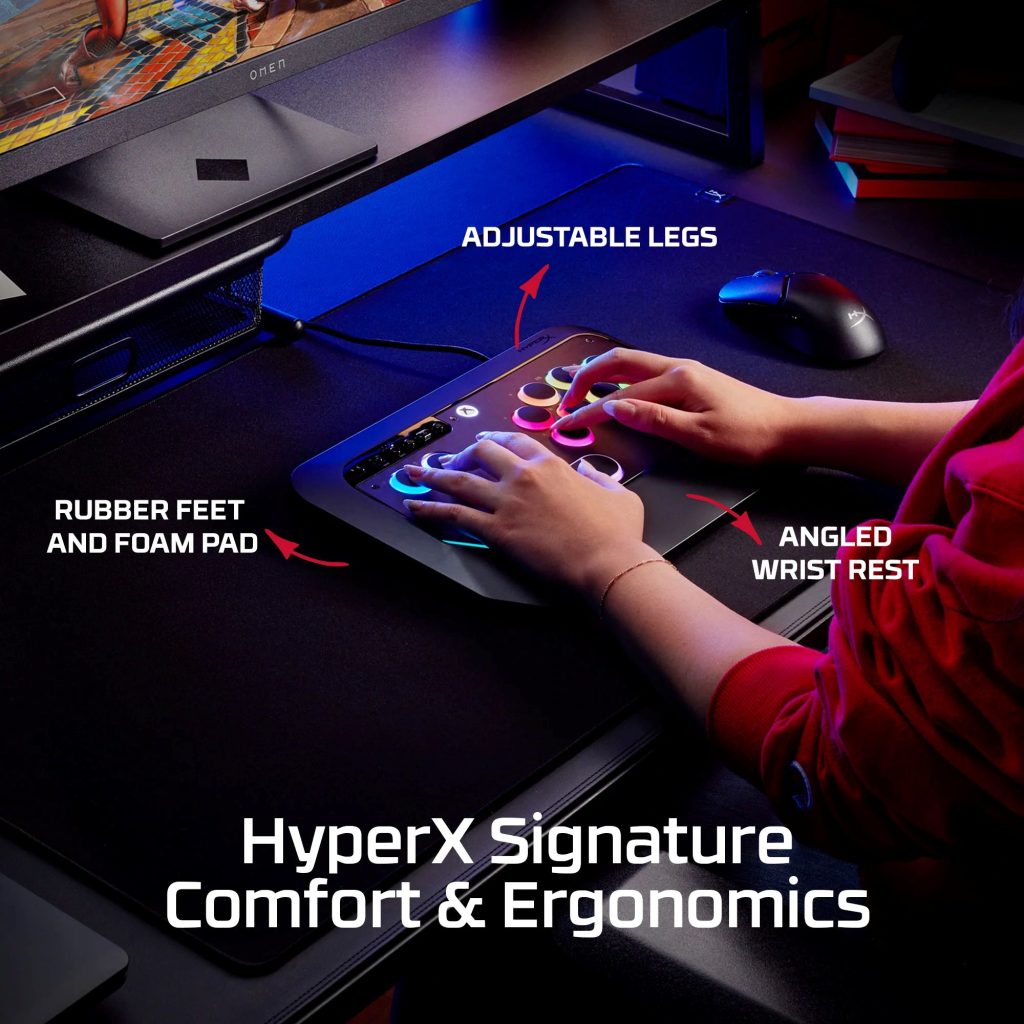
Ergonomics were an obvious consideration by HyperX when designing the Tachi. Considering the intensity of fighting games and the constant use of combinations by the fingers, it is important to be able to rest other parts of the hand as much as possible. The controller has a relatively spacious area to rest the wrist that takes up about a third of its entire real estate. Additionally, there is enough free space below the left and right groupings of buttons to minimize any accidental or unnecessary inputs.
The Tachi’s sleek design does everything it can to focus attention and movement on its 12 primary buttons, giving the player optimal room to find their most comfortable placement. At under just an inch high and weighing less than two pounds, the Tachi is very portable and not too bulky. A solid foam padding on the underside prevents the controller from slipping much on solid surfaces or even on the player’s lap. Two rubber feet can be unlatched to help raise the Tachi a bit higher, giving additional ergonomic options.
When I first used the Tachi, I sat it on my lap to connect it to my laptop and get used to its feel and build. It was heavy enough that I didn’t feel like it would slide off, which is also due to the foam bottom. The heft is equally distributed throughout the controller so lifting it up and shifting it around doesn’t make it feel lopsided. The USB-C cable to keep the Tachi powered on and connected has a dedicated cable channel keeping it secure, with a hollow spot to plug directly into. This prevents fatigue and damage by not having the cable jut out from the body of the controller.
Being an Xbox/PC controller, the Tachi has the standard system buttons–menu, home, share, etc.–that are all placed at the top of the controller above the 12 buttons. Players can toggle a lock switch back and forth that prevents these buttons from being used, meaning that the controller won’t get disconnected or the action of the game won’t be temporarily abandoned. It’s a simple tool that would be easy to overlook but essential in a device of this type. Another switch can change the functionality of the directional buttons, making them act like a traditional controller’s left or right stick or D-pad should there be any reason to do so. On the back edge of the controller is a button that can also be pressed to cycle between different customization options but I’ll touch on that later.
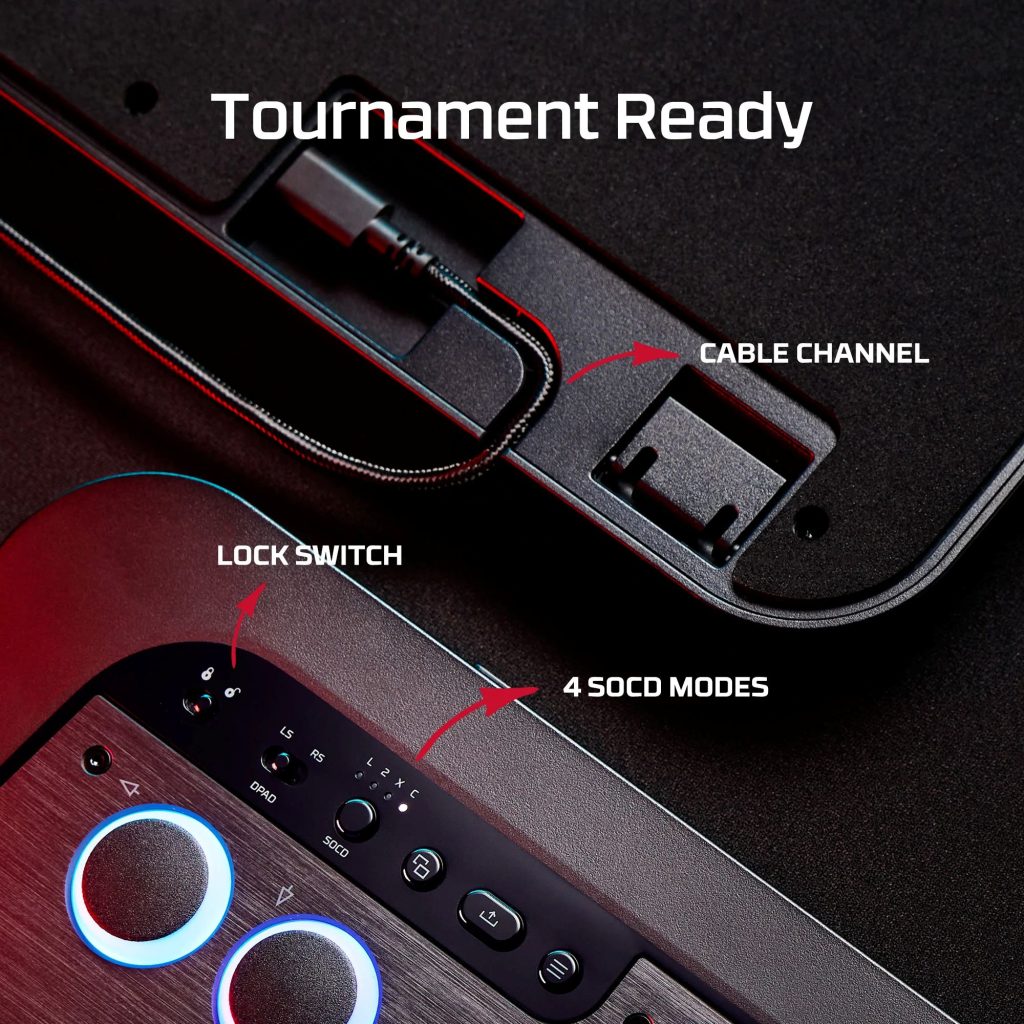
Finally, the Tachi includes a button allowing players to shift between SOCD modes. SOCD–short for Simultaneous Opposing Cardinal Directions–is an important feature of leverless controllers that dictate how directional inputs work.
Four SOCD profiles are available on the Tachi: Legacy, Second Priority, Capcom, and SOCD off. When using the Legacy profile, pressing left and right directional inputs at the same time leaves the character neutrally standing while pressing up and down causes the character to jump. Second priority means that the second directional press will always take priority, meaning players can hold a directional input button, then press another and have that second press register. The Capcom SOCD profile is traditionally used as a tournament standard, meaning that Tachi users are a quick button press away from being ready for universal competitive play. With SOCD disabled, button presses act in the order they are pressed.
Where Second Priority SOCD may make it easier to practice and execute combos, the Capcom SOCD profile has its own set of priorities dictating simultaneous button presses. For players who have minimal knowledge of SOCD settings, it’s important to have arcade controllers that allow for easy switching. Doing so will allow them to understand how these profiles work and how to adjust their gameplay and training. Those experienced in higher levels of competitive play will appreciate how easy the Tachi allows for all these adjustments on the fly.
When testing out the HyperX Clutch Tachi, I spent a great deal of time in Street Fighter 6 and the Capcom Fighting Collection 2. This blend of modern and classic fighting gave me a way to test out the Tachi’s responsiveness. But also, I have to admit that I had kind of a great time using the Tachi for platforming games which also require lightning-fast inputs.
Please understand that when it comes to fighting games, I’m a casual player that most often has fun in story modes while dabbling in a bit of competitive play. I cannot speak to how the Tachi hones my latent abilities as a fighting game player but I can gauge how it presents an opportunity for growth and how it feels beyond a traditional controller.
Navigating past the initial phase of acclimation to a leverless controller, there is a distinct ease in how it feels to operate movement and combos when not having to clutch a device between your two hands. It’s similar in the way of playing an FPS with a mouse and keyboard, where only four buttons dictate static direction and momentum while the mouse determines where your head is looking at while moving.
On the Tachi my fingertips hit the button I need to press without my thumbs needing to traverse a controller face. Need to jump? I tap up by pushing down with my thumb. A punch or a kick enacted by dropping the appropriate finger, feeling the brief resistance of the button and that satisfying feedback after.
When these fighting games put the combo input on the screen in front of me, there’s a tactile responsiveness to the speed. I have no technology here to measure the TMR sensor input timing but there is that sensation of the moment I feel the twitch of my finger, the action on screen will be represented with virtually no input lag.
Playing on the Tachi feels amazing, as it should. There would be no excuse for HyperX to release an arcade controller in this environment and with their established pedigree and have it perform poorly. And like many devices and accessories that specialize in a specific use case, the Tachi is willing to take players as high as they are willing to go. For an expert player, I imagine that swapping from their most-used controller to the Tachi will result in an initial strangeness but also an acknowledgement of the blanket comfort the ergonomics provide. Upon further use, muscle memory will be swapped to the Tachi and it will shine even more.
Out of the box, the Tachi’s all-black design is subdued but still makes a statement. A darker gunmetal faceplate allows for the LED lights to glow more prominently when activated. A surprisingly impactful choice is to have a small strip of LED on the left-side corner of the plate where the palm or wrist my lay, giving enough visual identity that it doesn’t exclusively rely on the buttons for appeal.
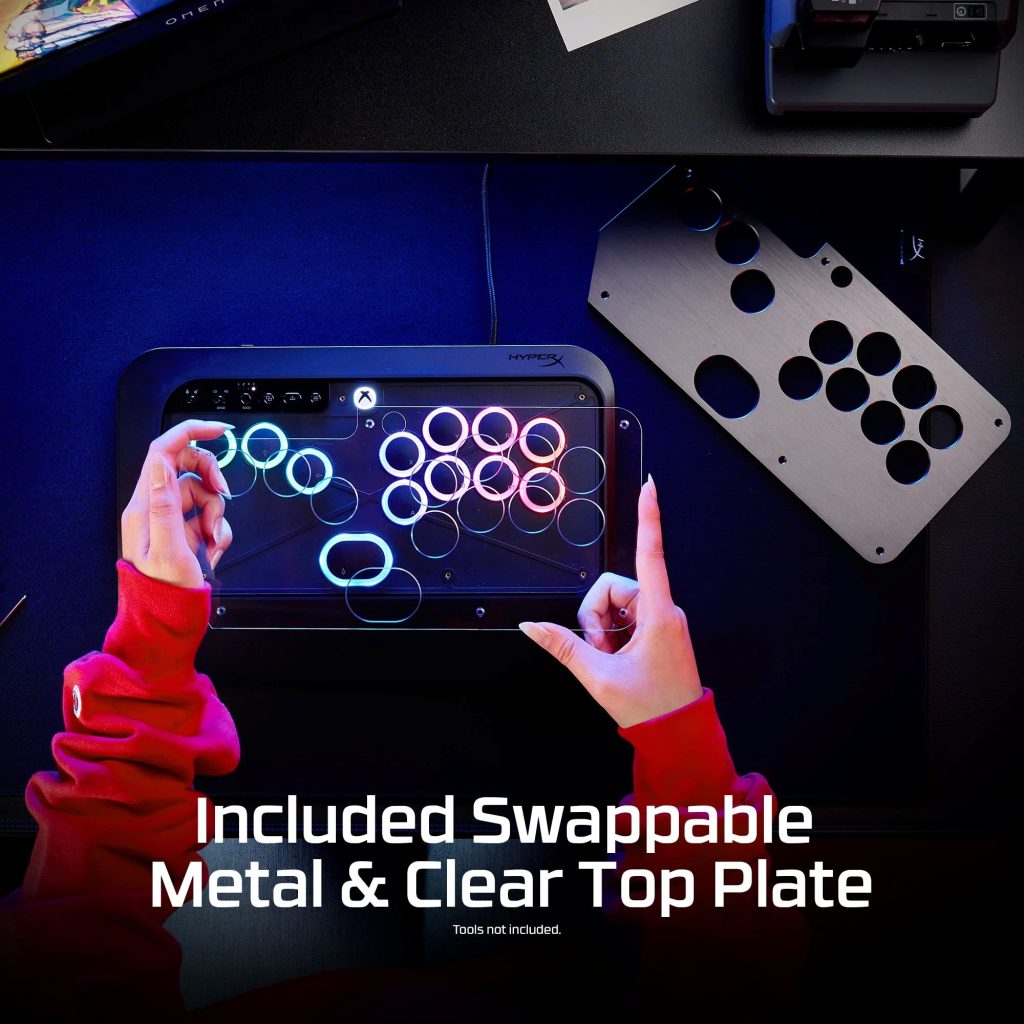
Should players wish, the removal of a few hex screws can have the metal plate swapped out with an included clear top plastic one. This allows for another level of customization should one wish to have a custom design shine through the Tachi that compliments their style or the lights from the buttons. HyperX directs players to open-source files that allow for 3D printing of button shapes as well. During my time with the controller, I did not take the device apart but did watch a video of it being done and saw that the buttons seem relatively easy to swap out if one wishes to do so.
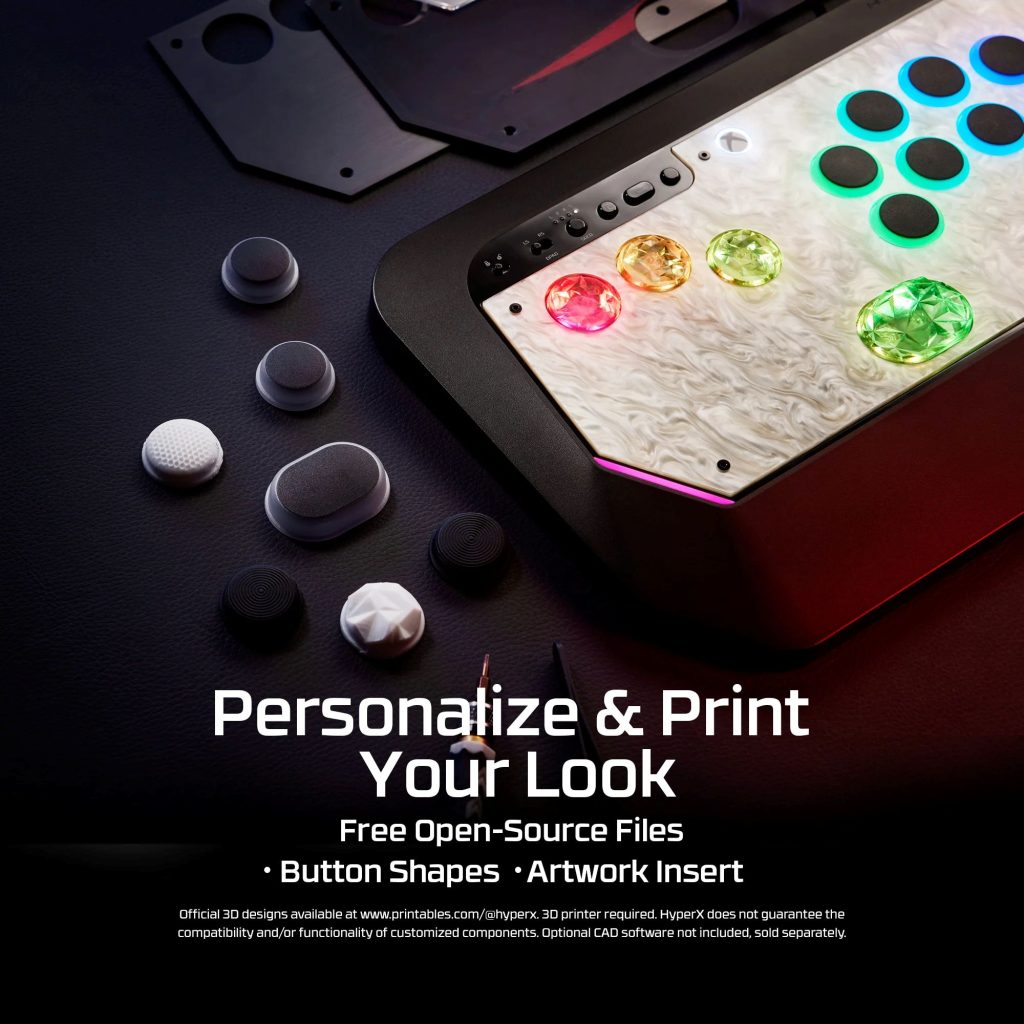
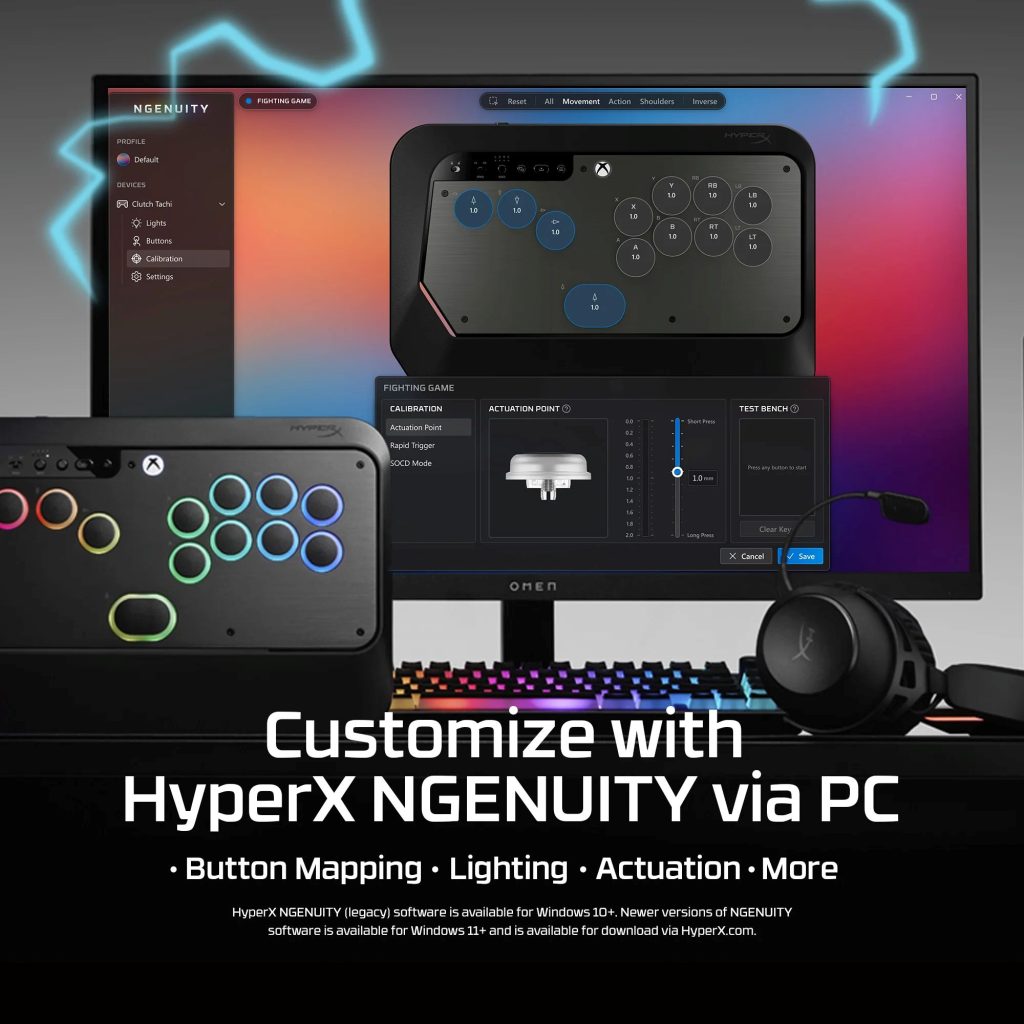
For the final touch of customization, the HyperX NGENUITY software can be downloaded for the Tachi, opening up a suite of features also available on other HyperX accessories. Players can set up profiles to adjust the colors and patterns of the LED lights to whatever their preference is, easily cycled through by that button located on the top edge of the controller. While I love a good breathing pattern, my favorite was absolutely the setting that had whichever button I pressed immediately light up with color.
Additional customization comes in the form of being able to assign the eight face buttons with any preferred input. While the three left-side buttons and the bottom “up” button seem to be static through the NGENUITY software, the right side has free reign. Granular adjustments can also be made to all 12 buttons’ actuation points and the rapid trigger sensitivity. The actuation points can be adjusted by long or short press from a range of 0.0mm to 2.0mm. The software can determine how far a button must travel before registering a press and what height it must return to before resetting. Finer details like this should be standard on devices like this and it’s fantastic that the NGENUITY software is easy to understand and simple to adjust.
Arcade controllers shouldn’t be overly complicated. Players need them to quickly, accurately, and skillfully perform in fighting games–a genre that requires instantaneous response with sometimes complex button inputs. As a leverless controller, the Tachi ticks all the boxes it should.
The HyperX Clutch Tachi normally retails for $199.99. You can find it right here on HyperX’s website.
But I have seen it on sale through HP’s website for $149.99 by using a discount code.
This price point situates the controller about where I’ve seen other brands such as Razer, Turtle Beach, and Corsair. Unfortunately, the Tachi doesn’t include any additional tools, buttons, or switches–something you might see in a device like the Victrix PRO KO–but it keeps the product at a more approachable price. There are cheaper controllers on the market but they lack the brand recognition and suite of customization like HyperX.
The HyperX Clutch Tachi’s aesthetic is one of my favorite things about it and I’m rarely one to care about form over function. But even then, this controller performs at an expert level and doesn’t overcomplicate things, allowing an inexperienced fighting game player like myself enough runway to appreciate the intricacies of a controller like this. Add more functionality and it may get too complicated or bulky, or simply not look as good. Simply put, this is a premium leverless arcade controller that, if you don’t mind it being Xbox and PC exclusive, will be the perfect accompaniment to any fighting games in your quest to be a tournament master.