While I prefer heavier and more premium materials, Epomaker’s foray into expanding the Hall Effect space with the HE108 should be praised. If they can make a full-sized keyboard this affordable yet compatible with other Hall Effect switches feel this good, imagine what they could do with a more premium construction. Keyboard manufacturers take note: Epomaker is making some good Hall Effect keyboards!
The hall effect (HE) keyboard space is overwhelmingly dominated by keyboard manufacturers competing to create the best 75% keyboard. There are some notable exceptions (like Wooting’s 60HE), but the fact remains that these keyboards are being artificially confined to smaller form factors. To date, the only full-sized HE keyboards I’ve seen have come from Wooting (with a large, but warranted, price tag) and Keychron (which use proprietary HE switches)…until now.
Epomaker has created a ~$100 keyboard that uses hot-swappable HE switches! Full-size keyboard users, rejoice!
Back when CES2026 occurred, there was no mention from the Epomaker crew about the existence of the HE108. There was mention of the Glyph (a keyboard that looks and feels like an old-school typewriter – DigitalChumps head honcho Nathan’s dream keeb), the RT98 (a novel and modular iteration of my personal favorite Epomaker RT100 keyboard), the RT82 (a retro-inspired keyboard with detachable mini screen), and the G84 HE (a Hall Effect version of the G84 that I reviewed last summer). When I got the opportunity to review the Epomaker HE108, I was surprised and excited to test out a full-sized Hall Effect keyboard that didn’t break the bank yet supported some of my favorite Hall Effect switches on the market.
Check out the Epomaker HE108 on Epomaker’s website by clicking here! (non-affiliated URL)
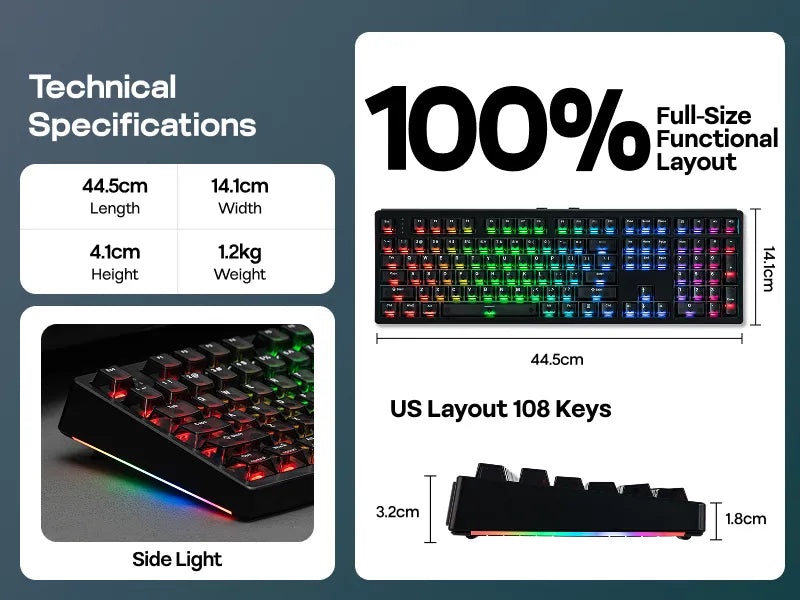
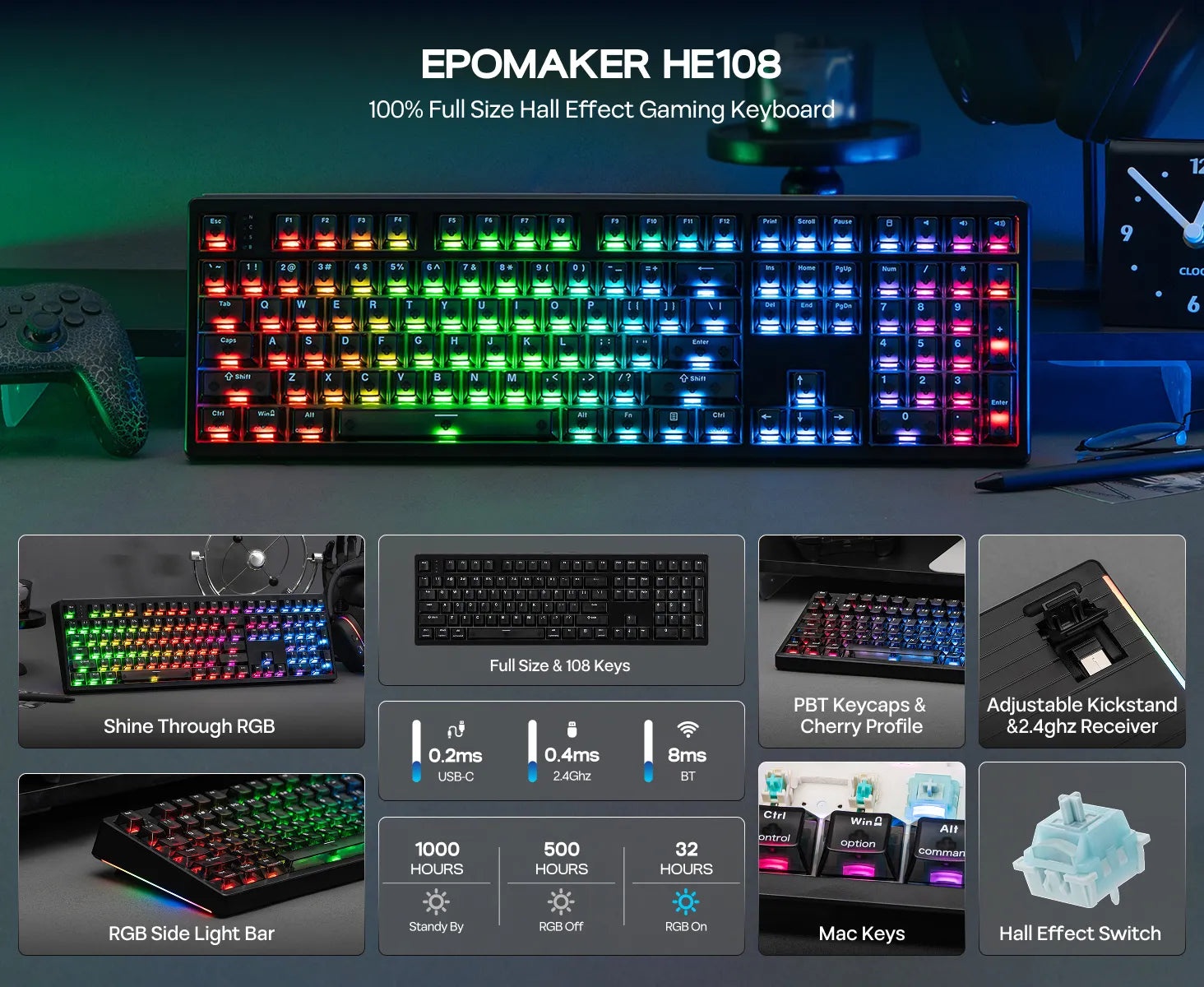 The HE108 is a true full-sized keyboard. It features the typical alphanumeric keys, the function key row from F1-F12, the editing keys (Insert, PgUp, PgDn, etc.), and a full numberpad. For those with home offices like myself and use their keyboards for working and playing, full-sized keyboards like the HE108 features excellent ergonomics and more than enough buttons needed for work macros and custom keybinds for playing games. The other uniqueness of the HE108 is that it is a hall effect keyboard, not a traditional mechanical keyboard.
Hall effect keyboards are becoming increasingly popular in the custom keyboard space. These keyboards utilize magnetic switches as opposed to regular ol’ mechanical switches. Where mechanical switches have set actuation points (how far a key is pressed before being recognized by the keyboard) and decent amount of maximum keypresses (~20-50million per switch), hall effect switches are different. They have customizable actuation points, allowing users to customize each switch to their liking. If someone wanted to press all the way down on the WASD keys before the keyboard registered an input, it can be done! If someone is playing a high-intensity shooter like VALORANT and needing ultra-sensitive inputs that react to the lightest touch, the Hall Effect keyboard supports that, too. Better yet, each of the Hall Effect switches are insanely durable, with each switch typically lasting upwards of 100m keypresses. That’s a lot of typing, folks!
With Epomaker’s HE108, the allure of customizability and durability are in full effect thanks to the custom Creamy Jade Magnetic switches. Interestingly, these switches are similar to Epomaker’s standout Creamy Jade switches in that they have around the same actuation force (how hard one must push down on a switch; here, it’s ~45gf when the switch is pressed halfway down), relatively similar housing materials (POK, PC, and PA66 for that deliciously creamy thock), and total travel of ~3.6mm. The only difference is that it’s a magnetic switch with a durability of 100m keypresses.
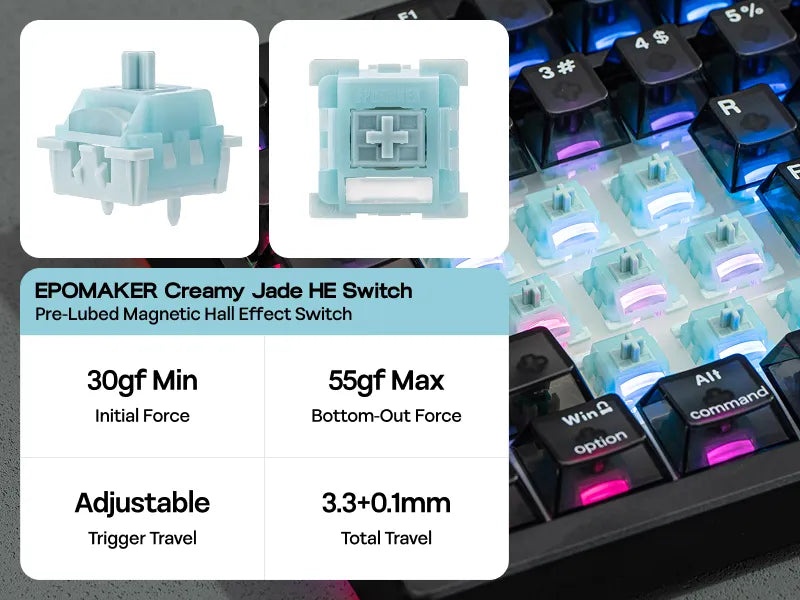 To customize the Creamy Jade Magnetics, all I had to do was download Epomaker’s driver (v4) from Epomaker’s website and install it on my desktop. From there, I could customize each switch to my liking by clicking into the “Magnetic Switch Settings” and adjusting the switches how I desired. I typically prefer switches with a deeper actuation point, so I set everything to 1.7mm and then adjusted the keys I would accidentally press (like some of the FN keys) to 2.0mm. The driver also has an “Advanced Key Settings” tab that includes the Hall Effect switch features like “Press and Click” (Epomaker’s version of Mod Tap that allows users to assign different functions to a key depending on if they tap or long-press a button).
I appreciate how Epomaker has pushed forward with unifying their keyboards under a single driver. VIA is great for customizing the simpler mechanical keyboards and all, but for keyboards with screens (like the RT98) and the granular Epomaker-specific features associated with Hall Effect it’s better for everything to be housed within a single unit. Wooting’s Wootility and Keychron’s Keychron Launcher operate this by unifying firmware updates and customization within a single launcher. While I wish that Epomaker relied on a web driver instead of an executable, I’ll celebrate the small win towards unification. As a side note: Epomaker’s Driver includes a Community Shares section with custom LEDs designed by other Epomaker keyboard owners, which is quite the nice touch.
In practice, the Creamy Jade Magnetic switches sound divine and perform wonderfully once I got them set up to my liking. The HE108’s transparent keycaps add a hollowness to the switch’s acoustics, but when I swapped out the keycaps with another set of PBT keycaps I ended up getting a similar acoustic profile to that of the Epomaker RT98 and its Creamy Jade mechanical switches. When playing high-intensity games like VALORANT and Counter-Strike 2, the Creamy Jade Magnetics felt snappy and responsive. Their medium-range strength was great for me who prefers stronger switches. They won’t necessarily be strong enough for ceramic keycaps (or other heavier materials), but they do the job well. Frankly, Epomaker’s foray into creamy magnetic switches has won me over just like how they approached their mechanical switches.
 I know I usually conclude keyboard reviews with switch assessments, but I took a different approach with the HE108 given Epomaker’s new switches and describing the benefits of Hall Effect keyboards. Let’s talk about the rest of the keyboard.
The HE108 comes in one colorway for now: a lightweight, matte, and black plastic. When taking it out of the box, it had a minimalist yet sleek design that didn’t catch my attention. That is, until I plugged in the unit and it lit up thanks to its transparent keycaps. The HE108’s keycaps have a frosted black gradient that clearly shows the LEDs underneath while becoming less transparent to clearly show the keycaps’ white legends. When sitting completely in the dark, the keyboard brilliantly lights up but the legends are near unreadable. For transparency’s sake, I generally prefer keycaps with shinethrough legends rather than fully transparent keycaps, but I appreciate it when keycaps elevate a keyboard’s design like so with the HE108.
During my testing of the HE108, I was pleased to see it function as well as it did. It held up impressively well under pressure, it looked great for a keyboard in its price range, and it was easy to customize to take advantage of the Hall Effect odds and ends. It was an exceptional hall effect keyboard with an impressive array of colors and functions.
While I prefer heavier and more premium materials, Epomaker’s foray into expanding the Hall Effect space with the HE108 should be praised. If they can make a full-sized keyboard this affordable yet compatible with other Hall Effect switches feel this good, imagine what they could do with a more premium construction. Keyboard manufacturers take note: Epomaker is making some good Hall Effect keyboards!