
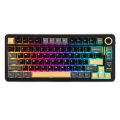
The Epomaker EA75 Max is a basic but beautiful keyboard that provides just the right amount of creaminess while sporting gorgeous keys and a very comfortable typing experience. It’s one of my favorite 75%-sized keyboards to date.
Let’s get right into it.
Design
The EA75 Max is a blessing when it comes to comfort and style. The comfort part lies within a wrist-resting prop-up that doesn’t put too much pressure on one’s mittens. I have been typing on this keyboard for the better part of a month and haven’t experienced any discomfort. Even without its legs, this keyboard isn’t at all harsh on the hands, and it sits at a perfect angle to avoid key-pressing mistakes. That might seem like a small detail, but it isn’t because one wrong angle and a keyboard can become a terror to type on. Thankfully, this isn’t that keyboard.
As for the style of this keyboard, it comes in black and gold, with a gray accent on the outside. It’s surprisingly a gorgeous color combination that stands out as much as it doesn’t suppress or distract from the LED illumination. It’s a visually appealing color scheme that adds to the overall design experience. In the world of keyboard junkies, that element of style is important. It’s a showstopper and jaw-dropper when people see the keyboard.

To round out the design, the EA75 Max also features a sliver of keys on the far right. You get a volume knob, which also blends in with the color scheme, and a home/end set of buttons underneath that (an editor’s dream). Below those buttons lies an LED screen that is typically seen at the top of this row on larger keyboards, but strangely fits comfortably right at the corner of the very accessible arrow keys. It works and just blends in with the rest of the keyboard.
Before moving on to functionality, it should be noted that this keyboard has a balanced weight. Epomaker has been known to make very heavy keyboards built for the competitive gaming audience that stay in place even if a tornado rips through a gamer’s home. At the opposite end of that spectrum, the company also makes very light keyboards designed primarily for portability and typing. Rarely do I see a keyboard drop on our desk that lies between those worlds, but here we are with the EA75 Max. It’s an even balance that doesn’t feel like you’re working out when you move it, but also feels steady on a desk when typing intensely or playing a game. It’s a comfortable weight that works for various reasons.
Functionality
Surprisingly, there isn’t much going on with the EA75 Max’s functionality. It is just a basic experience. That isn’t a knock; rather, its bells and whistles seem to reside in its design, with a side of hot-swappable keys and gasket mounts that suppress creamy sound as needed.
The keys are perfectly creamy on this keyboard and ready for some hot-swapping when the time comes. They are comfortable, audibly beautiful to listen to as one types (as I am doing now), and they are raised wonderfully for maximum accuracy. It almost feels like an old-school keyboard that you would find with the Commodore 64 machine back in the day. Its keys are just so darn clickity-clack, yet don’t feel like you’re smacking your fingertips across a snare drum. They’re perfect in functionality.
Beyond the keys, the EA75 Max also features tri-connectivity, which includes: a very loose dongle (it popped out a couple of times when moving it around), a wired solution (which I am currently using), and a Bluetooth option should you feel the need to go wireless. The latter of the bunch puts the internal battery to the test, which sits at 5000mAh, plenty of battery life to get through some gaming sessions (and maybe a few reviews). Being an old person, I prefer a constant stream of power, so wired is my preferred way of typing with this keyboard (and every keyboard). Outside of that dongle trying to get away (I wish they would adopt a compartment for the dongle like a few of their bigger keyboards), it’s nice to have options with a keyboard when it comes to connectivity. Some people don’t like wires, some enjoy dongles, and others just want to sit down, turn on the keyboard, and get right to work without fuss. Whatever the type, the EA75 Max gives options.
The only weak part of the EA75 Max, about its functionality, is its polling rate. Gamers can find higher rates on other Epomaker keyboards, while this one tops out at 1000Hz. It’s a basic polling rate, but it isn’t meant to win Esports tournaments. Its response time isn’t bad, though, and for someone typing or just playing games casually, this polling rate is just fine.
Overall, the functionality of the keyboard is as expected and advertised. It offers connectivity options, a good, creamy clickity-clack, and enough to warrant a hard look for gamers looking for a keyboard solution who are not interested in competing professionally. It’s a good keyboard with not a lot beyond one’s expectations.

Software
The driver software built for the EA75 Max is downloadable (yay!) and easy to use. It’s one of the better software experiences that I have had with keyboards recently. The software built for it allows you to adjust color below the keys and the LED hugging the bottom of the keyboard. It also allows for snazzy macros and varying profiles depending on the usage. Finally, the software allows the user to customize the graphics of the LED screen, which is fun and wacky, and just the right accent for the EA75 Max.
Ultimately, the software is easy to jump into and doesn’t require a computer science degree to operate. Good times for that last part, and huge kudos to Epomaker for making the software installable on Windows machines rather than relying on a browser-based solution.
Anyhoo, on that note, let’s wrap up this review.
Conclusion
The EA75 Max from Epomaker is a stylish, functional keyboard that isn’t built for Esports tournaments, but will fit the needs of gamers and typing enthusiasts alike. The keyboard is darn fun to use, as well as comfortable. It should be given a hard look if you’re searching for a multi-use keyboard solution.