My foray into the keyboard world this year has taught me quite a bit about what to expect when trying to choose a good keyboard. In my opinion, comfort, stability, flexibility, and good software are the main categories to judge a keyboard when picking the right one. Sometimes keyboards can be spot-on in those categories, and sometimes they can be a little off. Rarely are they so far off that the user will believe they made a mistake with their purchase.
The ERA75 Cyberpunk Edition keyboard from Womier nails most of those above categories. It’s one of the more comfortable mid-size keyboards that I have used this year; it feels sturdy in its metal design and weightiness, and offers a bevy of different options to adjust the keyboard experience in a variety of ways. The hiccup is the software, which runs only on VIA (and not on VIAL), and isn’t easy to get going in VIA. Not the end of the world, but certainly an aspect of the ERA75 that needs correction.
Let’s get this kicked off with design.
Design
The design of the ERA75 is both comfortable and sturdy. I don’t often enjoy smaller keyboards, not nearly as much as hardcore gamers, but this one had me forgetting its size. Sporting a 75% size, the keyboard is easy to use and feels comfortable when typing documents, such as this review. Being a big-handed monster, I generally dread smaller-sized keyboards, as they always make my fingers feel cramped, and the efficiency of the smaller keyboard can render it unusable. The ERA75 does a great job of avoiding those issues, as key space is good and quick, and, more importantly, comfortable.
To help make this even more comfortable and sturdy, the keyboard weighs in at 4.2lbs, which means that no matter how hard users decide to type or knock it around during a gaming session, it simply isn’t moving. That also brings up the reliability score of this keyboard, as you can expect consistent typing and button pushing every single use, simply because this thing isn’t moving from its sitting location. Users have to really knock the hell out of this thing, and they’re going to get hurt in the process, to get it to move.
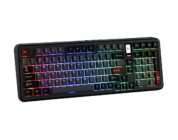
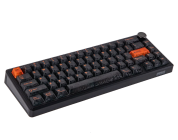
As for the artistic design of the ERA75, I like what Womier did with this line of keyboards. They gave them some colorful personalities and included stickers with the keyboard. Starting with colors, the keyboard series comes in purple (Cyberpunk), white (Doomsday), light blue (ICE), dark blue (Interstellar), and bronze (guess that name – BRONZE). We’re reviewing the Cyberpunk edition, which has a purple tint that works well with the LED lighting underneath. It’s an eye-opening, gorgeous mini-beauty.
Now, Womier didn’t stop there with the colorful display; they also included stickers with the keyboard that users can apply to pre-made indentations lying across the front, back, and side of the keyboard. While I love the intentions here, and it’s been years since I tried applying stickers to about anything, it was rather a chore to get these stickers right. The biggest issue is that some of those sticker indentations are super tiny. While they do add a bit of panache to the overall design experience, they take time to get in the right place. Having said that, once they’re in place, the keyboard looks slick as a slide at a water park. But they are a chore to apply. Recruit someone with tiny hands to apply these.
Overall, the design of this keyboard is solid, if not downright spectacular. It’s a cool keyboard that is designed for comfort, sturdiness, and coolness. It nails those factors perfectly.
Functionality
The ERA75 offers some flexibility to its functionality. The keys are gasket-mounted, which makes them comfortable (and creamy) to type on. Hearing that sweet-sweet click of a noisy keyboard, while also not tiring one’s fingers, is a Godsend. The keyboard is great for typing and delivering that creamy sound.
The keys on the ERA75 are also easily hot swappable, which means customization of the keyboard to your liking is easy-peasy. Just pulling a key out of its socket can be achieved through plucking it with one’s fingers, though users should probably use the key tool to do this. Placing it back in is just as easy. If key plucking and replacing didn’t seem enough, then let’s talk one more replaceable item – the volume knob. I haven’t seen that option before this review, but it’s an interesting option for customization. While it honestly wouldn’t be the first thing I would think about when customizing this keyboard, it’s darn neat that it is an option.
To round out key functionality, the keys also feature a front-facing LED light, which means that the lights shine through darn good and look majestic. It also means that the lights don’t get in the way of typing, which sounds ridiculous, but for a blind person like myself, minimal lighting annoyances are always best.
Related to the LED placement on the keys, if you’re the type of person who enjoys front-facing characters, you have them with the LED placement. If you are a user who has never experienced front-facing characters before, you’re in for a treat. They make typing oddly satisfying. I haven’t exactly figured out why that is the case, but it’s the case.
To round out the functionality section, the ERA75 also brings with it long battery life (I haven’t charged this in two weeks) and tri-connectivity. The latter of the bunch is nice, especially if a user loses the wire that came with the keyboard. I’m not saying that happened, but, yes, it happened. Having the ability to connect through Bluetooth without any button pushing trickery, or via a USB dongle, is a blessing. It certainly makes me feel comfortable in a household full of PC gamers who tend to snag keyboards without thinking about wire or dongle placement.
Software
This might be my only hiccup with this keyboard, and I wish it weren’t. The ERA75 doesn’t come with a full software package. Instead, the keyboard relies on the open-source wonderment of VIA to run its JSON file that brings up customization options for the keyboard.
While that shouldn’t be a problem, the keyboard JSON file isn’t a cinch to run perfectly in VIA. When I loaded up the JSON file in VIA, it gave me a small number of options, mostly macros, but wouldn’t bring up lighting or anything else. I know that lighting is included in this JSON file because I can see it in the code, but VIA simply doesn’t display it.
My previous Womier keyboard review had me going through a better browser-based solution, but this one relies too much on VIA. To tell you the truth, I am not a fan of VIA solutions, as it just seems like it doesn’t work well. This isn’t my first problem with VIA, and I’m sure it won’t be my last. Ultimately, the ERA75 needs another way of doing things through the browser-based software, or through Womier’s own.
Now, having said that, I understand that open-source software is anything but stable. I have used the open-source software Open Broadcaster Software (OBS) for years, and I have seen the best of times and the worst of times with it, but it’s cheaper than purchasing a television switcher. In the same vein, for newer and smaller keyboard manufacturers, using VIA is a good route to go, but users should always expect imperfections and hiccups with it, as it is always changing and updating.
On that sweet note, let’s wrap up this review.
Conclusion
The ERA75 keyboard from Womier is a gamer’s and keyboard enthusiast’s dream. It is comfortable to type on, wonderful to game on, and offers hot swap flexibility and customization. The software needs a bit more work to make this a complete package, but I’m hopeful that it will be updated and improved down the road.
The Womier ERA75 is available here.