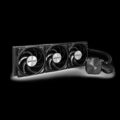
With the MONTECH HyperFlow Silent 360, you get incredible value for a quiet AIO cooling experience. While it lacks RGBs, it makes up for it with its minimalist professionalism and whisper-level quiet cooling.
The all-in-one cooler segment of the PC market has become oversaturated with novelty odds-and-ends as of late. I’ve seen manufacturers incorporate elements like RGBs, LCD displays, and wild designs to set their coolers apart from the pack, but rarely do I see a manufacturer emphasize noise (or lack thereof) as a winning feature for an AIO cooler. AIO coolers are great recommendations for PC builders as they offer premium cooling effectiveness (they are quick to cool down a CPU), but they can sometimes be loud.
MONTECH’s HyperFlow Silent 360 caught my attention right from the start as it lacks the novelty RGBs and emphasizes its effectiveness by its lack of noise when cooling my rig. For under $100, this AIO is worth your consideration if you’re looking for a liquid CPU cooler to last for the next 3-4 years until the next generation (or 2) of CPUs come around.
Check out the HyperFlow Silent 360 on MONTECH’s website. Here is their Amazon listing, too! (Non-affiliated URLs)
I haven’t had much exposure to MONTECH’s products, barring my two reviews of their MKEY and MKEY PRO keyboards I conducted earlier this year. I’ve become impressed with MONTECH’s approach to product design: Their products utilize professionalism, minimalism, and subtly rather than neon-laden futurism. If you want the traditional RGB aesthetic, MONTECH has some products with that aesthetic, but my desk and computer feel more like adult products I could use in an office without a manager batting an eye.
 The HyperFlow Silent 360 is a new and upgraded variant of MONTECH’s HyperFlow ARGB model (which does have ARGBs). MONTECH has updated the fans with 7 blades and adjusted the design to emphasize minimalism in either black or white. Without further ado, let’s get to the review.
Inside the HyperFlow Silent 360’s box are standard parts, including various screws, Intel-specific parts (standoffs, screws, backplate, and bracket), AMD-specific parts (standoffs and mounting bracket), thermal paste, paste spreader, paste application sheet, 3 fans, and the user manual. The only thing I needed that didn’t come in this box was a screwdriver. I was pleased that everything was in the box, clearly labeled, and supported with the included manual. Some manufacturers like using QR codes, but sometimes it’s hard to use my phone when I’m putting a device together/taking it apart.
The unit’s build quality leaves some room to be desired, but I’m fully aware of the HyperFlow Silent’s price point. I would imagine that some compromises were to be made to keep the cooler under $100. Here, the aluminum radiator feels decent while the fans feel a smidge too flimsy for my liking. There’s something to be said about fans that are encased in a stronger material and have some heft to them. It would be nice if the HyperFlow Silent felt heavier to mask its price point.
 The accessories, namely the mounting brackets, gave me some pause while installing the unit into my tower. The brackets were metal, but not the strongest. Brackets like these run the risk of being stripped by screws, so I had to be extra careful as to not rendering the brackets useless from being too forceful.
I want to emphasize that I don’t consider the HyperFlow to be cheap or too flimsy. The rest of the unit holds up well and is packed with other components that are comparable to other products that exceed the HyperFlow’s price. The pump block’s elegant design and the nylon sleeve with chrome casings held up well.
Thanks to the fans being preinstalled and the simple mounting hardware, installation took all of 10 minutes (maybe less). Seeing as there aren’t any RBGs in this unit at all, cable management is easy. My rig has an Intel CPU, but knowing that there is a four-point mounting hardware for AMD users makes me pleased that MONTECH is ensuring that users can install this cooler with ease, regardless of what type of CPU they own.
 Given the unit’s minimalist aesthetic, the HyperFlow Silent 360 is a stunner. The lack of RBGs makes the unit blend in, which is great if you’re the type of person who prefers minimal RGBs and/or showcasing a specific element in your tower. RGBs can be a dealbreaker, though; if you’re finding yourself in the RBG is Love/RGB is Life camp, then wait just a smidgen longer for MONTECH to upgrade their ARGB model to meet the Silent model’s caliber.
Now, let’s talk about the cooler’s performance. Part of this assessment will include discussing the cooler’s fan volume. Seeing as MONTECH claims that the HyperFlow Silent 360 is ~25% quieter (especially at lower CPU utilization %), it is worth evaluating those claims in real-world testing. For reference, my rig has an Intel i7-9700K @ 3.60GHz, 32GB of RAM, and a 2070 Super, so I’m used to hearing the fans when I’m playing games on HIGH settings and/or doing some heavier processing.
I noticed in my first round of testing that above 80%, the fans would get louder than they should be – around the same volume as someone talking. I adjusted the fan curve to prevent the fans from going over 80%. I also upped the ante by testing the HyperFlow with an Intel 12900K; in stress testing the 12900K, 80% was not enough to keep my CPU cool. Compared to a Liquid Freezer 1 cooler, the fans on the HyperFlow performed better in cooling but were significantly louder. The HyperFlow Silent 360 includes a high RPM pump that is surprisingly quiet – I was able to run the pump at full speed without excessive noise.
Here’s the thing, though, the stress testing conducted here is something that we would do for mid- to premium-tier CPUs. Even more, we don’t expect readers to be pushing their CPUs to their theoretical maximum limits. For the average owner of a midrange CPU (think a CPU that is sub-$400; e.g., AMD Ryzen 5 5600X or i5-12600K).
 These numbers are all well and good, but what does this mean in layman’s terms? When I run Starfield and recompile the shaders, I often hear my fans kick on for the first few minutes at the start. With the HyperFlow Silent 360, the fans maintained their low volume (~40dBa) while doing an excellent job in maintaining ~40C temperatures at idle while occasionally jumping to 60 under very rare but heavy processing loads. Thermal throttling didn’t occur at all during my review period (as I rarely attempt to overclock my CPU outside of testing), but I’m aware that thermal throttling occurs well over the 350W heat load mark. The HyperFlow Silent does its job exceptionally well for most gaming needs.
The real-world test is where the HyperFlow Silent 360 wins in offering a quiet experience for a gamer like me. Even in the most pressing of gaming loads, the fans would hardly increase in volume above that of a whisper, leading me to believe that the Silent moniker is more than appropriate for this AIO cooler. Of course, I had to make some adjustments in my BIOS to reach that stage. I don’t expect a sub-$100 AIO cooler to “just work” right out of the box, so be prepared to make some adjustments to get the most out of the HyperFlow Silent 360.
Let’s face it, technology is going to get more expensive for the next few years, and it’s going to be more difficult to get your hands on new and affordable parts for your PC. For now, I recommend getting a midrange selection of parts to last you 2-4 years until things hopefully return to a more affordable price point. Consider the HyperFlow Silent 360 to get you through the next few years of delightfully quiet gaming.
With the MONTECH HyperFlow Silent 360, you get incredible value for a quiet AIO cooling experience. While it lacks RGBs, it makes up for it with its minimalist professionalism and whisper-level quiet cooling.