
It has been a keyboard summer, folks. Will Silberman and I have gone through a bevy of keyboard reviews. And we are still going.
The latest keyboard we received is the L75 Air from developer XVX. It’s a 75% sized keyboard that may not bring a lot of pomp and circumstance like other bigger keyboards, but certainly delivers in comfort, style, and reliability. The fact that it is true to its name, Air, means that you won’t feel like you’re lugging around a weight when trying to transport and use this little marvel. While not everything is perfect, mainly the software, it’s a good typing experience that outshines most keyboards of its size.
Let’s get right into this puppy.
Feels good
The only way to emotionally feel good about a keyboard is to measure its audibility. That may seem like a snobbish way of beginning a keyboard review, but having come from the likes of an IBM typewriter and Apple IIe experience when I was younger, standards have been set for how a keyboard should sound. I think a lot of keyboard enthusiasts will agree with that notion. It’s generational, folks.
While I prefer the loud as hell, clickity-clack of a creamy keyboard experience, the L75 Air delivers something in between, although its sound sacrifice was for good reason. While the keys don’t audibly light up a room, the ultra-slim design of the keyboard and delivering a simplicity with its design makes for a complete experience led by purpose and execution. There is actual rhyme to its sound reason.
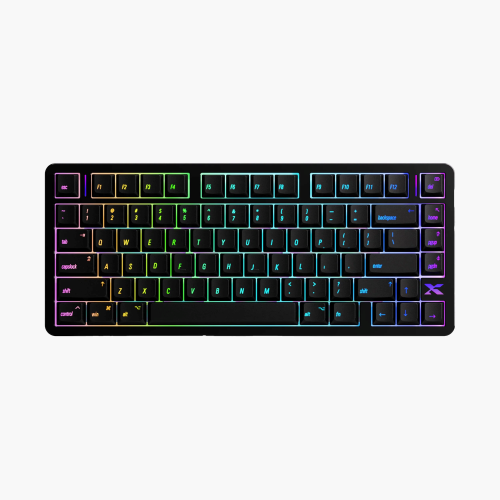
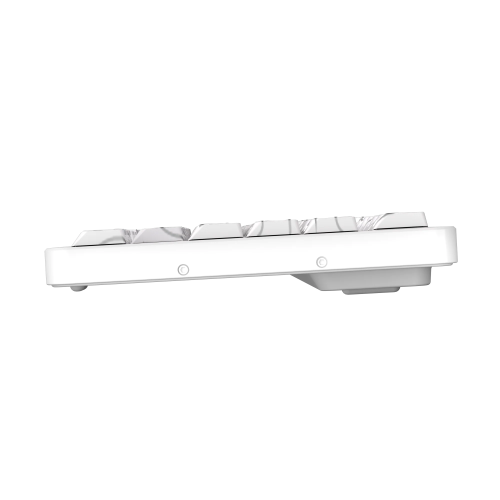
What this means is that the L75 Air substitutes a raised, creamy key structure and focuses more on comfort. Don’t worry, you’re not going to get some lame Apple keyboard experience where it feels like your fingers are punching flat buttons – not at all. Driven by Jerrzi Air low-profile switches, the L75 Air brings a slightly raised design that matches its ergonomic rise from 14.8mm (front) to 21.3mm (back). It means that it works with your wrists and fingers and not against them, which is nothing but a huge plus in my book.
Trust me, I was skeptical of the lack of keys and the missing props on the back, but the L75 Air’s design makes sense within its purpose, which makes it a good keyboard to type on for the long term. I don’t say that lightly because I am not a huge fan of smaller keyboards, but this one fits the bill well in terms of comfort and execution. It feels good to type on, and there is little to no wrist fatigue. That’s a huge deal for an old guy like me with arthritis. Having a good slant on the keyboard, properly raised keys that react and deliver good key punches means the world to my keyboard experience. It delivers with an equal balance of design and execution, which is what you want from a good keyboard experience.
Batteries and response
The L75 Air comes back with tri-mode connectivity options, a long battery life, and a par wired and wireless 1000Hz response rate. Let’s start with the outstanding battery life. Fully charged and wireless, the keyboard delivers as advertised with its long battery life. One complete charge of the keyboard lasts around 300 hours, depending on how frequently you use it and if you manage to give it a proper rest. To put this in perspective, I am going on three weeks with this keyboard, and I have yet to charge it. The battery is worth its weight in gold, especially if you’re not interested in wiring it up. As for the actual ‘hooking it up’ part of that sentence, you have options.
Tri-mode connectivity is becoming a more common theme for keyboard manufacturers. This allows the user to hook up a keyboard via Bluetooth, a dongle, or a wire. The Bluetooth functionality is nice and seamless, which means once you’re good to go and hooked up, you don’t really have to revisit this process. It’s smooth, reliable, and it works just fine.
On the dongle side of the tracks, the functionality is fantastic, but not losing the dongle is a game of its own. The RF dongle comes packed in a small baggie that is thrown into the overall package. Most keyboards of this size and shape typically have some sort of place on the keyboard where that dongle can be stored. The L75 Air has a small baggie. There is no designated place for the dongle to be set, which makes for a pro/con. The pro is that the dongle doesn’t interrupt the intended design, nor does it haphazardly give the dongle a chance to magically fall out of said place. I have had many Epomaker keyboards that have come packed with an exposed dongle placement on the physical keyboard, only to lose the dongle mid-transport from home to office. That makes the keyboard a duo-mode, rather than a tri-mode.
Now, having said that, trusting an idiot like me to keep up with a dongle baggie is equally as hazardous. I have lost more dongles because they didn’t have a designed hardware home than I care to admit. I have had many keyboards, mice, and controllers die sad deaths because their dongles went missing. The fact that nearly every good gaming keyboard manufacturer now features a tri-mode connectivity set of options means that they acknowledge how idiotic and irresponsible the users might be (myself included) with additional dongle hardware. I do appreciate that silent acknowledgement on their part.
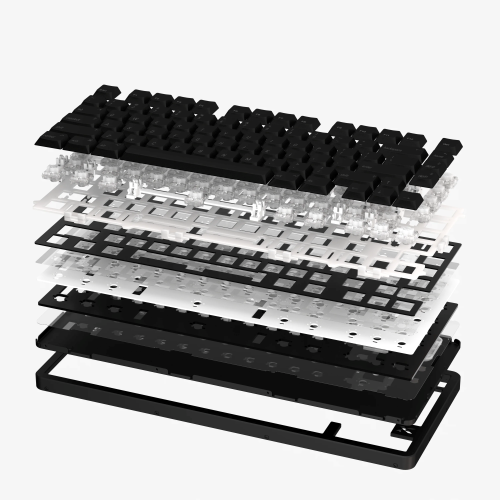
So, what is the solution for the dongle? Well, the solution could have been a small storage area to store and close the dongle within the design, which helps to maintain the design intention, while also making it a safe place to store an important RF item. The last Epomaker keyboard I reviewed came with a closed storage space for its dongle, which meant that there was a lower chance of me losing it. I still have it, and it has been months since the keyboard was in my house. While that idea might give the design of the L75 Air a bit of a road bump, there is a strong possibility that the engineers of the L75 Air would be the only ones who notice. It took me forever to find that little compartment on the Epomaker, which means it wasn’t obvious, and that means the design wasn’t bothered by it. I am not an engineer, so how does that affect the gasket-mounted design, which is beautifully stacked for the L75 Air? That is a question for more qualified individuals. As it stands, I don’t love how the dongle is packaged and stored, mainly because I can’t trust myself to keep up with it.
UPDATE: The folks at XVX have assured me that the dongle will have a safe home when the final version is released. It will have a safe home on the USB-C wire, which is more than enough to keep up with it.
Shifting gears just slightly, the L75 Air brings with it a standard response time of 1000 Hz. While most high-end gaming keyboards sport 8000 Hz, though wireless is typically capped at 1000, the all-around response time with the keys for all connected modes sits at 1000 with the L75 Air. It’s a standard response time for keys to a consistent computer, no matter how you use the keyboard. I know for a lot of gamers, they typically like the wired route, but having the option between wired and wireless, and getting a consistent response time is a blessing. That consistent number across the board might not appeal to super-hardcore competitive gamers, but for us filthy casuals, it’s enough, and it works well.
Software
I am not a fan of web-based software. I have mentioned this before in Epomaker and Turtle Beach reviews, and I am still standing by that feeling. It’s just not a consistent way to go.
I do understand that the alternative is to have locally installed software specific to the keyboard on the computer. I like that option, but I also do not like installing resource hogs into my machine. For example, the Swarm software, in all its functioning glory, is a resource hog that enjoys making itself a startup application. While it’s certainly not a creative product made by another company that enjoys self-launching and resource hogging, it’s still a bit of a processing burden on my laptop.
BUT! I do like having software built specifically for the keyboard that doesn’t have to piggyback on common web-based solutions. I do realize that it’s the best way to go, especially for a company not called Turtle Beach or Logitech, but navigating, learning, and getting the process of integrating a software driver into a web-based application is a learning curve that I am not a huge fan of when it comes to keyboarding.
Now, having said that, it’s a good solution for the L75 Air that works easily. Booting up VIA, identifying the connected keyboard, and then bringing in its package into the program that is specific to the keyboard is easy-peasy. It works, it’s fine, and the adjustability of the keyboard is simple to understand. I just know that web-based applications have little room for failure and can be frustrating at times when they don’t work. It essentially gives the user less control over the software process.
Again, it works fine for the L75 Air, but I would love to see XVX have its own standalone software someday. Of course, software that doesn’t hog resources.
On that sweet note, let’s wrap up this review.
Verdict
The L75 Air from XVX is a remarkably nice 75% keyboard that brings comfort, good sound and feel, fantastic design, and just the right amount of customization and beauty to make it a keyboard contender. Its lightweight aluminum design is a solid choice when it comes to transporting this marvel between locations. Overall, it’s a nice keyboard that you should consider if you’re in the market for one.
To check it out, please visit this link: https://www.xvxchannel.com/products/l75-air