

There is nothing like a light mouse that packs some gaming power punch. Epomaker’s Carbonis Mouse is a fine example of never judge a book by its cover.
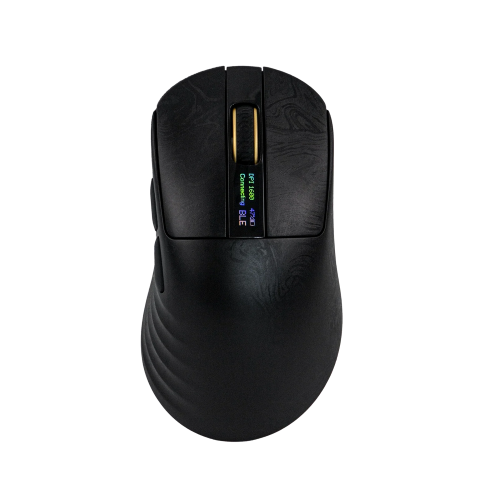
The little engine of a mouse that could brings not only an insanely accurate wireless gaming solution, but also packs a punch with programmability of macros, good battery life, and, and this is one thing that I cannot get over because I have never seen it on a mouse before, an LCD near the scroll wheel that gives real-time DPI data. Maybe this is common practice for competitive gamers, but that LCD is a small marvel to behold for me when it comes to getting detailed data quickly.
Anyway! Let’s get this ball rolling with the Carbonis Mouse.
Design
The Epomaker Carbonis Mouse has quite a few good design and quality choices. Some of them I can see as upgrades to previous mice in the company’s family. Some of them I am blown away by when it comes to performance and usage. Regardless, this mouse is a step forward in a lot of good ways with little fallback.
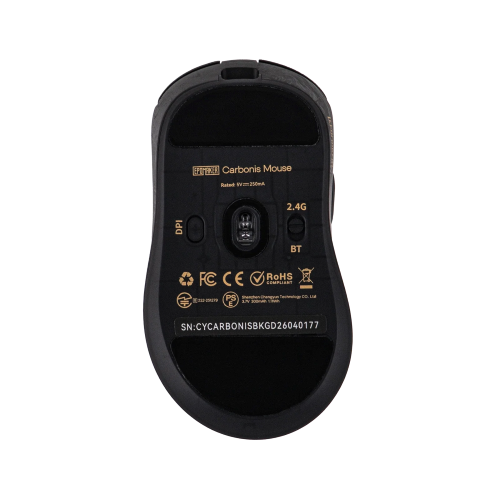
The upgrades to this mouse are simple but also necessary when it comes to delivering a perfect gaming mouse experience. The outer shell of the mouse is durable, yet the mouse itself is lightweight. In fact, it’s so light that it feels inexpensive and cheap, but what one would assume is a cost choice is really a choice led by purpose. The lightness of the mouse means that player reaction time is cut down tremendously, putting more on the player than the device when it comes to accuracy and performance. In competitive games like Valorant or Overwatch 2, getting the drop on enemies is led by the speed at which a player can acquire their target. This lightweight solution for the Carbonis Mouse almost guarantees that it will always be the case for the user, if the user’s own reaction doesn’t get in the way. Weight is such a non-factor with this mouse that at times it almost feels like you’re moving nothing on the mouse pad. That is where any gamer would want to be when using a mouse.
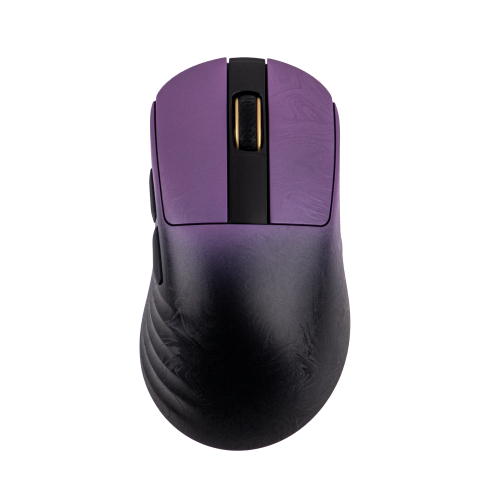
On the flip side of that, the mouse features a wonderful purple to black gradient that gives it style and panache. It screams ‘gaming mouse’ with its color scheme and backs that up with its functionality. It’s a gorgeous mouse that doesn’t do too much to get there, which is oddly okay by me. While most gaming mice are bulky and mechanical, this one is hellbent on being stylish, artsy, and something to contemplate deep thoughts about. It’s like seeing a Monet at an art museum. You’ll want to interpret what the artist was thinking, while also trying to turn a corner and put one in the face of a competitor. You have no idea how much I am patting myself on the back for that ridiculous comparison. Totally over the top, yet intentional.
ANYWAY! On the functionality side of the tracks…
Functionality
The Carbonis Mouse is what it says it is – a pure gaming mouse solution. Right out of the gate, the fact that it sports a PAW 3950+Nordic 54L MCU means that this is a mouse dedicated to getting the very best out of a wireless-based gaming situation. The PAW3950 makes sure that the mouse delivers absolute, nearly flawless precision for gaming competitors who enjoy a high sensitivity with their gaming experiences. It’s one of the best optical mouse sensors on the market, and this mouse delivers on its promises with precision.
The Nordic 54L MCU inclusion guarantees working hand-in-hand with the PAW3950 to help process user input and make sure it delivers on its precise promise. As much as the PAW can push data, the Nordic processes said data and make sure there is nothing left behind in response. It’s impressive to see how much of a load the Nordic can handle as the PAW is throwing data at it, and how that ultimately translates to onscreen results.
To top these functionality processes off, the mouse sports an 8K Polling rate, which means that it’s constantly chatting back to the computer with its orders and getting them processed in real-time. To put this in perspective, a regular gaming mouse will push about 1k polling rate back to the computer, but this one is a constant and nearly ensures absolute perfection when reporting the mouse’s position. All these combined equal an incredibly impressive back and forth between gamer and machine, something you want when you’re playing a high-intensity match.
As stated previously, I have not seen a mouse feature the following in my entire gaming life. The Carbonis Mouse features a tiny LCD screen giving a DPI response readout in real-time. Truthfully, I am a dumb, old gamer who guesses on DPI when using a mouse or who launches software to make sure I understand what my DPI setting is locked into. Having an LCD readout on the physical mouse telling me what I am getting in comparison to how I am doing is incredibly useful overkill. I never knew how much I needed that LCD screen until I saw it in action. Now, I must judge every mouse afterwards on whether it’s serious enough to deliver an LCD readout to help old fogies like me improve during competitive matches. It’s a lovely addition to the mouse’s functionality.
In addition to all the above, the mouse sports a solid battery life, despite all the additional pieces and functions that it has to pursue, and a non-downloadable software solution for updating and creating macros. While I love a good battery life, and I am more than thrilled with the mouse’s longevity in this area, I would still prefer a locally installed software solution just to ensure reliability, though the non-downloadable solution hasn’t proved wrong. Still, my experience with non-local software is mixed. Sometimes it malfunctions and is hit or miss when trying to set up a device, as it is dependent on the company’s end to ensure functionality. But that said, I do understand why this is the way Epomaker went. It’s much easier to have one software solution for all products that can be rightfully updated at any given time by the company, thus making sure it’s always controlled by said company. It’s just a consistency concern on my end and the lack of control as well. I am a control freak with software and hardware updates and upgrades.
Anyway, overall, this mouse is everything and more than I thought it might be. It’s truly built for a competitive gaming environment and delivers on its promises through design and functionality.
On that sweet note, let’s wrap up this review.
Conclusion
Epomaker’s Carbonis Mouse is a step up from other Epomaker gaming mouse solutions. It features a lightweight design, a gorgeous, artsy, and comfortable outer shell, and it has efficient and innovative ways in which it functions. It’s a solid mouse to consider, especially if you’re into the competitive gaming scene.