

Back in the day, when streaming was a wee lad and Twitch was just breaking in its teeth, ready to dig into the industry, I had the pleasure of owning an Elgato HD. It was a magnificent capture device, as it allowed me to stream a 1974 PONG home machine on Twitch, while seamlessly allowing footage capture that I could edit later. It was a marvel, a piece of tech ahead of its time, and all while being very inexpensive (under $200).
As much as I loved the Elgato HD after months of usage, it was plagued by constant software updates, which brought horrible hiccups to the capturing and streaming process. And as the software kept getting updates in the early-to-mid 2010s, it had progressively become unstable, moody at times, and had an unusual knack for not working directly with Twitch/YouTube consistently. Somehow, the software became worse with every release, even dipping to a new low in 2014 with the emergence of the Elgato HD60, and brought it to the point where I simply could not guarantee it would work with older systems, which is a shame because this piece of hardware was brilliant with flexibility for its time.
Thankfully, the first edition of Open Broadcaster Software (OBS) came to the rescue, and slowly the Elgato became useful again. At least until AVerMedia released a similar version that was essentially a piece of hardware that worked with all streaming software. For a brief period, AVerMedia became the way to go for an inexpensive solution for video streaming and capturing without being tied down to software. In fact, it simply had none, and it worked right out of the box. Most of all, it worked seamlessly with my older and newer systems; thus, it became my go-to for game capturing and streaming, as well as the occasional streaming of Dig Dug on Zoom during meetings.
A decade later, the Elgato Game Capture Neo was released, an inexpensive solution for game capturing that took the same road as AVerMedia, though pulling in HD at max rather than going above and beyond. For a $99 device, it was affordable for newbies to the game capture/streaming world, and did its best not to complicate the process with software that dragged it down. Most importantly, it worked with everything. Not as powerful as some solutions in 2025, but good enough to get most games out there on the Interwebs or Twitch/YouTube.
Now, just under a year after reviewing the Neo, the Elgato Game Capture 4K S has arrived on the scene. It’s a $159 capture solution that is just $20 more than the latest AVerMedia 4K solution, but it comes packed with the ability to capture 4K UHD at 60fps, and brings a varying degree of capabilities for different resolutions and frame rates. In other words, it’s extremely flexible with how it works. Additionally, it includes its own software, which isn’t bad at all, but also isn’t a necessity when streaming and capturing.
So, let’s chitter-chatter about this latest Elgato release.
Design
Much like its capture devices in the past, Elgato prides itself on simplicity with its hardware, while touting itself as a high-quality solution in terms of capture results. While we’ll talk about the latter in the next section, I can praise Elgato for its continued design simplicity right out of the box.
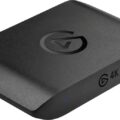
It seems like they have taken a page from other capture devices, where you can pull the hardware straight from the box, plug it into a system, launch any streaming or capture software, and then be off to the races. The design of the game capture allows for this non-instructional plug-and-play, properly labeled IN/OUT for HDMI, a straight USB-C to USB-C connection, a 3.5mm audio input for whatever you want coming in at the same time, though not necessary these days, and a cute little light that indicates if it’s connected (white), working (blue), or something has gone wrong (red).
Beyond those things, the hardware works. And that is what you want out of your capture device. Pull it from the box; it’s easy to hook up, and you’re on your way to capture. No fuss, no mess, no software – it just works. In addition to this plug-and-play design, the box is compact and accommodates all its connections without occupying unnecessary desk space. In comparison, the AVerMedia is about an inch or two wider, and the Razr solution is ungodly big, dwarfing the 4K S.
In my opinion, it’s a little box with simplicity and punch, and does what it says it will do.
Quality
While the design of the 4K S is simple, what it produces is not. There are a variety of different resolutions and frame rates that you can use this capture device with when you game. Of course, it does depend on the game’s capabilities and what it can push, which is somewhat limited when playing a console in comparison to the PC.
For this review, I used my PlayStation 5 Pro to test out what the device was capable of capturing and how it looked. While the Elgato website recommended the Elgato 4K X as the go-to for the Pro, I found it was just right using the 4K S. It still maintained 4K quality, while bringing in the 60fps with my captured games that have been a crown jewel with the performance mode of the Pro. While the 4K X does have some advantages over the 4K S, especially with how it can capture 4K HDR at 30fps, the 4K S still does the trick for basic capturing needs. While resolution and frame rate are constant, depending on the game, and you can go up to 240 fps should you have that Fortnite hankering, the audio is a different beast entirely.
The audio within the 4K S, like every capture device I have ever reviewed or worked with, comes in via HDMI. As you probably are aware, the HDMI connection carries both video and audio, and is supposed to do so in the highest quality possible without the intervention of an amplifier or some fancy soundbar system that uses a digital connection. Does that usually sound great? Well, you’re not going to get the theater experience, but it does enough.
Now, why this is a beast with the 4K S is that the device will automatically turn your audio into an underwater experience. You will have background noise that sounds like it’s flustered and underwater, while the foreground will sound overly loud because the software/device is trying to compensate for the imbalance. This is akin to messing up audio during an interview, maybe you shot video with a camera’s front mic instead of a lav or boom, and you’re trying to correct it using audio filters via your editing software. That solution will produce a canned, underwater sound that is audibly not redeemable.
The hard and fast rule with audio is that it’s 90% of a production. When you mess that up, the only chance you have of correcting it is to probably go back out and redo whatever it was you captured. There is little chance you’re going to correct bad audio. Little. Chance. If you go the audio filters route with editing software, and pardon my language here, it’s going to sound like pure shit. Get audio right the first time, and you won’t run into this problem.
Anyway, back to the review, when the Windows operating system detects the Elgato 4K S, the firmware will automatically tell Windows to turn on audio enhancements, a terrible idea built into Windows. By doing so, you will launch whatever software you’re using, including OBS, Stream Labs, and/or Elgato’s capture utility, and you will get that filtered sound with your audio that is incredibly imbalanced with its background and foreground sounds.
The solution? Well, the default response online will point you to making sure your console is set correctly to stereo, and will have you jumping through unnecessary hoops on your way to disappointment. There is nothing more frustrating than expending energy on a non-solution.
The real solution, and something I found with this gentleman on YouTube, is that you must go into your sound settings in Windows 11, find the Elgato 4K S device, and uncheck the audio enhancements box. Once you do that, that filtered, underwater sound will go away. From that point on, you’ll capture perfect audio from the game and enjoy the sweet sound of good sounds.
(with audio enhancements)
(without audio enhancements)
Elgato should make sure the option for audio enhancements automatically turns off when the hardware firmware talks with Windows 11. That should be by default. If you’re not a tech-savvy person or someone who can identify audio issues, then this automatic feature might throw you for a loop, and maybe even have you taking the device back to the store you bought it from, thinking it had a defect or unsolvable glitch. But the above is the solution, so make sure to hold onto the 4K S. Just pray for a firmware change somewhere down the road.
Overall, the Elgato 4K S does deliver with quality on the video and audio side once the settings are correct. It’s a good device that delivers what it promises, and it won’t disappoint.
Software
On the software side of the 4K S life, Elgato uses the KISS method of HCI – Keep It Simple Stupid. The Elgato Studio software is as simple to operate as the device is to hook up. The software is one standard window with an upper-left pull-down menu for different resolutions and frame rate choices. It features a big fat record button in the bottom-middle, a settings icon on the upper-right, and does its best not to be in the way of the capturing process. It’s incredibly simple to operate and use, which makes it invaluable, especially if you intend to only capture AV rather than stream it. The software knows its hardware, so it gives you the best options without having to sift through the garbage. Again, simple and precise.
If you enjoy clutter, then you’ll still be able to use this hardware with old favorites like OBS and Stream Labs. The hardware works in a no-fuss way with those, and the software allows you to control everything that the Elgato Studio software brings to the table, though the external software is more flexible with audio, but it just brings more clutter to the table because the software is made for various capture devices. This is a pick-your-poison sort of deal, where there are no wrong answers, just ease versus headaches.
Overall, the Elgato 4K S works fine with all external software that doesn’t have an Elgato label on it, while also excelling on its own software.
On that sweet note, let’s wrap up this review.
Conclusion
The Elgato Game Capture 4K S from developer Elgato is a simple video game capture solution that is flexible with external software usage, delivers wonderful video capturing at a fair price, and includes software that is super easy to use. The only downer is the automatic audio enhancement, which is easily remedied.