I have been a typing enthusiast for as long as I can remember. I started a lonnnnngggg time ago on an IBM typewriter. Yes, the one with ink ribbons. Also, the one that didn’t feature the Whiteout ribbons. What a Godsend those were. It sure beat standalone Whiteout.
Anyway, I digress.
As time marched on, my keyboard experience journeyed from typewriter to serial wired, then from serial wired to USB. After the world achieved its USB marker, the wonderful world of wireless reared its head and made the thought of typing while lying down on a couch a reality. What a horrible reality that was, too. When we found out how bad of an idea that was, and inefficient for typing, the world started to turn to another keyboard way, and something terrible happened – the keys started to become flatter. Why in the world would this happen? Ask Apple.
Praying for the return of the good old days, and getting my wish granted, the world of keyboarding reversed course, sans Apple, and has been thrown back to its glory days with raised keys, creamy sounds, and good respect for full-sized keyboards. It has also brought with it more modern amenities customization through software, replaceable keys, and it takes chances to change old concepts.
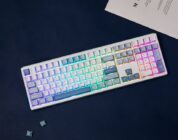
The latter part of the last sentence is the reason why you’re reading this review for the AULA F108 keyboard. It not only brings a good creamy sound with its keystrokes and most of the modern amenities expected nowadays, but as a unique key perspective. Literally, a new perspective.
Let’s get into this typer.
What is down with those keys?
The AULA F108 is a creamy keyboard that I’m satisfied with as much as I’m baffled by. I have never seen keys with letters/numbers/symbols on the bottom. My old-man eyes are trained to look down when I type on a keyboard, as do most keyboards out on the market. It has been that way forever. Most of us oldies were trained to look down when we needed to do so, which unleashes a bevy of bad ergonomics on the body.
Click here to check out the AULA F108 keyboard from Mechlands! (non-affiliated URL)
Well, the AULA F108 takes that concept, flips it on its head, and, strangely enough, pops into the market with something that visually works well. I never knew how useful it would be to see letters/numbers/symbols in a slanted way. Believe me, I’m picky as hell when it comes to keyboard design and how it works both visually and physically. It’s so weird how well this works and how not only visually appealing the keyboard becomes because of the new letter/number/symbol placement. It’s like looking at a well-built colorful shade on a window that reveals itself as you pull it down. It is almost art.
Now, just because it is pretty doesn’t mean that it isn’t useful. The keyboard adjustment helps locate the correct key, if need be, without having to shift my body forward and lean over my keyboard. My shoulders and arms appreciate that consideration, as I can quickly look down at the keyboard to see where my fingers should be placed without an inch of my body shifting. It’s wild how well this works. Believe me, I was skeptical of this design. When I first turned the keyboard on, I was flabbergasted by the placement, even dreading typing on the device because sometimes I just lose track of my finger placement. The initial look triggered bad memories of my Final Cut Pro keyboard from yesteryear, where letters/numbers/symbols were replaced by shortcuts and colors. I was fearful that it would take me down that unmanageable keyboard road, but thankfully, it didn’t.

Anyway, that simple design adjustment works. It’s a good reason to advocate for more keyboards going this route.
Software
While the keyboard doesn’t do anything special beyond the usual expectations on a basic level, it’s still so easy to install and get right into creating a customized keyboard experience. It took me a whopping three minutes to install the software for the AULA and understand what I’m looking at onscreen. The software is intuitive, doesn’t get too complicated for its own good, and features several options that are mostly visual rather than functional.
With the software, you can change the color pattern of the keyboard or even create profiles and macros that suit your gaming or application fancy. Again, this is basic-level stuff, but the ease-of-use makes it nice. At the very least, this type of keyboard would be a good one for an entry-level enthusiast to get used to working with keyboard software.
Other features
While the software can change color, save specific key profiles, and bind together macros for most likely cheating in a game, it also features the ability to hot-swap keys. Yes, the keys are hot-swappable with 3/5-pin switches. While this keyboard didn’t come with additional switches, lifting one out of its socket is incredibly easy. Should I ever dive into that side of keyboarding, I will most certainly keep this one around to test new switches.
In addition to the hot-swappable keys, the keyboard also features an insanely long battery life with 4000mAh batteries. I had this one powered on for the better part of 20 days and just needed to recharge it during this review. That longevity is impressive and outperforms battery-led keyboards. Yes, I’m that old, but I know those still exist. They shouldn’t, but they do.
Beyond hot-swappable keys and long battery life, the AULA F108 brings three different ways to connect to a computer – Bluetooth, USB Dongle, and wired. The latter of the bunch will charge the keyboard, while the others are just a matter of personal preference. Having reviewed a few keyboards over the last year, this is a standard design practice, but a welcomed one for us old farts.
Just a reminder, though, don’t type in the lying-down position on a couch. It’s tempting when you have wireless capabilities, but utterly useless.
I wanted to drop that note again before moving on.
Conclusion
The AULA F108 isn’t going to dive too deep into key customization to the point of action/reaction adjustments while pushing down the keys, it will bring a new key perspective, simple software to work with, a long battery, solid comfort, and that sweet-sweet-SWEET creamy sound you expect from a new keyboard experience.