KB5 is king. That’s the end of the review.
Kidding.
I am required to type more.
The Turtle Beach Command Series KB5 Keyboard landed on my desk a couple of weeks ago. As I have written a bajillion times in countless keyboard reviews, I am a big stickler for a comfortable, functional, and well-designed keyboard experience. If it doesn’t meet all those categories and expectations, it isn’t a keyboard I will use long-term. Having grown up on the IBM globe typewriter and seen the progression of the keyboard experience through the decades (ouch), I have garnered enough keyboard expectations to know what is good and bad. And guess what? The KB5 might be my current favorite keyboard experience in a while.
The KB5 from Turtle Beach exemplifies what a keyboard experience should entail. It has a sweet, unimpeding design, while sporting some responsive technology that goes above and beyond what it should. In short, it’s a damn good keyboard. Let’s break this puppy down.
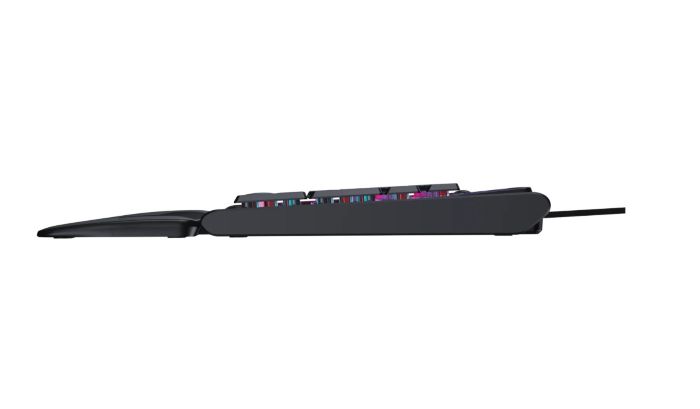
Right out of the box, the KB5 is a big keyboard with a small-sized personality. It’s a full-sized boat that lies flatter than most modern keyboards. It sits quietly on a desk and doesn’t visually look as big as it is. The design decision that went into the girth versus visual prowess creates a keyboard illusion of the KB5 not taking up a large amount of desk space. In comparison to its older cousin, the ROCCAT Vulcan, which is roughly the same size and feels like it takes up massive tracks of desk to type on comfortably, the KB5 is the new hotness with spacious courtesy in its design. I cannot explain it, but the KB5 has a perfect amount of depth from keys to back, and it seriously looks much smaller than it actually is sitting on the desk. Again, it’s some weird keyboard illusion that is pleasant to the eyes.
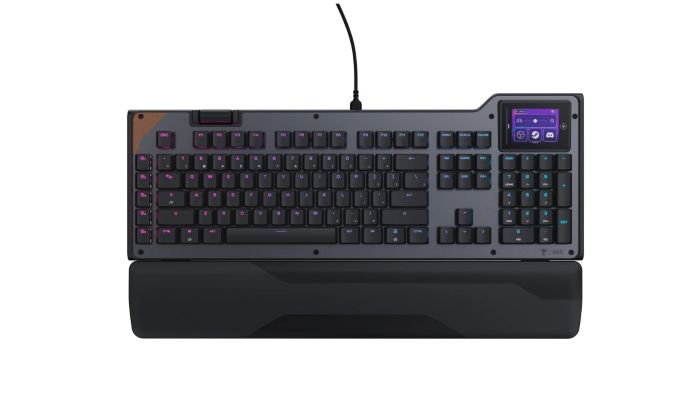
On the full-sized design, Turtle Beach made some interesting decisions with tech placement. At the top left of the keyboard lies a spinning volume wheel. While most keyboard manufacturers, like Epomaker, use knobs for volume function, Turtle Beach has gone with a rolling wheel that is easily accessible with the left hand, and that can quickly and thoughtlessly be used in the heat of battle. While it’s a tad weird, it weirdly works well. The accessibility and ease of use might be a new standard for future keyboard designs. I hope that Turtle Beach has locked down that patent because they’re probably going to be rich from this volume design decision.
On the opposite side of the volume wheel lies a two-inch touchscreen. When I first turned this keyboard on, I stared at that screen and tried to imagine its usage. Why would someone want this odd touchscreen on a keyboard? It seemed like overkill at first sight. Then my old-man brain began to wander a bit about the screen’s usage. I am a huge fan of Elgato’s Stream Deck, and I mainly use it to switch scenes and hit record/stream instead of mousing to those functions in OBS. Assigning such simple, yet accessible tasks to this touchscreen instead of a separate device means that I would save time. It would also save me a USB port and fiddling with separate wiring when setting up my desk. Beyond my myopic scope of use, I can imagine an easily assignable wide range of functions for this screen. Who would have thought a touchscreen would be so useful for a keyboard? Not me initially.
Design gimmicks and gadgets aside, the keyboard’s main use is for gaming. The KB5 was built for a great gaming experience. The keyboard features 8K polling with key to computer response. In comparison, a typical non-gaming keyboard is around 1K polling, which is still good, but not as fast. Having a solid gaming keyboard starts with 8K polling, as the faster a user can press a button and get a quick response, the better a gaming session is going to go. Ask any Fortnite player how important good polling is for a keyboard and mouse. They will let you know their success rate versus failure, and point to the former as proof in the pudding why 8K polling is a necessity.
In addition to the speed, the keyboard also features double-shot PBT keycaps that bring good texture, as well as easy replacement. Being a late-blooming PC elitist, I never knew how important it was to feel one’s way to the WASD key combination through texture and rise. The KB5 makes it easy to get those keycaps in place, and the result is easy-to-find keys with comfort to boot. While I am not a competitive gamer by nature, it’s still nice to know where I can find those keys without looking at them, and to identify them quickly and easily due to their texture.
On the actual everyday use of this keyboard, because the KB5 is a full-sized beast, it functions well with everyday typing. I am not a fan of smaller keyboards in this arena of work, as missteps in typing annoy the hell out of me. Keys slightly pushed together, we’re talking millimeters, means a horrible experience when typing out papers, reviews, or whatnot. I am also not a fan of beastly keyboards that are overly big and confusing to the hands. I am the Goldilocks of keyboard users, where the porridge must be just right for me to enjoy the experience. The KB5 is one damn good porridge. The keyboard feels good to type on long-term, sounds good as well with its creamy clicks, and brings an oddly flatter keypunch to the process. Typically, creamy keyboards have very raised keys to get that clickity-clack sound going, but the KB5 lies somewhere perfectly in between smaller key raise and perfect sounds. It’s odd, but after experiencing this keyboard over the past couple of weeks, it’s an oddly satisfying keyboard in weird ways.
To wrap this review up, let’s talk software.
I have been more than suspicious about the overall functionality of Turtle Beach software and what engineering thought went into its information architecture and overall creation. Having had an awful experience with TB’s software for their controllers in the past, and a few other pieces of hardware, I was not looking forward to installing and working with Swarm II to adjust the keyboard. Thankfully, the software has been drastically improved. It brings easy-to-use functionality and adjustments to the KB5, allows for color schemes and flows to happen instantly and easily, and has a plethora of pre-built macros waiting to be assigned to the keyboard at a moment’s notice. I’m sure that TB has taken a hard look at software like what Elgato has with its products and found that perfect sweet spot on how to bring a non-engineering experience to the user with respectful HCI design elements. Anyway, the result is that the Swarm II software is far better than it used to be and much easier to understand and use right out of the box. Huge kudos to TB for an improved software solution for its hardware.
On that note, let’s wrap up this review.
Conclusion
The Turtle Beach Command Series KB5 Keyboard is simply extraordinary to use. The design is phenomenal, unusual, functional, and creative. This is the ultimate keyboard for gaming and everyday usage.