JSAUX’s Switch 2 accessories brought me much needed relief with the added durability of the carrying case and anti-glare screen protector. My Switch 2 felt far better to use thanks to the joystick caps and the controller case set, too. Thanks to these accessories, I fully expect to get more out of my Switch 2 and enjoy gaming without the typical drawbacks of a caseless and unmodified Switch 2.
Within a few hours of securing my brand new Nintendo Switch 2, I realized that my existing Nintendo Switch accessories I had acquired over my years of ownership couldn’t be used any longer. They were incompatible with my shiny, new, large, and powerful Nintendo Switch 2!
JSAUX is a leading provider of gaming and PC accessories, creating peripherals that augment your device of choice by improving its durability, ergonomics, and aesthetics. I’ve had my eye on their docking stations and transparent backplates for a hot minute; the RBGs in their devices make the ROG Ally quite colorful! Leading up to the release of the Switch 2, JSAUX was one of the first accessory manufacturers to showcase upcoming products for the new Nintendo console. Now that I have my Switch 2 in-hand, let’s see how JSAUX lives up to its name in providing standout accessories.
Without further ado, let’s evaluate these products!
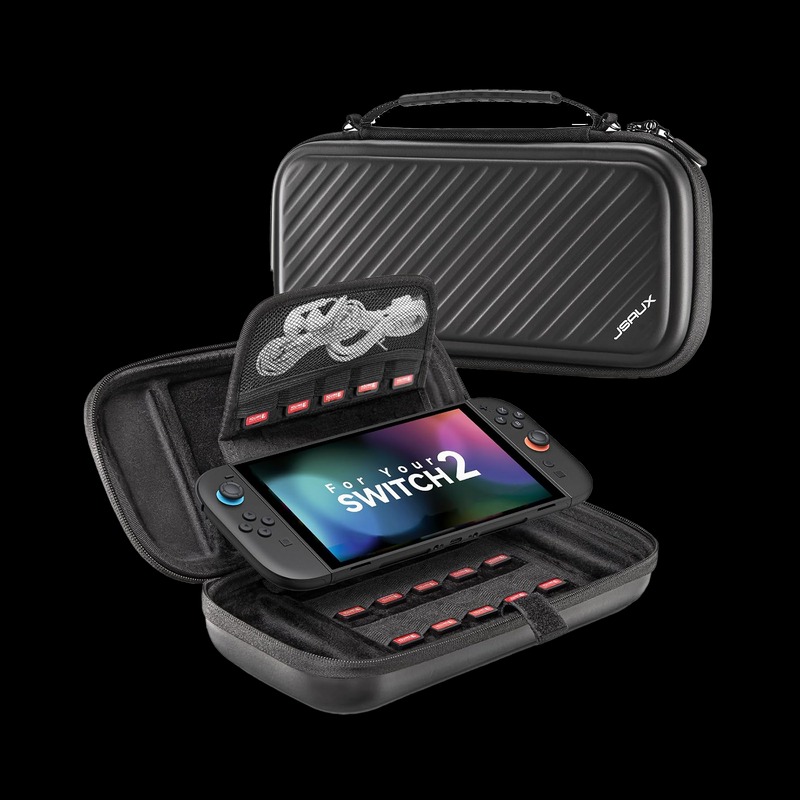 Carrying Case for Switch 2 (BG0117)
First, we have JSAUX’s Carrying Case for Switch 2. JSAUX boasts this case’s durability thanks to its thick black exterior. Inside, the case has a soft velvet that won’t scratch your new Switch 2 along with 15 game card placeholders. There’s also a small netted pouch that can tuck away small chargers, think something the size of a phone charger and USB cord. The case comes with two additional straps that lets you wear it around your shoulders or your wrists.
Check out the JSAUX Nintendo Switch 2 Carrying Case by clicking here! (non-affiliated URL)
I was relieved when I received this case, not just because I didn’t have a case to begin with. This carrying case held up quite well to pressure on all sides. While the exterior was slightly flexible, my Switch 2 was properly secured thanks to the Velcro internal strap and the tough exterior of the case. The rubber handle felt quite durable, too. The case has a surprising amount of spaciousness, too. I was able to properly store an encased Switch 2 (with JSAUX’s case, reviewed below!) and still have some spare room for additional accessories without impacting the zipper’s integrity. Sadly, the Switch 2’s stock AC adapter didn’t fit, but I have a smaller charger for charging my device on the go.
The only element that gave me pause was the case’s additional straps. The strap material is made of a thinner fabric and connects to small black rings at the top of the case. While the straps were easy to install and remained secure, they felt flimsier than the case’s handle. If I was you, I would stick to holding the case’s handle and/or storing it in a backpack.
The JSAUX Nintendo Switch 2 carrying case is available now for around $20, which is more than fair for what it does. Keep in mind that the Switch 2 is a large handheld, so the case has to secure the console and store some additional accessories. For the price, this case checks off multiple boxes and brings me peace of mind when it comes to protecting my new console!
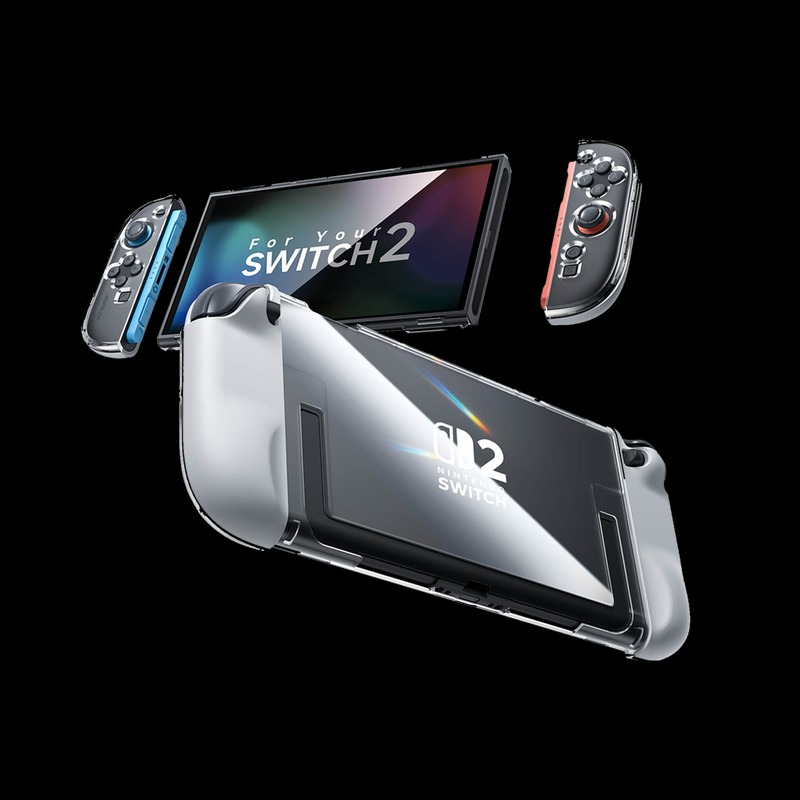 Ergonomic Controller Full-Cover Case Set for Switch 2 (PC0119A)
If you’re taking your Switch 2 throughout rooms of your home and/or on the go, it makes sense to want another layer of protection. A secondary case (i.e., something that wraps around your device while it is able to be used) can help meet that need. JSAUX’s ergonomic controller full-cover case set for the Switch 2 decently protects the case while ensuring that your Switch feels good in-hand!
JSAU’s case set comes in three parts: a clear shell for the screen and two clear Joy-Con shells. The Joy-Con shells can be disassembled to slot the controllers within while the screen easily slides into the case.
Check out the JSAUX Ergonomic Controller Full-Cover Case Set by clicking here! (non-affiliated URL)
I have mixed feelings about this full-cover case. It was easy to install, yes. It’s quite ergonomic because it gives a smidge of additional heft to the relatively skinny Joy-Cons. However, the bottom of the case around the screen does not grip the console and lacks the security of the rest of the case. The bottom of the screen case feels unusually flexible and weak; I shouldn’t be able to move the bottom of the case through normal use. The rest of the case, though, is solid and protects the unit and its Joy-Cons.
The additional heft may take some getting used to, especially if you’re coming from the original Joy-Cons’ (Switch 1) size. The button cutouts are large enough so that my fingers naturally find the buttons without issue, so don’t worry about that. The case makes it slightly difficult to slot back into the dock, though. With some additional pressure, I can slot it in, but it’s not as smooth as the caseless Switch 2.
 Anti-Glare Screen Protector (GP0124)
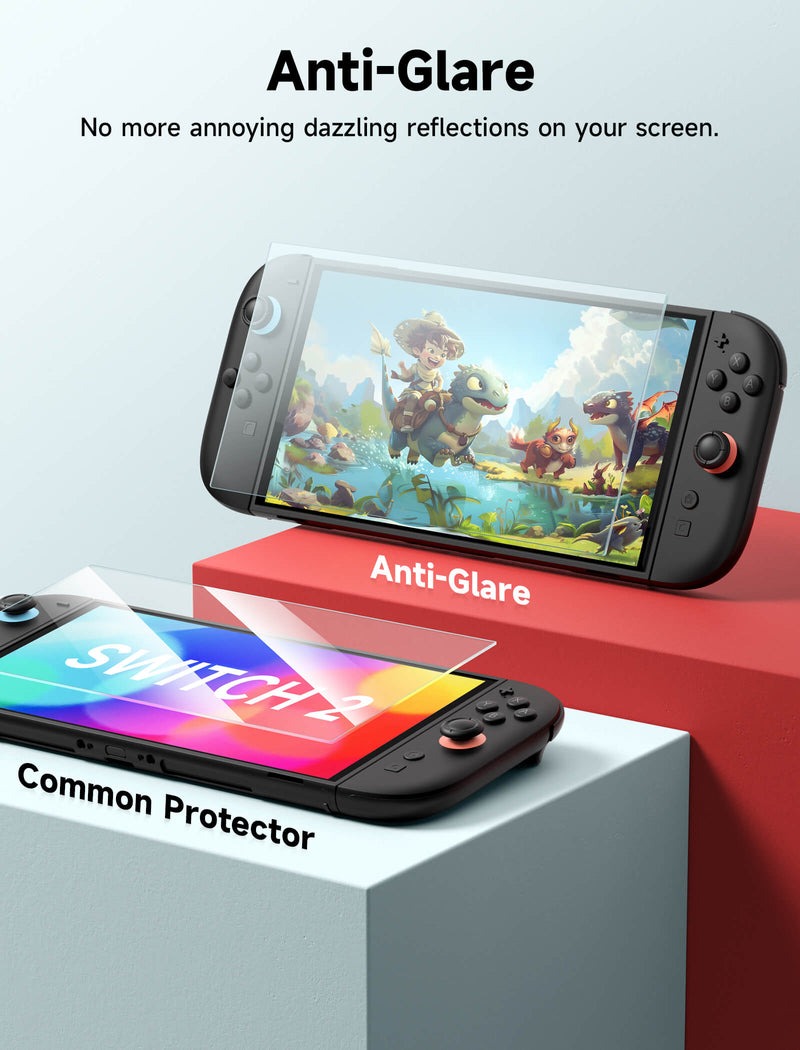
If you’re in the market for a screen protector, you’re probably one who uses their Switch 2’s touchscreen more than the average player. Every time I’ve gotten a new phone, I’ve had some frustrations with the screen protection impacting my screen’s visibility. I’ve had to specifically seek out matte protectors that don’t impact my screen’s visibility! JSAUX’s anti-glare screen protector is the perfect addition for me, as I want something to protect my screen without being too shiny to see!
Check out the JSAUX Anti-Glare Screen Protector by clicking here! (non-affiliated URL)
The screen protector kit comes with two glass screen panels (in case your first installation doesn’t go well), a microfiber cloth, a cardboard bubble removal tool, and a plastic frame for guiding the installation. It’s the standard screen installation kit you’d probably expect from the folks who make phone screen protectors, nothing fancy like the Whitestone Dome Glass with liquid adhesives.
Installing the screen protector was a breeze. Simply put your screen in the yellow frame, wipe it down with a microfiber cloth and the alcohol wipe, layer the glass onto the unit, and then smooth out any final bubbles. If the first installation doesn’t go well, take off the glass and use the other included screen protector. It’s so easy, it takes maybe two minutes!
The anti-glare screen protector lives up to its anti-glare description in that I could still use my device in direct sunlight without too much glare. It’s glass supposedly has a 9H hardness, but I don’t have the glass tools to test for sure. I don’t doubt its hardness, though – I attempted to scratch the glass with my nails and a few tools in my office and it passed the basic scratch test.
This anti-glare screen protector kit is honestly what most players need for their Nintendo Switch 2. The device is far too big to fit into most pockets (which are often sand and dust magnets), so you don’t need “fancy” protection for your Switch 2. Unless you’re prone to scratching your Switch screens through unusually heavy use, this screen protector will keep your screen pristine!
 Multi-Mode Joystick Cap and Thump Grip with Lever Guard Set (GP0404)
If you’re like me and just acquired Street Fighter 6, Guilty Gear -Strive-, or Yakuza 0: Director’s Cut for the Nintendo Switch 2, you’re probably learning quickly that the Joy-Cons hinder your abilities in making finer movement inputs. The Joy-Cons’ joysticks are far from the quality of a fight stick, that’s for sure. Third-party joystick caps act as a middle-ground, adding much-needed texture to prevent slippage. In some cases, they add height, too!
Check out the JSAUX Multi-Mode Joystick Cap and Thump Grip with Lever Set by clicking here! (non-affiliated URL)
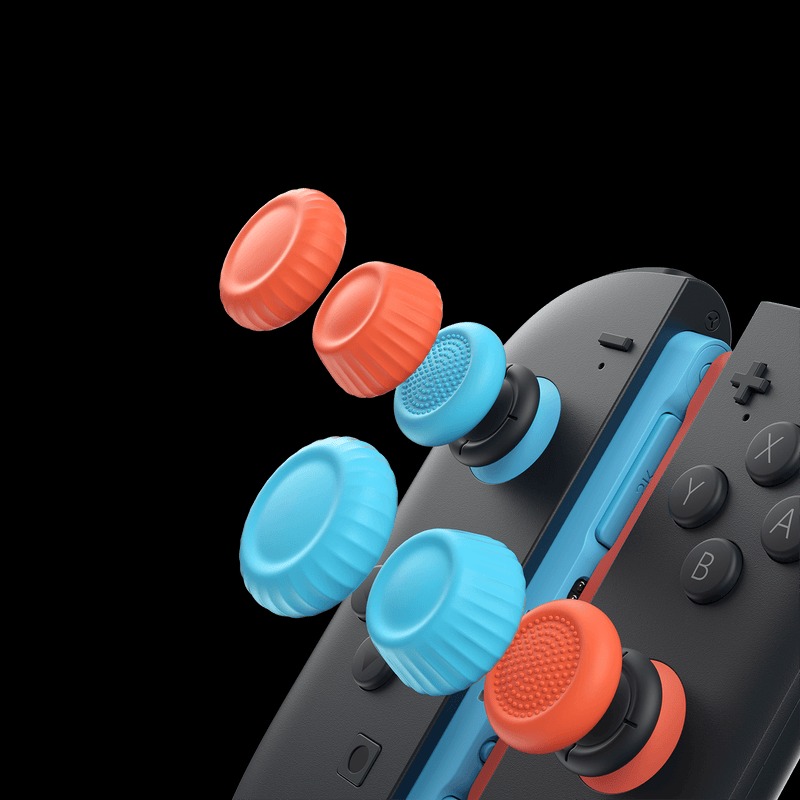
The JSAUX joystick cap set comes with three sets of joystick caps. The first set adds the least amount of height to the joysticks but feature an anti-slip texture. It’s the same texture on my SCUF VALOR PRO controller, for what it’s worth. The second set adds 3mm of height and has a ridged edge around the cap. These caps have a larger radius, which is great if you have large fingers like I do. Finally, the third set looks similar to a miniature Reese’s cup, adding tapered height and width to the joysticks.
It was quite easy to install these caps onto my joysticks. I simply flipped the caps inside out, centered them on the joysticks, and they naturally wrapped around the joystick. There were no issues whatsoever. I cannot speak to their long-term durability, but I don’t imagine that the average consumer will be hot-swapping their joystick caps on a regular basis. Instead, I would imagine that the average player will try out all three sets and then settle on the caps that feel best.
Personally, I enjoyed using the first and the third sets. The first set’s anti-slip texture made it so that the joysticks never slipped out of my fingers. This was especially useful when I was playing Mario Kart World and attempting to complete the harder challenges on the World Map. The third set’s added height made it slightly easier for me to make inputs in SF6, too. Of course, your experience will differ from mine given that everyone’s hands are different, but it doesn’t hurt to try out all three sets to see what feels best for you.
With that said, let’s wrap this up!
JSAUX’s Switch 2 accessories brought me much needed relief with the added durability of the carrying case and anti-glare screen protector. My Switch 2 felt far better to use thanks to the joystick caps and the controller case set, too. Thanks to these accessories, I fully expect to get more out of my Switch 2 and enjoy gaming without the typical drawbacks of a caseless and unmodified Switch 2.