The keyboard reviews keep on coming. I can dig it. Or is that ‘type it’?
ANYWAY!
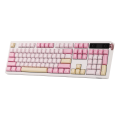
Our latest keyboard review is the Epomaker – TH108 Pro, and this pink beauty is pleasant as it is pretty. It’s a gasket-mounted keyboard that features a useful LCD screen, raised creamy keys with jade switches, and a pretty swanky knob for multi-uses. It’s a solid choice for multiple typing situations, as it is incredibly comfortable to use and very reliable.
The only sticking point to this creamy creature is the polling rate, which sits at an average of 1000Hz when wired and 125Hz wirelessly. Of course, that might be a sticking point due to my previous Epomaker keyboard reviews featuring devices with 8000Hz. My gaming expectations get in the way of normal keyboarding some days.
On that note, let’s talk about this keyboard.
On the design side of the keyboard, it’s a full-sized, beautiful monster that feels good to type fast on and gives reassurance that there will be fewer stumbles. I have typed about five reviews on this keyboard over the last few weeks, and I have positively enjoyed the experience the entire time. As I have stated multiple times with keyboard reviews, I am a big critic of keyboard experiences because my expectations for use and style are through the roof. I was born with an IBM typewriter at my fingertips, which set very embedded standards for me growing up in a computer world. I expect a comfortable typing experience, and if that doesn’t happen, it will be written about in these reviews.

On the functionality side of the tracks, the biggest pluses for me about this keyboard lie within its cute LCD screen, which is more of an accent than a useful detail. It’s a programmable piece, via the Epomaker software, that is more for show than it is anything else. It certainly helps to fill space, while also making the keyboard interesting and visually engaging.
The knob connected to that LCD is gorgeous, as it’s shiny pink metal that fits right in with the color scheme of the TH108 Pro. It’s easy to access, while also somewhat anonymous in its presence. It sits quietly hanging halfway off the edge of the LCD and keyboard, and blends well. It’s solid and easy to use, which is what you want from a keyboard knob.
As for the software that goes with this keyboard, it’s an online solution, which can be looked at in two ways. The first is that it prevents the need to put unnecessary software on your PC, which, to some, is a huge plus. In a world of Turtle Beach SWARM software, NVIDIA software, and everything else that launches and runs underneath the forefront functionality of an operating system, who needs another system hog? It’s rather annoying to have too many little processes taking up valuable resources that could be used for gaming. Or any Adobe product that demands all the system resources it can gobble up.
For me, I would prefer to install something that is 1:1 on my machine, which obviously goes against all my previous paragraph rambling. I like the convenience of online software, but I don’t like the drawbacks of having to depend on it. Knowing why software isn’t working locally on a machine is easier to figure out when you have complete control of it. Online software is basically handing over control to a company and crossing one’s fingers in hopes of it going swimmingly. For the TH108 Pro, it goes swimmingly, and it works just fine. I am just set in my ways.
Anyway, the software offers macros, slight adjustments to key functionality, lighting schemes, and an incredibly easy way to update firmware. These points cover all the needed bases for a good keyboard experience. When everything is kicking on all software cylinders, the software communication to the keyboard is quick and more than reliable. It’s good. Epomaker has progressively perfected this aspect of their keyboard business, and hopefully, it continues to trend upwards.

On that sweet note, let’s wrap up this review.
Conclusion
The Epomaker TH108 Pro is a marvelous keyboard that delivers solid functionality without the unnecessary bells and whistles that come with overly fancy keyboard experiences. Its full-sized status is comfortable, the online software that runs it is customizable and intuitive, and it is just a good all-around keyboarding experience. I highly recommend this for anyone looking for a long-term keyboard.
If you’re interested in checking it out during Epomaker’s mid-summer sale, click here to see the full Epomaker breakdown.