I had no idea that Epomaker made mice. They generally do a damn good job with keyboards, but mice? That’s a Logitech/Razr game. Wrong.
The Epomaker Click Lite Mouse is an interesting yet unassuming mouse. On the surface, this lightweight, plastic-like mouse feels like one you might have bought at the checkout aisle of a grocery store in passing. But don’t let that fool you. While most gaming mice are designed to be weighty, the Click Lite Mouse offers simple style, a solid battery life, and an almost too-easy-to-change set of attributes via the Epomaker software.
So, let’s briefly discuss this small wonder and get you wondering why you should give it a look.
Click here to check out the Epomaker Click Lite Mouse! (non-affiliated URL)
Design
The design of this mouse is an early contemporary Microsoft mouse from the late 90s. The design is what you would think a simple mouse might be. Typical curved and comfortable design that isn’t trying to do too much, while reinforcing that simplicity with its lightweight stature. In both physical design and weight, it is unremarkable in both categories.
Beginning with the physical design, the contour design of the Click Lite Mouse felt like any other plain mouse. It curved nicely with my hand, didn’t prop itself up in some weird angle like mouse serious gaming mice do these days, and featured easily accessible buttons on top and left sides. What I thought was plain design quickly turned into perfect design.
Visually, the shape of the mouse doesn’t look special, but once you take command of it, all the buttons seem placed perfectly in their spots. Less work for the fingers and thumbs meant more comfort for an old guy like me. Again, it didn’t go all Razr with its design and try to be flashy with its construct, but it was good enough in the right spots to warrant a deep sigh of relief that my arthritis wouldn’t act up during hours of gaming. And thankfully, it didn’t act up.
Now, the lightweight feel of the Click Lite Mouse will throw you off, as it feels like you’re holding nothing. Is that a good thing? Depending on your expectations, maybe. When I first unwrapped the box, I felt some weight to it, and immediately thought this was one of those heavy, precision gaming mice that would improve my future Battlefield KD ratio. Once I removed the mouse from its box, I understood that most of that weight was the box itself. To be quite frank, the mouse felt cheaper than expected because of its weight, which was fine, especially at a $29.99 price point, but I soon found out that this puppy had more punch than previously predicted. The mouse was nice to move around, and quickly, and it didn’t cause any wrist fatigue because it was so light. I enjoyed that aspect of it very much.
Combined, the physical contour and the lightweight provide a smooth movement across pretty much any surface, while maintaining a somewhat accurate feel when gaming. I was amazed that the simple design of this mouse worked so well, and it felt very intentional.
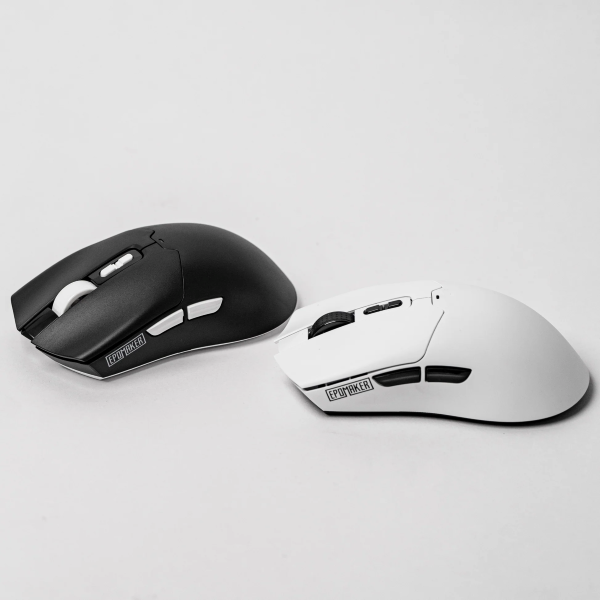
Epomaker has a knack for giving some good functionality when it comes to its hardware. One repeating variable in nearly all their keyboards has been the Tri-Mode Connectivity. This allows you to go dongle, Bluetooth, or wired with their devices. The Click Lite Mouse takes a page from its keyboard brethren and features the same set of options. The mouse will easily allow you to go wired via USB-C, a port that sits underneath the two mouse buttons in the front. In its underbelly, it hides a USB dongle option featuring 2.4GHz reach, which is more than you need for a mouse, but it’s a good option if you need to go old-school wireless. And if that doesn’t suit your fancy, it comes ready to go the Bluetooth route. None of the three options is bad, and when the mouse battery starts dying, you have plenty of avenues to choose from to keep the movement going.
Now, speaking of battery, this mouse has an insanely good battery life. While there aren’t any flashy LEDs to drain the battery, it holds over 70+ hours of usage before you need to plug it in and recharge. I’m going on the second week of using this mouse, and I have yet to recharge it. Granted, I have been using my keyboard more than my mouse, as well as my controller, but it’s still nice to have a wireless mouse option that doesn’t require me to regularly recharge or replace batteries. The battery is quite impressive. Oh, and it does fall asleep to help with that battery life when the mouse is not in use.
As for the buttons, they are solid, yet light in design and execution. The only outlier is the scroll wheel, which feels great when you use it. There is some underneath ‘click’ to it, which makes it reassuring that it’s working. It’s nice to have some reassurance when using a mouse wheel.
Overall, the functionality of the mouse is spot-on, with that Tri-Mode Connectivity and battery life being the superstars in this category.
Software
If you have ever owned an Epomaker piece of hardware, then you understand that there is good software and so-so software that you can run into. The latter of the bunch is browser-based, which I don’t like. It gives me less control, and I need all the control when it comes to my hardware. The former is where the software for this mouse hits.
The software for the Click Lite Mouse is the general Epomaker software you would expect for their keyboards. This software allows for macro creation, multiple profiles to be made (just in case you’re going between games or productivity software), and allows you to fiddle with a wide range of DPI settings.
Starting with DPI, you have a DPI range from 800 to 24000 (good luck with the end number). You can adjust your mouse to go as fast as you want or as slow as you need. The DPI increments are in 50s, and the only hiccup to this much adjustment power is possibly sneezing and turning the DPI to 24000. That makes this mouse highly uncontrollable and difficult to bring back to DPI Earth for adjustments. Well, at least for me. Some Valorant players out there might love it. Weirdos (kidding, love ya).
As for macros and button assignments, you can create keybinds that can be assigned to single buttons. It’s super simple, and with multiple profile options, it’s nice to have more gameplay or productivity button options. The software makes it simple and easy, and the changes are basically 1:1 active as soon as you make them. The software is impressive in this respect.
Overall, the software is as simple as the mouse. It doesn’t take much time to get used to it, and changes are seamless. The fact that the software works with multiple Epomaker products makes it nice to have a one-stop for software needs. Not that I don’t enjoy installing more than one software, but it is kind of pointless.
Of course, it would be wrong of me not to plead with Epomaker to please put your software on your product pages. It would make it HCI-friendly, as users could just go to the product and download the right software. I believe in your website and your webmaster’s talents! C’mon and get this done, Epomaker.
On that sweet note, let’s wrap up this review.
Conclusion
The Epomaker Click Lite Mouse is an excellent and comfortable mouse for someone not wanting to commit to one of those expensive gaming mice. It features good movement, great battery life, and easy-to-program buttons.
If you’re interested in the Click Lite Mouse, then enjoy more information about it here.